

Release notes
What changed for you in each stable release of Farhelm, newest first. Release candidates are not listed separately: their changes appear under the stable release that follows them. Farhelm on your Mac updates itself to each new stable release.
v0.41.0
Section titled “v0.41.0”Released 2026-11-18.
🚀 Added
Section titled “🚀 Added”-
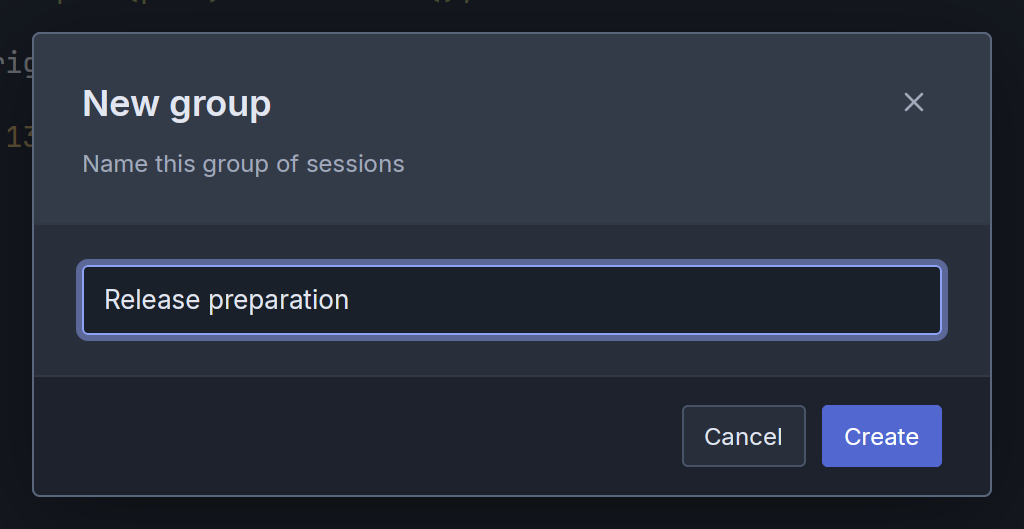
You can now organize sessions into named groups in the sidebar, pin sessions within a group, and collapse a group while still seeing its most urgent session status. (#4112, #4114)
show screenshot
-
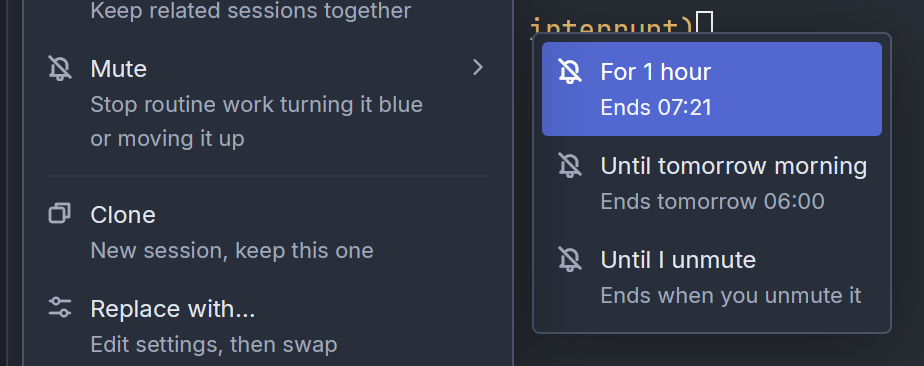
You can now mute a session (in the sidebar). While muted, routine activity stays quiet and leaves the session in its place in the sidebar. Questions blocked on you (red indicator) and permission approvals penetrate the mute and work like usual. (#4106, #4108)
show screenshot
🔄 Changed
Section titled “🔄 Changed”- The session launcher now suggests
gpt-6.2-solandgpt-6.2-astrafor Codex, Goose, Pi, OMP, and OpenCode. Codex offers Low, Medium, and High effort for Astra. (#4099)
v0.40.0
Section titled “v0.40.0”Released 2026-11-17.
Changes to release notes going forward
Section titled “Changes to release notes going forward”- Going forward, the requirement to upgrade remote hosts to match the desktop app will no longer be called out as a breaking change. It’s just a regular part of upgrading.
- Going forward, the release notes will be much less complete erring on the side of highlighting only what is more likely to be relevant for a typical user OR highly critical for a small number of users.
🔄 Changed
Section titled “🔄 Changed”- Farhelm has now transitioned fully away from a web based stack for the GUI. It’s now based on a native desktop stack based on GPUI. This was a major internal change but should only have minor immediate implications (the interface should feel a little faster). This is mainly in preparation for adding a Linux desktop app.
- As a result of the migration away from the web stack, a small number of settings are getting reset to defaults in this release: Sidebar width, whether the navigation rail on the left hand side of the screen is expanded, status sound switches, and terminal text size. Sorry about that! (#3467, #3523, #3642, #3828)
- The first launch after the update opens the window at its default size, centered. On a Mac with several displays, a window previously left on a second display now reopens on the main one. (#3569)
- When Enter or Escape closes the last open dialog or menu, pressing the same key again within half a second does nothing. A double-tapped Escape no longer reaches the terminal and interrupts the agent. This is intended to avoid accidentally sending keystrokes to unintended places. (#3592, #3949)
- The session quick switcher (Cmd+K) now sorts matches in a sensible manner. The previous behavior was pretty broken and not worth even describing :) (#3966)
v0.39.0
Section titled “v0.39.0”Released 2026-11-13.
💥 Breaking
Section titled “💥 Breaking”- This release requires you to update your remote hosts. (#3348, #3359, #3369)
- Updating ends the old terminals that still ran in tmux, as earlier releases warned; remote hosts do this when you update them. A session whose agent was still running in one shows as interrupted, with a notification: Restart starts the agent again in a new, empty terminal and resumes its conversation, and Replace starts it anew where Restart is unavailable. Old shell tabs are closed, and a session whose agent had already exited no longer shows its last screen. (#3362)
- Farhelm no longer needs tmux on any machine, and
farhelm helm setup --tmuxandfarhelm supervisor run --tmuxare removed: a script or service unit of your own that passes either has to drop it, or setup refuses to run and the supervisor will not start. The services Farhelm writes never pass them. Oncefarhelm helm setupor Update rewrites a Linux machine’s Farhelm service, sessions there no longer find programs in your tmux’s folder (Linuxbrew’s, say) unless your login shell’sPATHincludes it. (#3368, #3371) - Updating a remote Linux host removes the tmux that Farhelm installed there, so
tmuxtyped in a session on that host runs the host’s own tmux, or is not found if it has none. (#3373) - A browser tab of Farhelm that stayed open across the update needs reloading; until then its terminals can show garbled output. (#3369)
🚀 Added
Section titled “🚀 Added”- EXPERIMENTAL: Agents in sandbox and container sessions can now use
farhelm agentcommands andfarhelm spawnwithin their own sandbox or container, to open links, start more sessions there, and rename, stop, restart or delete its other sessions; anything reaching beyond it is still refused. Agents on other hosts can now start a session in a new sandbox or container from one of your recipes, once you allow it on an approval card that always asks. (#3338, #3348)
🔄 Changed
Section titled “🔄 Changed”- In the desktop app, Cmd-click on a file path in a terminal now also opens PNG, JPEG, GIF, WebP, BMP and AVIF images by default. A File types to open with Cmd-click list you have saved, even unchanged or empty, stays as it is. (#3351)
- EXPERIMENTAL: Delete of a session in a sandbox or container now removes only that session, and its checkout, while other sessions remain, and removes the sandbox or container with its last session. When Farhelm cannot reach the sandbox or container (suspended, paused, unreachable or needing an update), Delete offers to delete the whole thing instead, warning that every session in it is destroyed. While one is being deleted, Hosts and the sidebar show it as Deleting… instead of unreachable. (#3361, #3364)
- EXPERIMENTAL: Suspending or resuming a Tensorlake sandbox no longer holds up launching sessions or changing hosts elsewhere in the same window. A launch that wakes a suspended sandbox or paused container now waits for another Suspend or Resume of it to finish instead of failing with “This host is busy”, and fails at once if the host is suspended again while it waits. (#3339, #3341)
🩹 Misc fixes
Section titled “🩹 Misc fixes”Fixes that would normally be summed up as a single “various bug fixes” line. In the interest of transparency, the complete list is included.
- Creating a container session no longer sometimes fails with a missing setup-script error while its container is starting. (#3388)
- In the desktop app, text over 256 KiB copied to the clipboard, by a program in a terminal or from a mouse selection, now reaches the clipboard, up to 8 MiB. Before, it was silently dropped, while the same copy worked in a browser. (#3369)
- Opening a session after its host rebooted now shows it as interrupted, with its Restart button, even when an earlier Restart of that session finished while you were looking at another session. Before, the app could try to show a terminal the reboot had destroyed. (#3345)
- “Stop and suspend” on a sandbox or container session no longer closes a terminal tab or stops an agent that was opened or started after you clicked. (#3337)
- A quick launch that woke a suspended Tensorlake sandbox and was then refused without an error message now shows the session launcher again, instead of leaving it invisible and catching every click and key until Escape. (#3356)
- A launch that woke a suspended Tensorlake sandbox for a GitHub checkout now gives up after 60 seconds, with an error in the session launcher, if the window never sees the sandbox connect. Before, it could wait forever, with New, quick launches and host changes in that window unavailable. (#3357)
v0.38.0
Section titled “v0.38.0”Released 2026-11-11.
💥 Breaking
Section titled “💥 Breaking”-
This release requires you to update your remote hosts. (#3132, #3254, #3252, #3261, #3329)
-
Farhelm now refuses to update an installation or remote host older than v0.23.0, and explains how to remove it and set it up again. Your data can stay on disk, but a fresh installation may not be able to use all of it. (#3239, #3241)
-
The earlier experimental containerized sessions are retired: existing ones can only be deleted, and their agents keep running until you delete them. Templates that used the old Containerized setting can launch once it is removed. Containerized sessions remain EXPERIMENTAL and may change at any time in incompatible ways and are likely broken in various ways. (#3330)
-
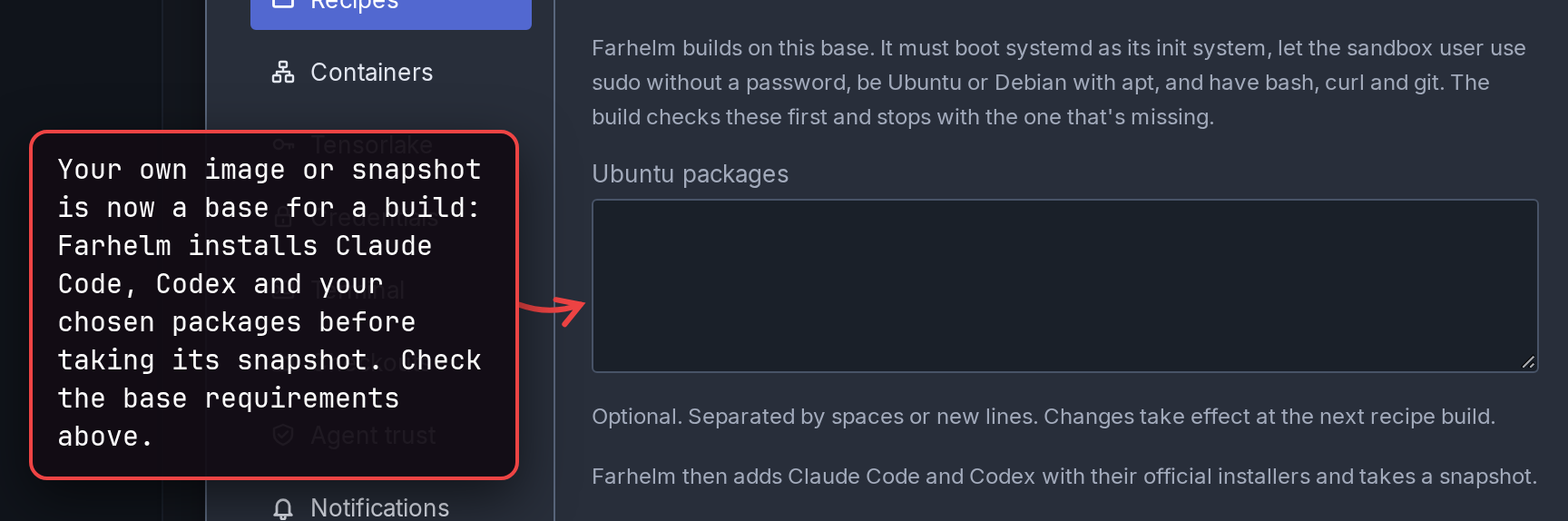
EXPERIMENTAL: Tensorlake recipes now install Claude Code, Codex and your chosen packages on any base, including your own image or snapshot. A recipe that reused an image or snapshot needs a snapshot build before you add hosts from it, and a custom base must now meet these requirements. (#3178)
show screenshot
🚀 Added
Section titled “🚀 Added”-
EXPERIMENTAL: Sandbox sessions give a session its own Tensorlake sandbox, chosen with New sandbox in the session launcher. The sandbox bills while running, and Delete permanently removes it and its files. (#3264, #3265)
-
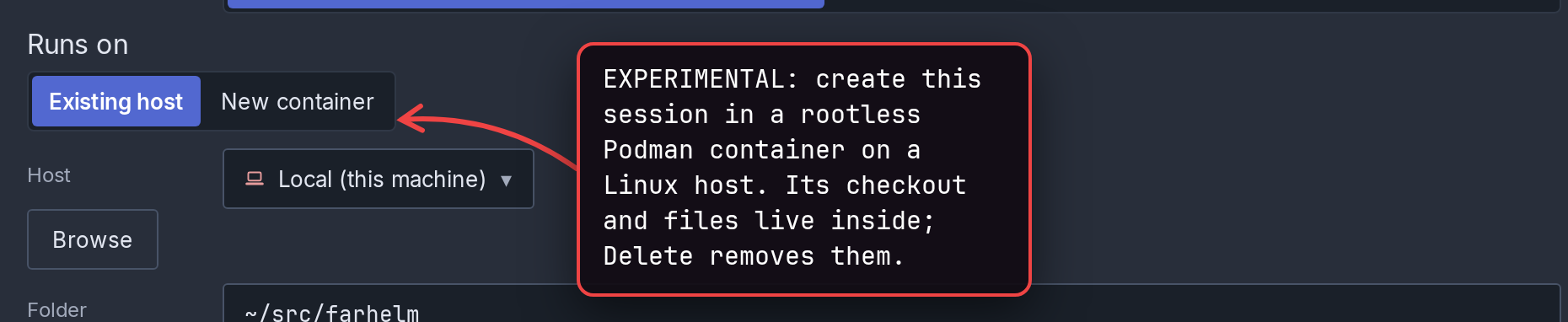
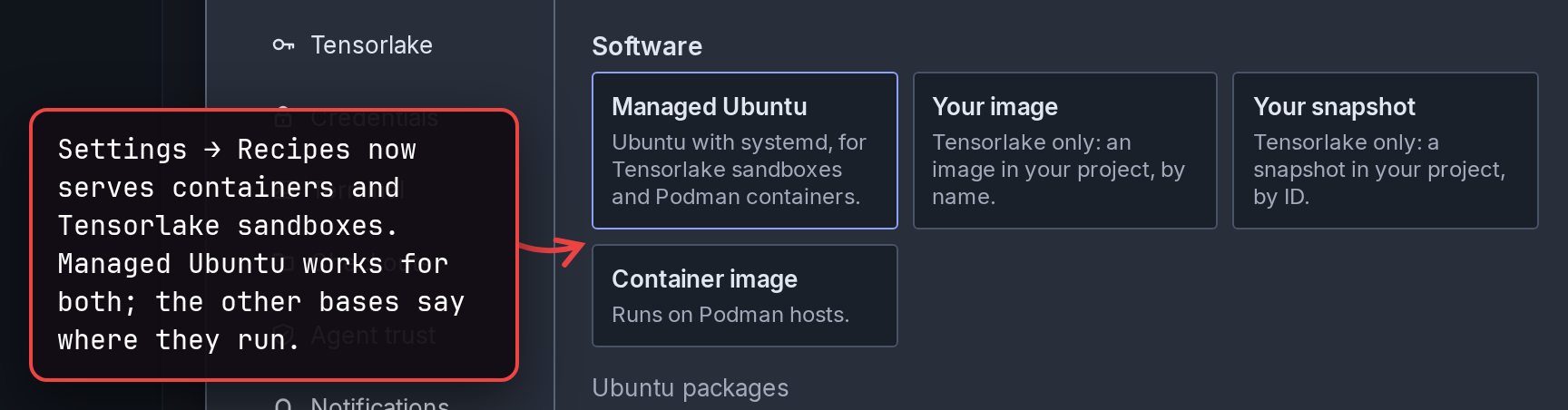
EXPERIMENTAL: Container sessions run a session and its checkout in a new rootless Podman container on one of your Linux hosts, chosen with New container in the session launcher. Delete removes the container and its files, including unpushed work; recipes for containers and Tensorlake sandboxes now live together in Settings → Recipes. (#3321, #3325, #3328, #3329)
show 2 screenshots
-
You can now add an Apple-silicon Mac as a remote host over SSH, provided it does not have the Farhelm desktop app installed. After the Mac reboots, Update in its host menu starts Farhelm again. (#3213, #3267, #3298)
-
You can now switch to and act on other sessions while one is stopping, restarting, being replaced or deleted, or launching; its result waits on its row. (#3276, #3278)
-
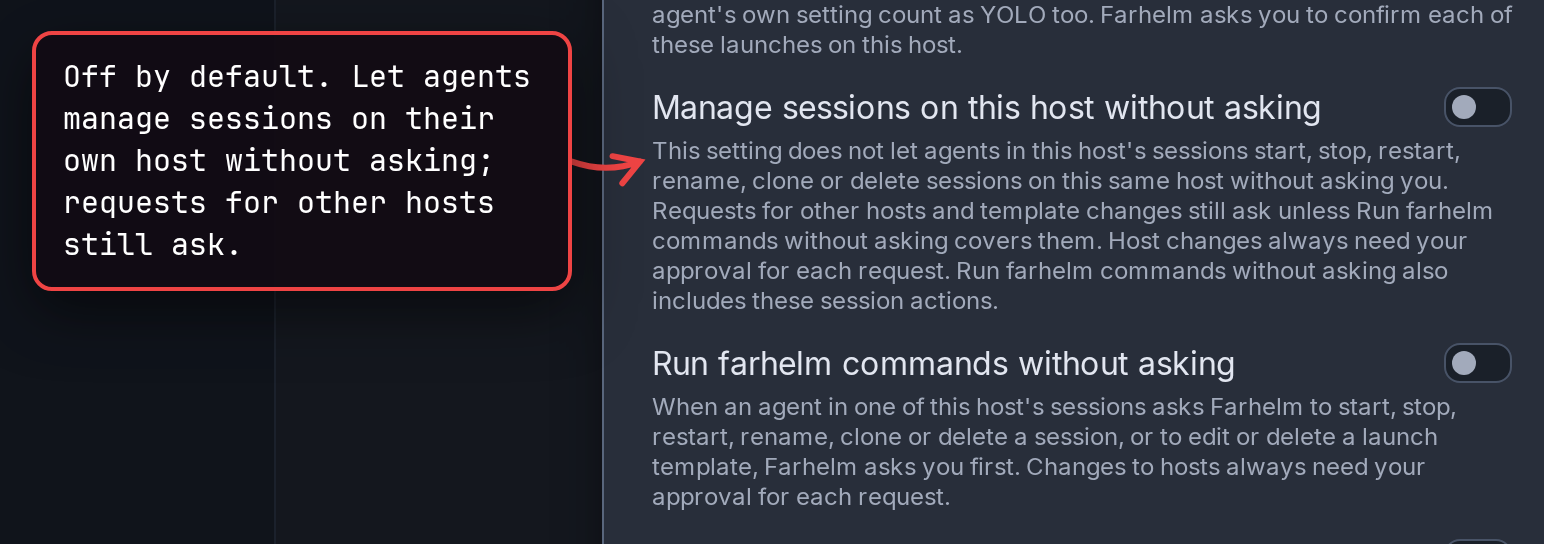
You can now let agents manage sessions on their own host without asking, from the host’s settings or an approval card. It is off by default, and requests for other hosts still ask. (#3205, #3206, #3208)
show screenshot
-
A bell above Hosts on the navigation rail now shows failed Trash cleanup, with buttons to retry it or open Trash. (#3243, #3244, #3251, #3315)
-
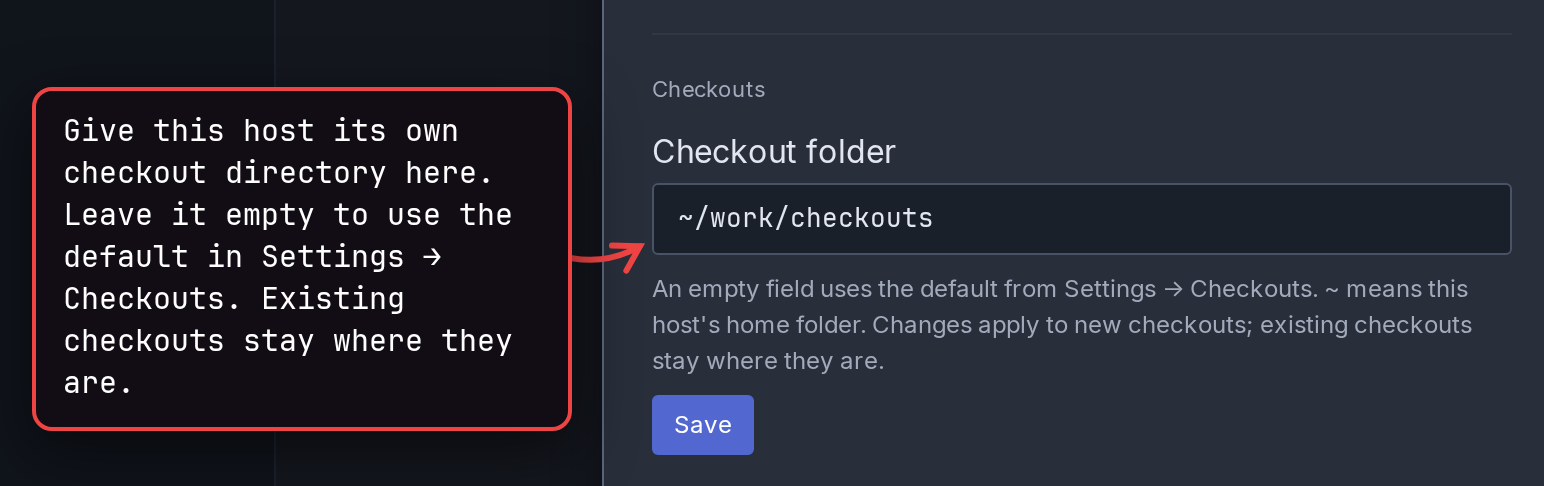
Each host’s settings now has its own checkout folder, with Settings → Checkouts as the default for the rest. (#3250)
show screenshot
-
The host update prompt now offers Always update, which updates the listed hosts and turns on automatic updates from then on. (#3269)
-
Hovering a host’s running setup, update or uninstall, in Hosts or anywhere on its sidebar row, now shows its steps and connection details. (#3272, #3309, #3310)
🔄 Changed
Section titled “🔄 Changed”- Stop now closes a session’s terminal tabs as well as ending its agent, and asks first when tabs are open. Restart still leaves them running. (#3132)
- EXPERIMENTAL: New Tensorlake hosts now start from a snapshot with Farhelm already installed. Preparing that snapshot, for the first host from a recipe and again after 24 hours, a Farhelm update or a rebuild, briefly bills a preparation sandbox. (#3203)
- New terminals now send their screen and scrollback in fewer bytes when you open or reconnect to a session, and very colorful scrollback uses much less memory. Uploads, downloads and tunnels also leave less data queued ahead of your typing on a remote host. (#3252, #3254, #3255)
- On Linux, jobs you start under your own tmux inside a session, and programs that move out of the session’s systemd groups, can now keep running after Stop, Restart, Replace, Delete or closing a tab; the tmux server itself still ends. (#3237, #3297)
🔧 Fixes worth highlighting
Section titled “🔧 Fixes worth highlighting”- Agents can now use
farhelm agentcommands andfarhelm spawnin sessions that are not open on screen. Before, they were refused with “no helm is attached to this session” even while Farhelm was connected to the host. (#3261) - An agent’s request to add a host no longer opens the Add host dialog by itself, where it could interrupt your typing; it waits as an approval card whose button opens the dialog. (#3326)
- Agent request cards now keep their answer buttons visible, with long commands and other details scrolling inside the card, and show permissions as short labels. (#3273)
- New checkouts no longer keep failing after interrupted repository-cache maintenance left a Git lock behind. (#3296)
🩹 Misc fixes
Section titled “🩹 Misc fixes”Fixes that would normally be summed up as a single “various bug fixes” line. In the interest of transparency, the complete list is included.
- A broken or malicious host can no longer make a link in a new terminal’s scrollback open a different address from the one shown. (#3289)
- Switching back to a session in a new terminal no longer shifts text at the right edge or full-width lines, including after resizing the pane. (#3234)
- Opening another session’s actions after a failed action no longer shifts the session list under the click. (#3194)
- Settings now keeps the same size when you switch sections, so its Close button stays put; longer sections scroll inside it. (#3231)
- In the desktop app, the controls at the top of an open session now use their compact style only when the row is short of space, instead of whenever a tunnel is open. (#3288)
- Stopping a session while its agent is starting now says “Exited — stopped before the agent finished starting” instead of blaming the host’s systemd user manager. (#3210)
- Editing Custom permission words while a suspended host resumes now cancels the pending launch, so the session launcher waits for another Launch press. (#3174)
- The session launcher now spells the extra-high effort level “xhigh” instead of “Xhigh”. (#3232)
- Removing a host can no longer be undone by a sudden power loss, which could bring it back with its old permissions. (#3171)
- In Hosts, a cancelled or replaced Suspend question no longer acts on an earlier Suspend click. (#3299)
- Settings → Credentials no longer shows the Not encrypted on disk warning twice, and labels the Tensorlake field Tensorlake API key. (#3165)
- Tensorlake snapshot builds and connections now offer Farhelm’s registered key first, ahead of keys from your ssh-agent and any certificates or hardware-token keys your SSH configuration names; your proxy and jump settings still apply. OpenSSH 7.6 to 7.9 may print a harmless error about loading a library. (#3300, #3312)
- Tensorlake connections now refuse a helm state folder whose path contains
%,"or\, with advice on fixing it, because older OpenSSH versions could not connect reliably from one. A setup in such a folder that worked with a newer OpenSSH stops connecting until the folder moves. (#3168) - Adding a Tensorlake host now refuses a sandbox name already in use that Farhelm did not ask for, instead of taking that sandbox over, and building or deleting a recipe leaves alone another sandbox with the same build name and its snapshots. (#3188, #3190)
- Delivering recipe credentials to a Tensorlake host no longer undoes Claude Code or Codex settings saved during the delivery. (#3173)
- Claude Code and Codex credentials chosen in a Tensorlake recipe now clear out old API keys, extra headers and Claude Code credential helpers left in the host’s settings, starting with the next credential delivery. (#3290, #3291)
- Deleting a Tensorlake recipe now always warns that a running build is cancelled and the snapshots Farhelm built for it are deleted, also when a build finished after the editor opened; your own base images and snapshots are kept. (#3187)
- Cancelling the deletion of a sandbox under Sandboxes not on this helm in Settings → Tensorlake now stops an already queued Delete click from deleting it. (#3186)
v0.37.1
Section titled “v0.37.1”Released 2026-11-07.
💥 Breaking
Section titled “💥 Breaking”- This release requires you to update your remote hosts. (#3135)
- Tensorlake (which remains EXPERIMENTAL) recipes no longer keep their own API endpoint tokens, and upgrading removes the ones they had. Re-enter those tokens in Settings → Credentials and choose them by name in the recipes that used them. (#3077)
🚀 Added
Section titled “🚀 Added”-
Every session with something still running in an old terminal (one run by tmux) now gets a notification in the session list, linking to Move sessions to new terminals, because an upcoming release will forcibly terminate those terminals. Remote hosts show it only once you update them to this release. (#3137, #3139)
-
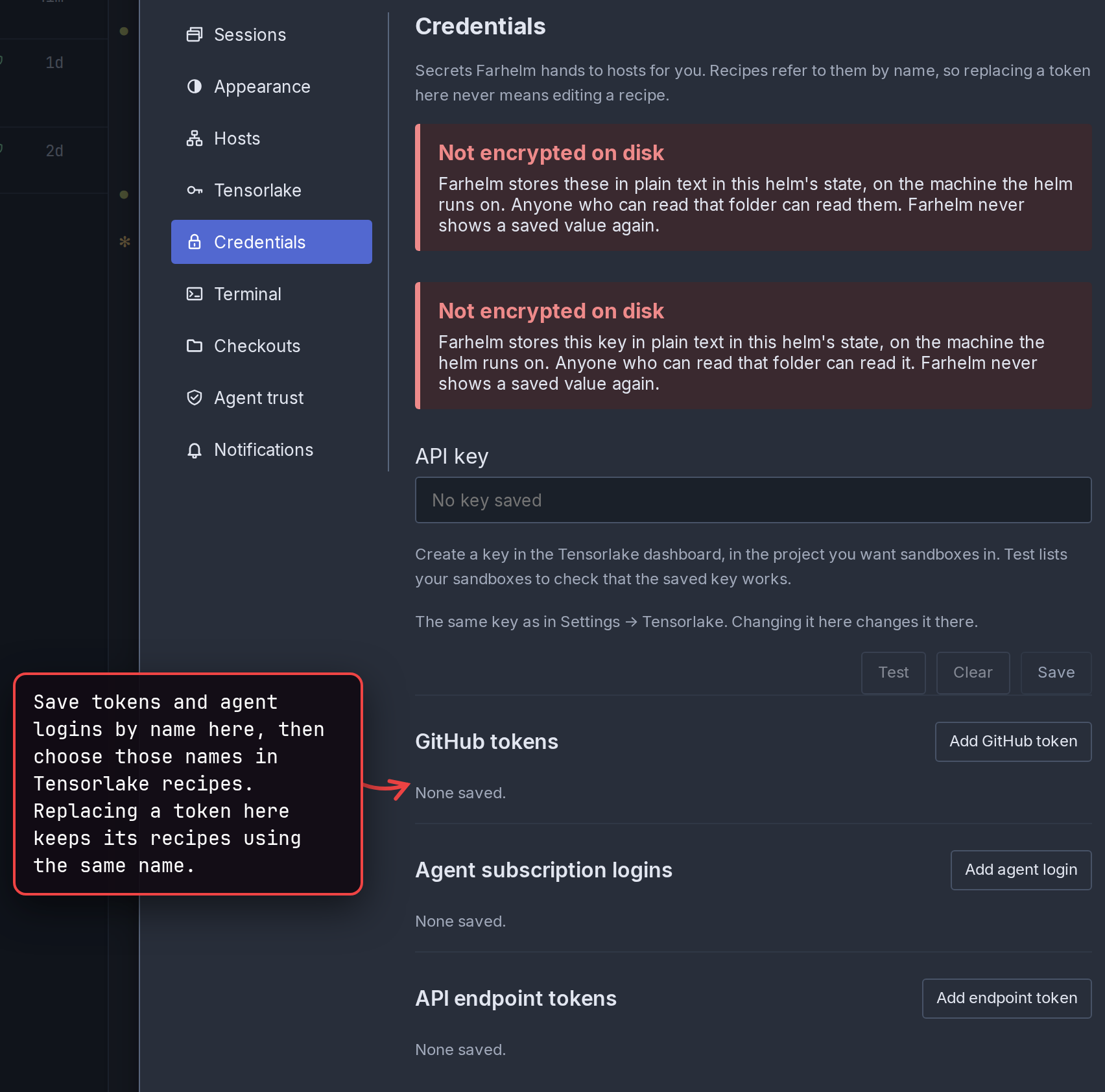
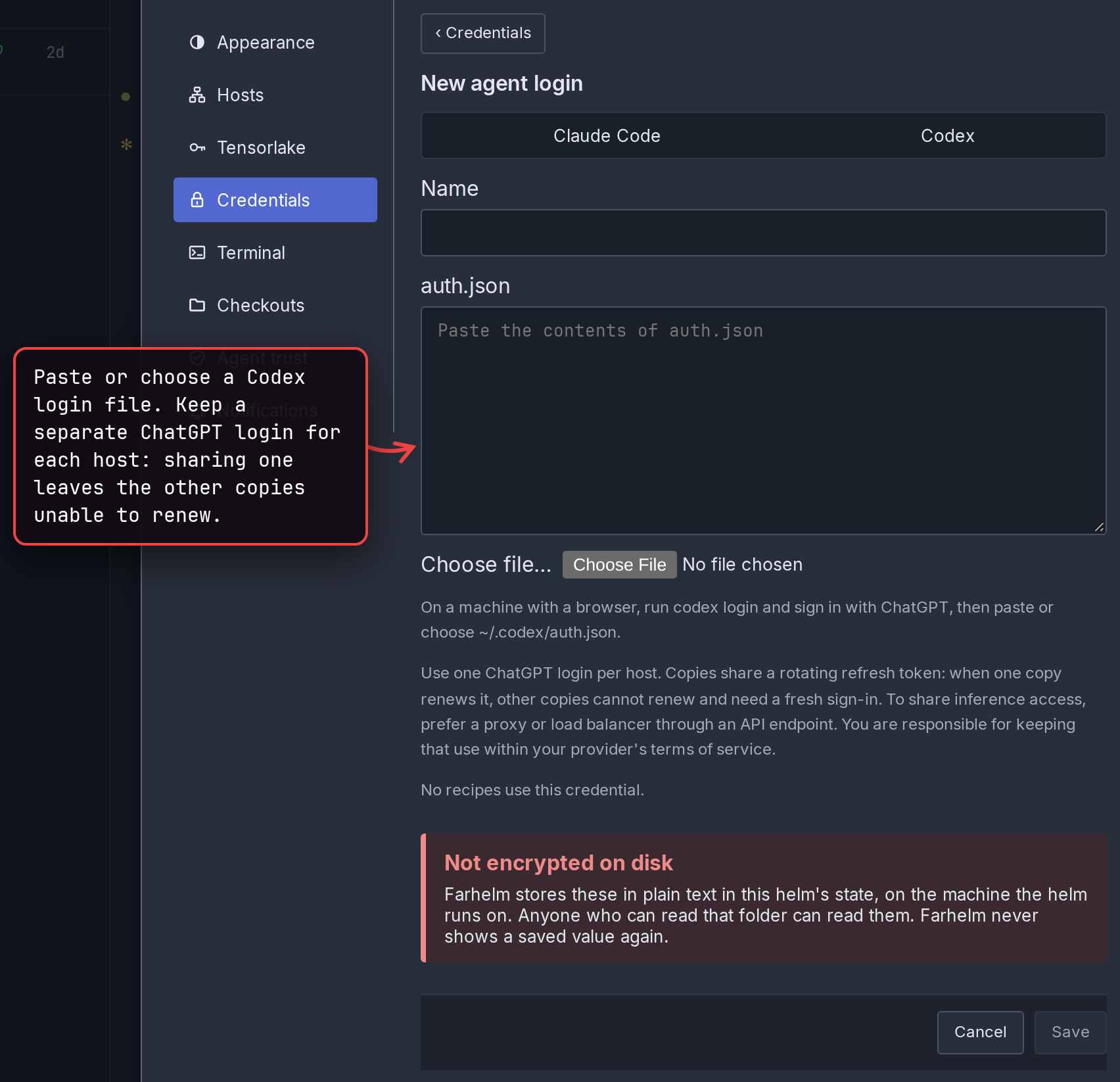
EXPERIMENTAL: Tensorlake recipes can now use a named GitHub token for private checkouts, Claude Code and Codex subscription logins, and named API endpoint tokens from the new Settings → Credentials, which stores them unencrypted on the machine running the helm. A ChatGPT login used on more than one host stops renewing on all but one; Tensorlake sandboxes has the details. (#3074, #3082, #3086, #3126)
show 2 screenshots
-
EXPERIMENTAL: Replacing a saved credential in Settings → Credentials updates the Tensorlake hosts already using it, and disconnected hosts get the new value when they next connect. (#3081)
-
EXPERIMENTAL: Tensorlake recipe tunnels now work with the host’s SSH settings, including ProxyJump. (#3138)
🔄 Changed
Section titled “🔄 Changed”-
The note at the top of a session in an old terminal now asks you to restart, replace, stop or delete it as soon as possible, and to reopen its old shell tabs, which a restart leaves running. (#3136)
-
Confirming Delete all in the trash now closes it at once, and the trash icon shows which hosts are still freeing disk space; emptying the trash no longer holds up starting, restarting or deleting sessions on that host. (#3131, #3134)
-
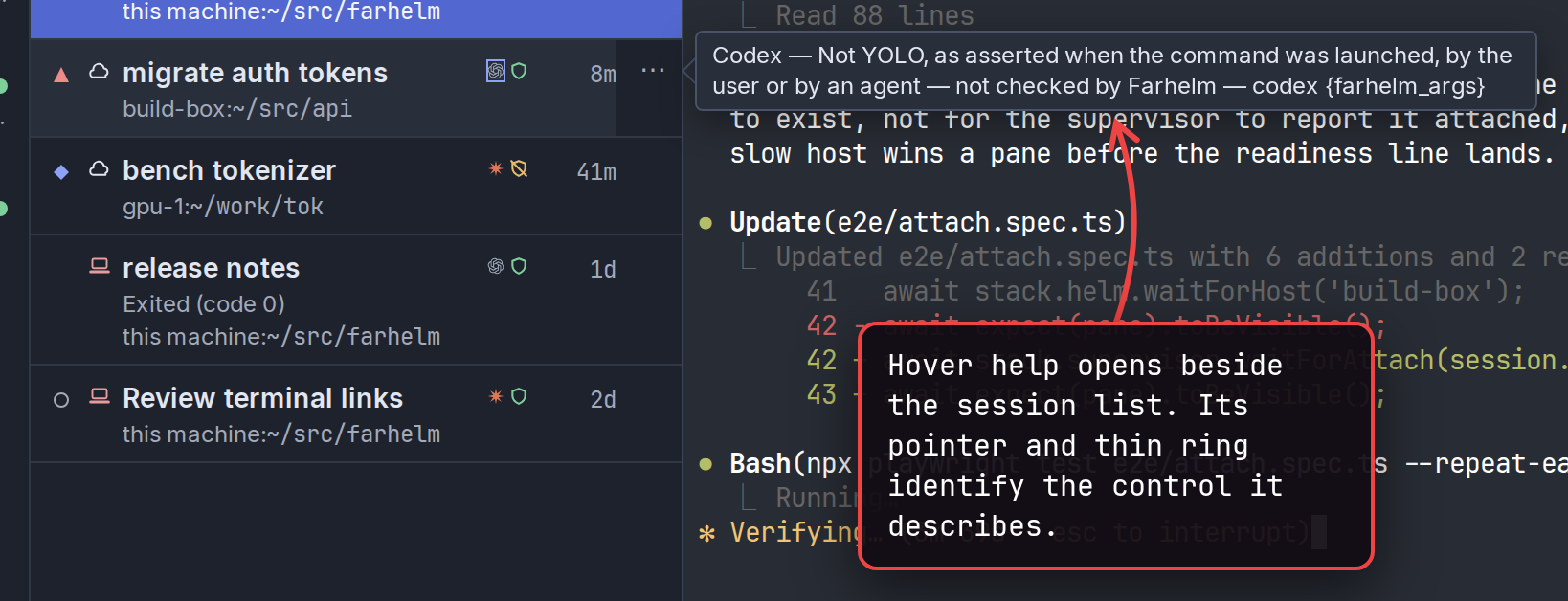
Hover help on a session row, its summary included, now opens beside the session list, with a pointer and a thin ring showing what it describes. (#3128)
show screenshot
🩹 Misc fixes
Section titled “🩹 Misc fixes”Fixes that would normally be summed up as a single “various bug fixes” line. In the interest of transparency, the complete list is included.
- Starting a session in a new managed checkout no longer stops in its terminal while Git tidies the repository cache; Farhelm now does that in the background afterwards, though another launch of the same repository can still wait for it to finish. (#3130)
- On a Mac, Tensorlake recipe tunnels now close when the desktop app is force-quit or crashes, instead of possibly staying open and still reaching services on your Mac. (#3138)
- Localhost tunnels in the Mac app no longer cut off a service’s response when the program using the tunnel finishes sending its request first. (#3135)
- Clicking a file path that a program printed across two lines, breaking it itself near the right edge, now downloads the whole path from either half instead of looking up only the half you clicked. (#3129)
v0.36.0
Section titled “v0.36.0”Released 2026-11-07.
💥 Breaking
Section titled “💥 Breaking”- New terminals now tell programs they run in Farhelm’s own terminal (TERM_PROGRAM=farhelm) instead of in tmux. This should have been the case already when we moved away from tmux for new terminals, but due to an oversight we still claimed to be tmux. This change does not affect old sessions that are still on tmux. (#3087)
🚀 Added
Section titled “🚀 Added”-
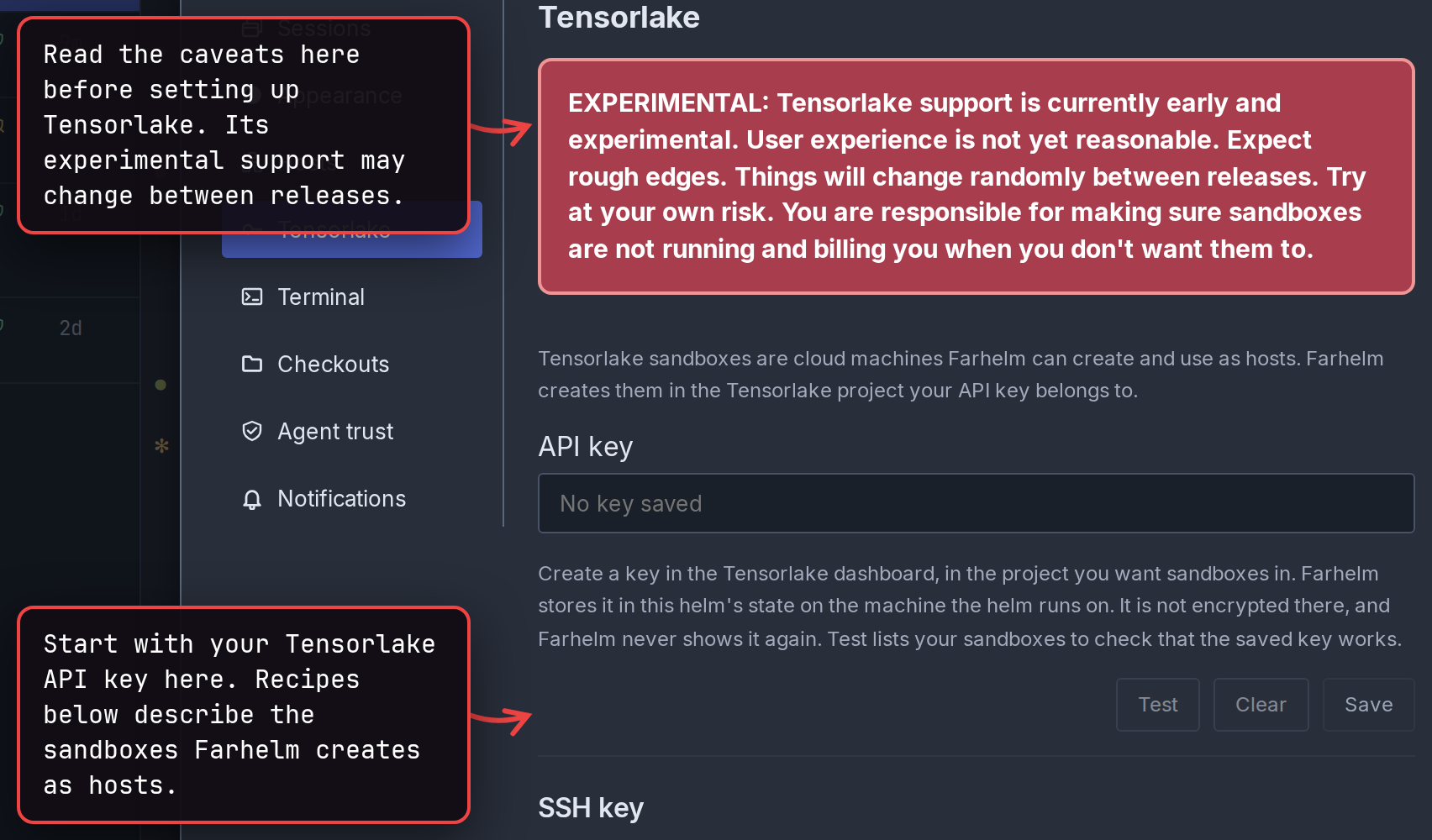
EXPERIMENTAL: You can now add a Tensorlake sandbox as a host. Details will change, no backwards compatibility promised. Caveats are called out in the UI. Tensorlake sandboxes explains how to set it up. (#2939, #2942, #2946, #2967, #2973, #3050, #3051, #3067)
show screenshot
-
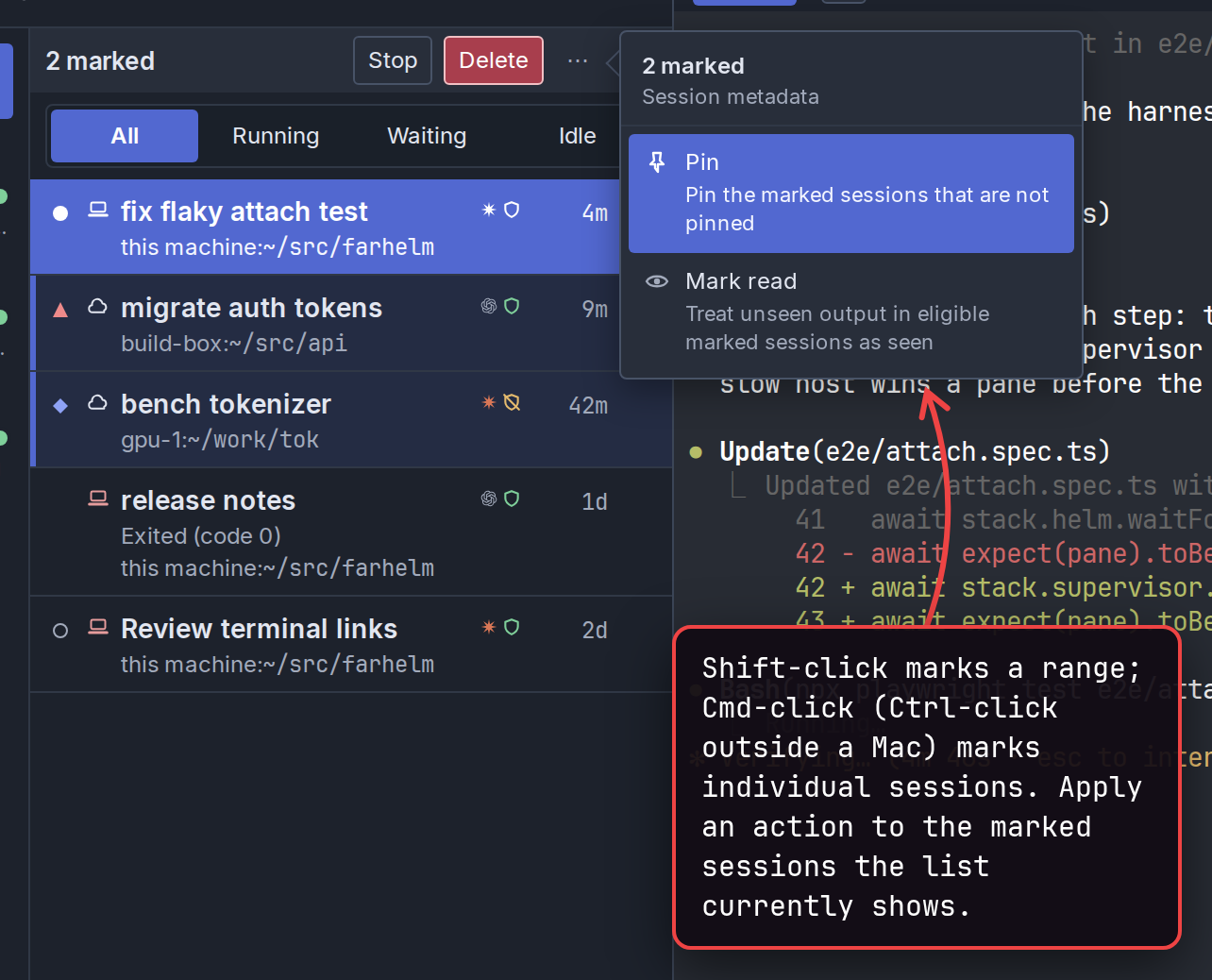
You can now mark several sessions in the session list with Shift-click or Cmd-click (Ctrl-click outside a Mac), then stop, delete, pin, unpin, or mark them read or unread together. Only marked sessions the list currently shows are included, and a bulk Delete asks once, listing each session. (#3052, #3053)
show screenshot
🔄 Changed
Section titled “🔄 Changed”-
Hosts with a problem, an update, or setup still running now appear together above your sessions, with their progress and actions in one place. This replaces the separate update banner and card; optional update reminders can still be dismissed. (#3044)
-
Pinned sessions now keep a manual order, shared across your devices and kept whatever the sidebar’s sort, with new pins at the bottom. You can drag them by their grips or use Move up and Move down in their menus; after the upgrade, existing pins start oldest session first. (#3041, #3046, #3047)
-
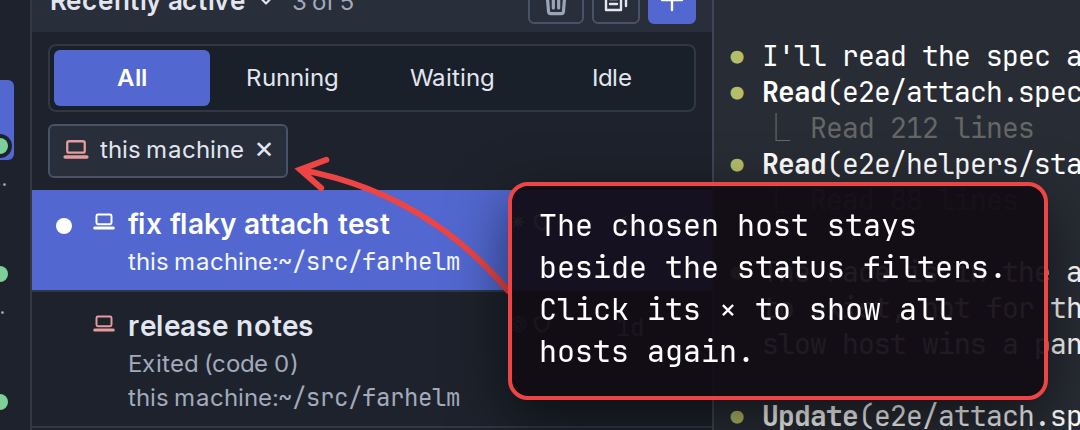
Choosing a host on the navigation rail now shows it beside the session list’s status filters, with a button to show all hosts again. When no sessions match, the list names the filters in use and offers buttons to clear them. (#3054)
show screenshot
-
A host whose sessions all use new terminals no longer runs a tmux server, and the one holding old terminals now stops by itself once the last of them is closed or deleted; Farhelm still needs tmux installed. If tmux is missing or too old, old terminals show as not running, and Delete and Restart of their sessions are refused until tmux is fixed or their agents are stopped. (#3094)
🩹 Misc fixes
Section titled “🩹 Misc fixes”Fixes that would normally be summed up as a single “various bug fixes” line. In the interest of transparency, the complete list is included.
- New terminals now open directly in their own terminal view, without first setting up an old-style terminal. (#3083)
- In a session whose agent runs in a new terminal but which still has old terminal tabs, losing the agent’s terminal no longer hides those tabs, so Delete warns before closing their running work. (#3040)
- If a terminal tab stops responding while Delete makes its final check, Delete now refuses instead of closing work that your confirmation said was no longer running. (#3024)
- Delete no longer leaves a program running after Farhelm failed to reconnect to the session’s agent or terminal tab, including on macOS. (#3032)
- Turning off a host’s command, YOLO or link permissions, or withdrawing tunnel consent, can no longer be undone by a sudden power loss after Farhelm confirmed it. (#3023)
- A newly added host can no longer, in a rare case, finish a launch that another host had been approved for. Agent requests still waiting when you upgrade ask for approval again. (#3025)
- When an agent asks to change a template, its approval card now shows changes to the container image, proxy port and GitHub token file, including removing the container setting. (#3035)
- In a new terminal, clicking a printed web address that a program extended onto the next wrapped line now opens the whole address, instead of sometimes the old, shorter one. (#3018)
- New terminals no longer drop standalone Kirat Rai vowel signs and other unattached vowel or trailing signs from displayed and copied text, which started with the emoji width change in v0.35.0. (#3045)
- With attachment debug logging turned on, control characters in a host’s tab names can no longer change how the log displays. (#3036)
- The web UI and desktop app now include the license texts for xterm.js, its size-fitting add-on, and the Visual Studio Code code that xterm.js compiles in, and for the code Farhelm’s own terminal took from xterm.js and Visual Studio Code. (#3079, #3095)
v0.35.0
Section titled “v0.35.0”Released 2026-11-04.
🚀 Added
Section titled “🚀 Added”-
When a session launch, Restart or Replace is slow, Farhelm now shows which host it is waiting on and for how long, beside the button or, for a quick launch, at the bottom of the window. If the app stops waiting after a minute, it says that the operation may still finish. (#2970, #2974)
-
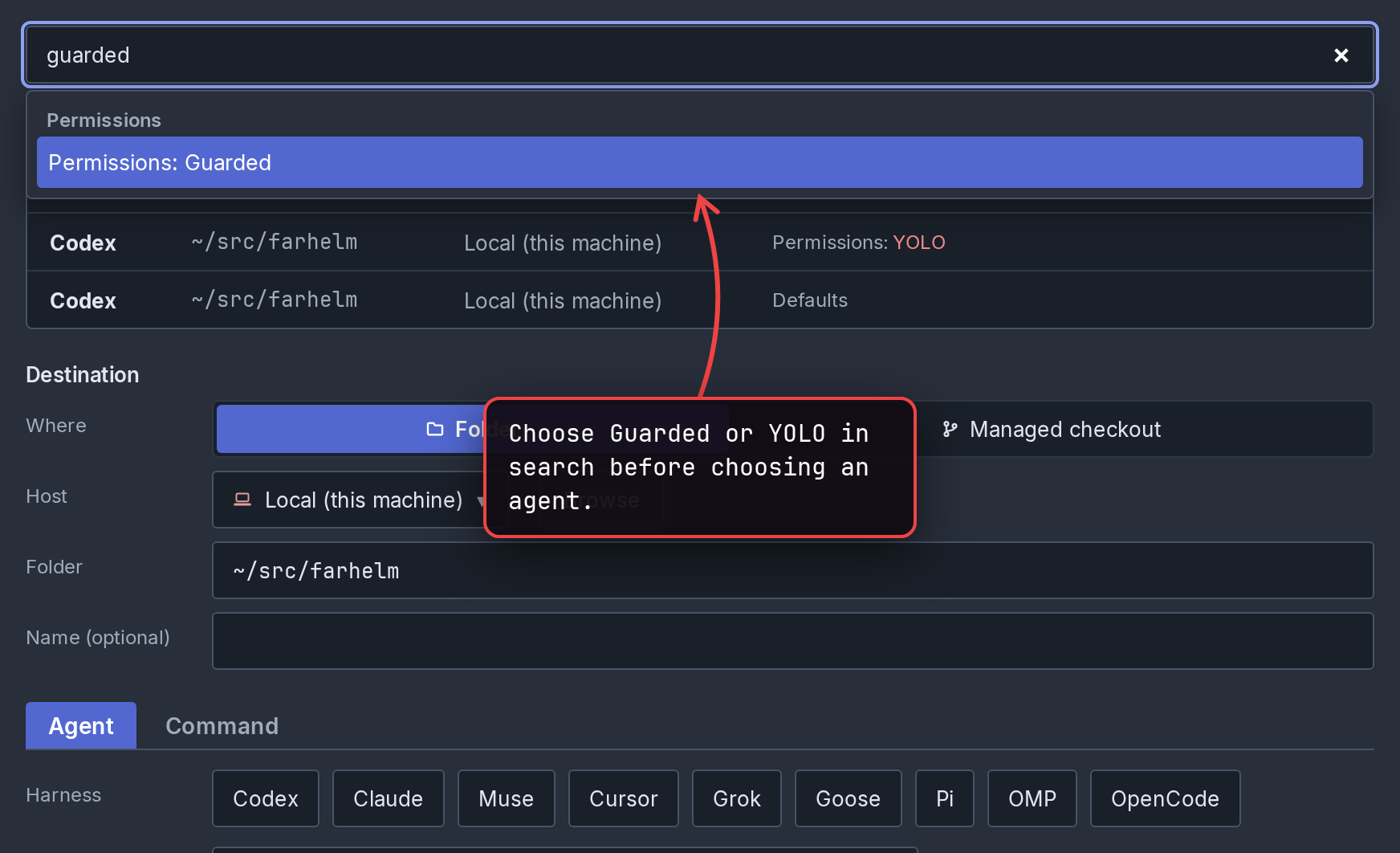
In the session launcher’s search, you can now choose Guarded or YOLO before choosing an agent, as the permission buttons already allowed. If the agent you then choose replaces that choice with a riskier mode, the launcher shows its red warning with Undo. (#2989)
show screenshot
-
You can now drop files, images and text onto a new terminal, in a session’s agent and in its terminal tabs (this functionality temporarily got dropped in the transition away from tmux/xterm.js). (#2965)
-
New terminals now show the hint about holding Shift (Option on a Mac) when a program that uses the mouse keeps a drag from selecting text (fixing another regression from when tmux/xterm.js was replaced). In both kinds of terminal, the hint now appears a few rows above where you let go, or below when there is no room above, so it stays off the text you dragged over. (#2969)
-
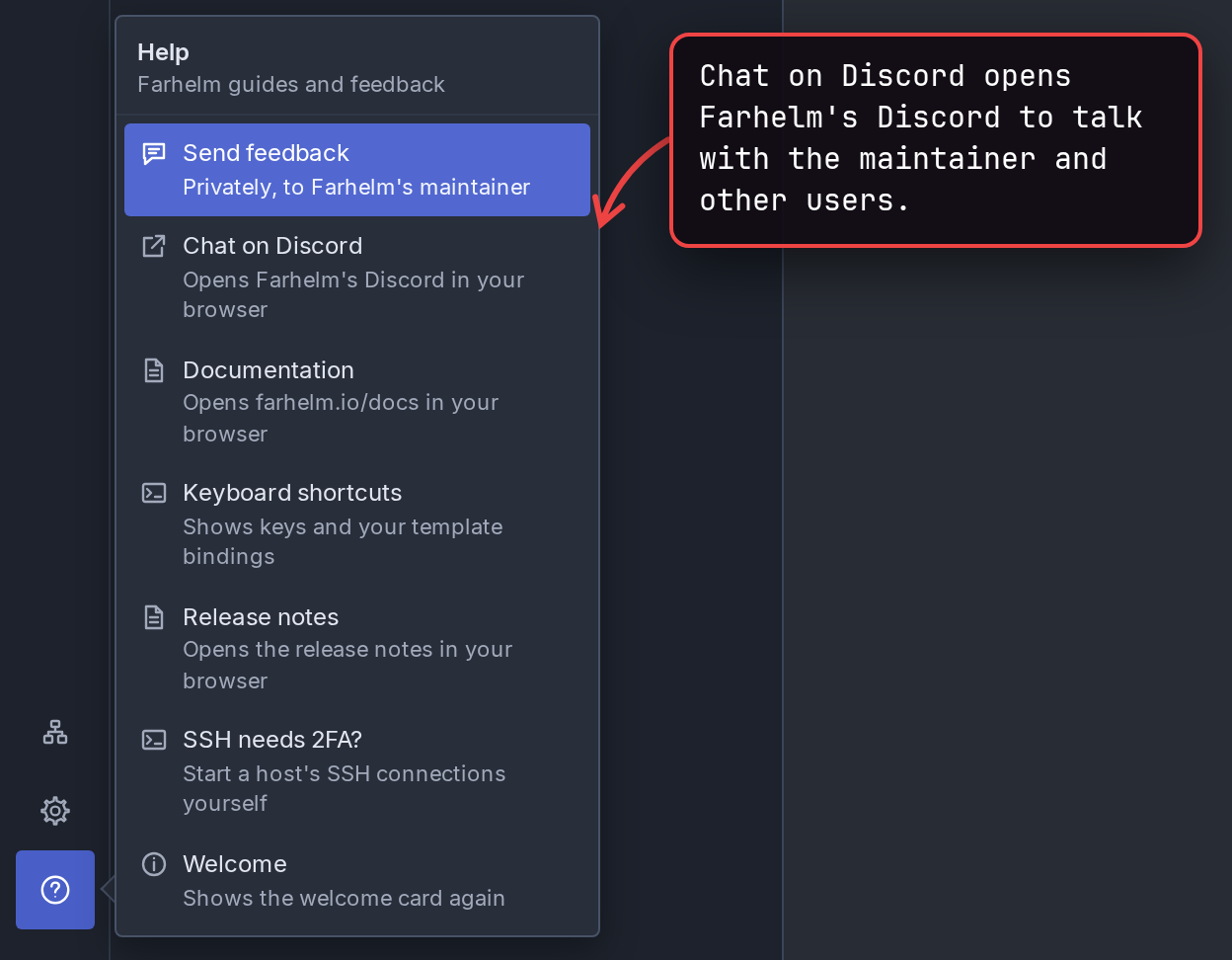
Chat on Discord, in the Help menu and in the feedback dialog, opens Farhelm’s Discord, where you can talk with the maintainer and other users. (#2963)
show screenshot
🔄 Changed
Section titled “🔄 Changed”-
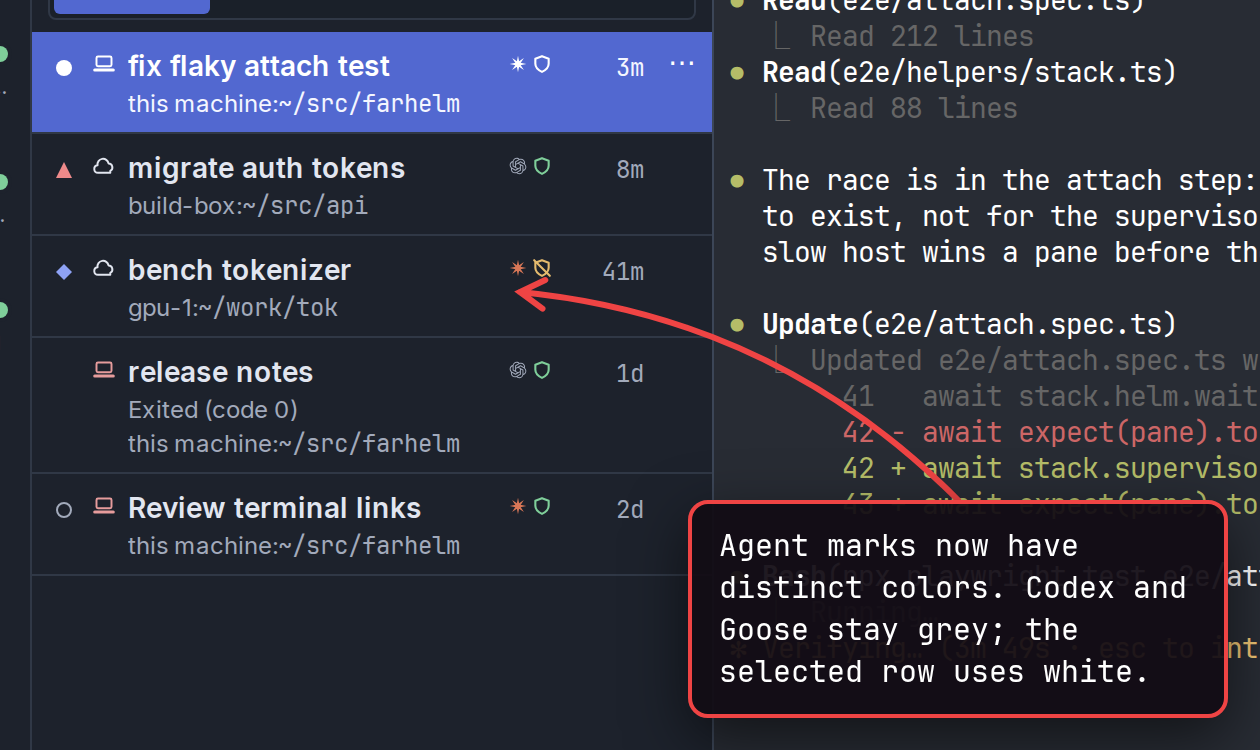
Agent marks in the session list now have distinct colors, so agents are easier to tell apart. Codex and Goose keep their grey marks because their owners’ terms restrict color changes, and every mark on the selected row is white. (#2961)
show screenshot
-
Hovering a session in the list now shows its summary beside the list, level with that row, instead of over the sessions next to it. Very narrow windows still show it above or below the row. (#2972)
-
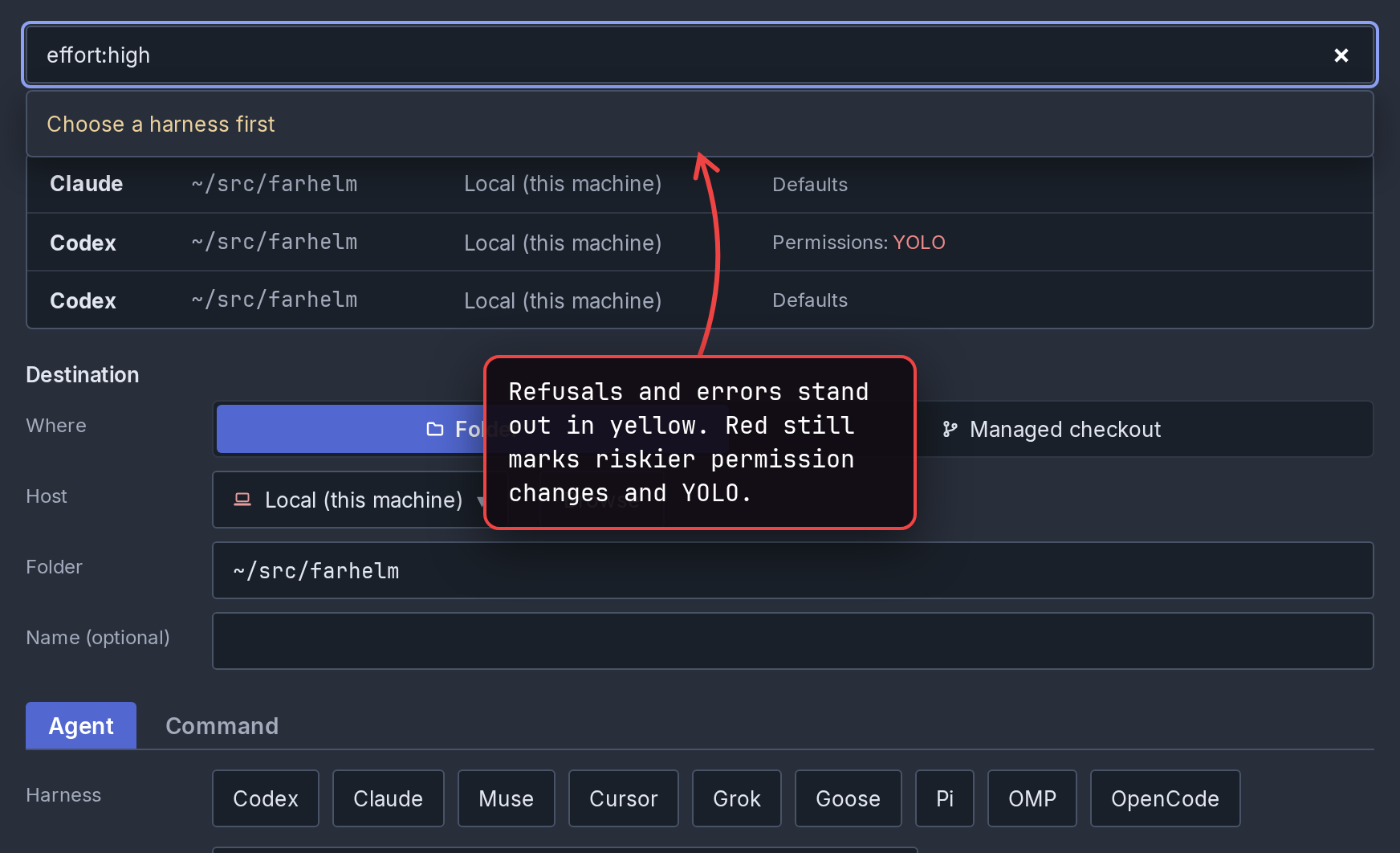
The session launcher now shows refusals and errors, such as “Choose a harness first”, in yellow so they stand out from ordinary hints. Red still marks riskier permission changes and YOLO. (#2987)
show screenshot
-
New terminals hold up typing for less time while Farhelm saves their history, most of all after very colorful output, which is also less likely to leave a terminal showing “Some earlier output could not be recovered”. (#2953, #2960, #2964)
-
Updating Farhelm or restarting a supervisor now takes less CPU away from the rest of the machine while it saves new terminals’ history. (#2952, #2954)
🔧 Fixes worth highlighting
Section titled “🔧 Fixes worth highlighting”- Uninstall Farhelm on a remote host no longer fails with “the remote probe answered without reporting its resolved binary” when Farhelm’s ssh connection to that host is shared between commands, which is how Farhelm normally connects. Checking a remote host before updating it could fail the same way. (#3005)
- Adding or updating a remote host no longer hangs if copying Farhelm to the host stalls; it now fails, leaving the host free for another attempt. (#3006)
🩹 Misc fixes
Section titled “🩹 Misc fixes”Fixes that would normally be summed up as a single “various bug fixes” line. In the interest of transparency, the complete list is included.
- A session’s agent or terminal tab in a new terminal now recovers by itself after briefly losing contact with the process that runs it, instead of staying unavailable until the supervisor restarted. After repeated losses, Farhelm waits at least a minute before reconnecting. (#2950, #2956)
- An emoji drawn wide by a variation selector, as in ❤️, now takes two columns in a new terminal, so the rest of its line is no longer one column off. (#2971)
- In a new terminal, hovering a link that a program printed in several pieces now underlines the whole link and no longer warns falsely that “Link text does not match where it goes”, also when the link wraps onto the next row. (#2949)
v0.34.0
Section titled “v0.34.0”Released 2026-11-03.
💥 Breaking
Section titled “💥 Breaking”- This release requires you to update your remote hosts. (#2882)
🔄 Changed
Section titled “🔄 Changed”- Farhelm started life running agent sessions and side terminals inside a tmux that was meant to be an implementation detail, and used xterm.js in the local UI. Farhelm is replacing this with a new system that drops both of those dependencies. New sessions and terminal tabs no longer run inside tmux. Old sessions still use tmux and xterm.js, but a future release will entirely drop support. tmux is still required as a matter of installation dependency for now, until a future release when old sessions running in tmux stop being supported (see next bullet). Move sessions to new terminals explains what changes and how to move the sessions you already have. (#2875, #2917)
- Sessions that were already running keep working in tmux, with a note at the top saying that a future release will stop supporting it. Restarting, replacing or cloning a session moves its agent to a new terminal, but its old shell tabs move only when you close them and open new ones. (#2907, #2908, #2917, #2922, #2927)
- Dropping a file onto a new terminal is refused with a message saying to paste it instead. File drag and drop may come back in a later release. (#2899, #2917)
- In a new terminal, text you compose with an input method, as for Chinese, Japanese or Korean, does not show at the cursor until you commit it. (#2899, #2917)
- A new terminal does not show the hint about holding Shift (Option on a Mac) when a drag over a program that uses the mouse selects nothing; holding the key still works. (#2899, #2917)
- In a new terminal, an emoji with a variation selector, as in ❤️, takes one column where tmux gave it two, which can leave the rest of that line one column off. (#2880, #2917)
- Quitting the desktop app no longer stops its supervisor, the background part of Farhelm that runs your sessions; opening the app reconnects to it, and on a Mac
farhelm uninstallstops it. The supervisor’s log is nowsupervisor.login Farhelm’s state directory instead of the app’s log. (#2870, #2873, #2916)
🩹 Misc fixes
Section titled “🩹 Misc fixes”Fixes that would normally be summed up as a single “various bug fixes” line. In the interest of transparency, the complete list is included.
- The helm no longer starts another connection attempt to a host while it is shutting down or removing that host. (#2929)
v0.33.0
Section titled “v0.33.0”Released 2026-10-30.
💥 Breaking
Section titled “💥 Breaking”-
This release requires you to update your remote hosts. (#2825)
show screenshot
-
Custom commands, resume commands and wrapper prefixes, saved ones included, are now run by Bash. Characters such as
~,$,*, quotes,;and|now do what they do in a shell, instead of being passed along as plain text. (#2847, #2848) -
Wrapper prefixes saved before this release lost their quotes, so
--profile 'work space'now passesworkandspaceas two separate words. Any saved prefix that needs its quotes has to be typed in again. (#2848) -
In a custom command, a placeholder such as
{cwd}must now stand alone, without quotes or other text attached, so--dir={cwd}no longer works. A saved command that breaks this rule is refused the next time it starts. (#2847) -
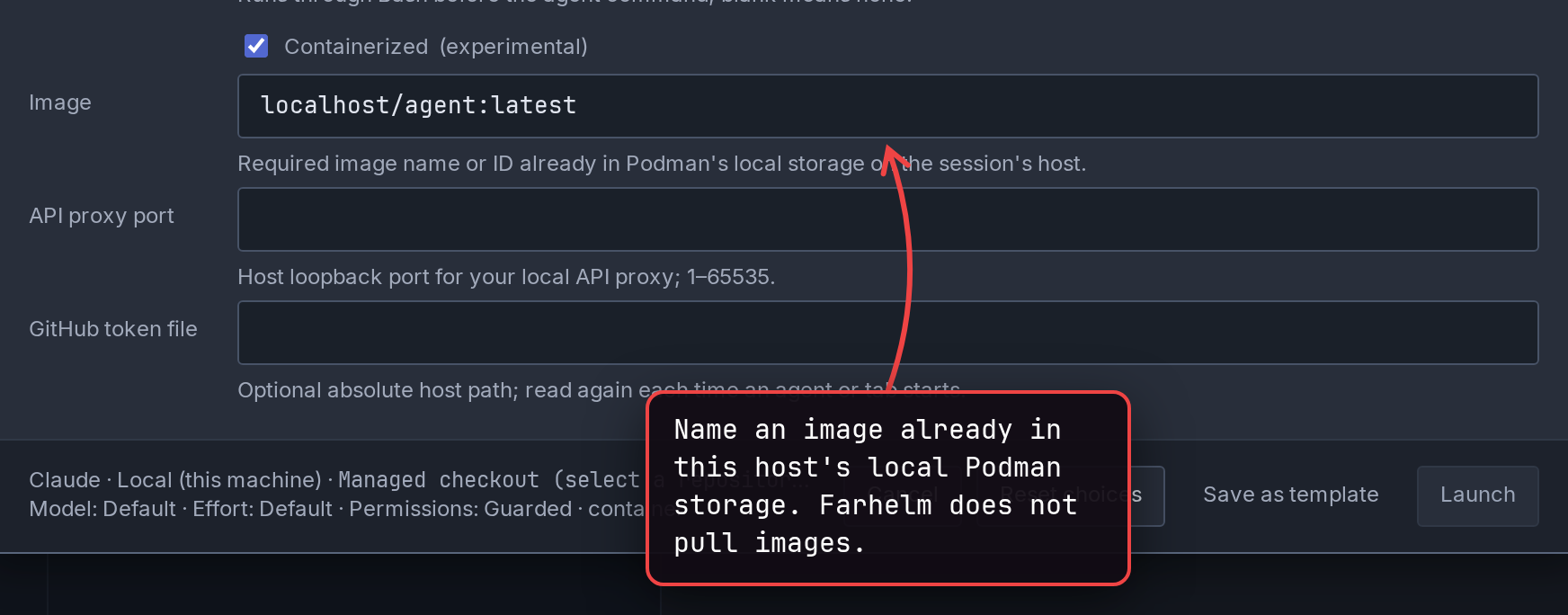
Containerized sessions now use an image already loaded into Podman on that host, named in the new Image field, instead of an image archive file; Farhelm does not download images. Anything set up with an archive, including saved templates and existing sessions, needs an image before it can launch again (Replace with can set one for an existing session). (#2825)
show screenshot
-
A containerized session that uses a wrapper prefix now needs
bashinstalled in its image. (#2848) -
New containers now run as an account matching your own user name, user ID and home folder where the image allows it, instead of always the image’s user 1000; existing containers stay as they are until replaced. If your user ID is not 1000, an image set up only for user 1000 may need its agents installed for all users, with their default settings in
/etc/skel. (#2832) -
A new container may now fail to start if your user or group ID is very large, as with some directory-service accounts, and rootless Podman cannot map the account Farhelm picks in the image. (#2832)
🚀 Added
Section titled “🚀 Added”-
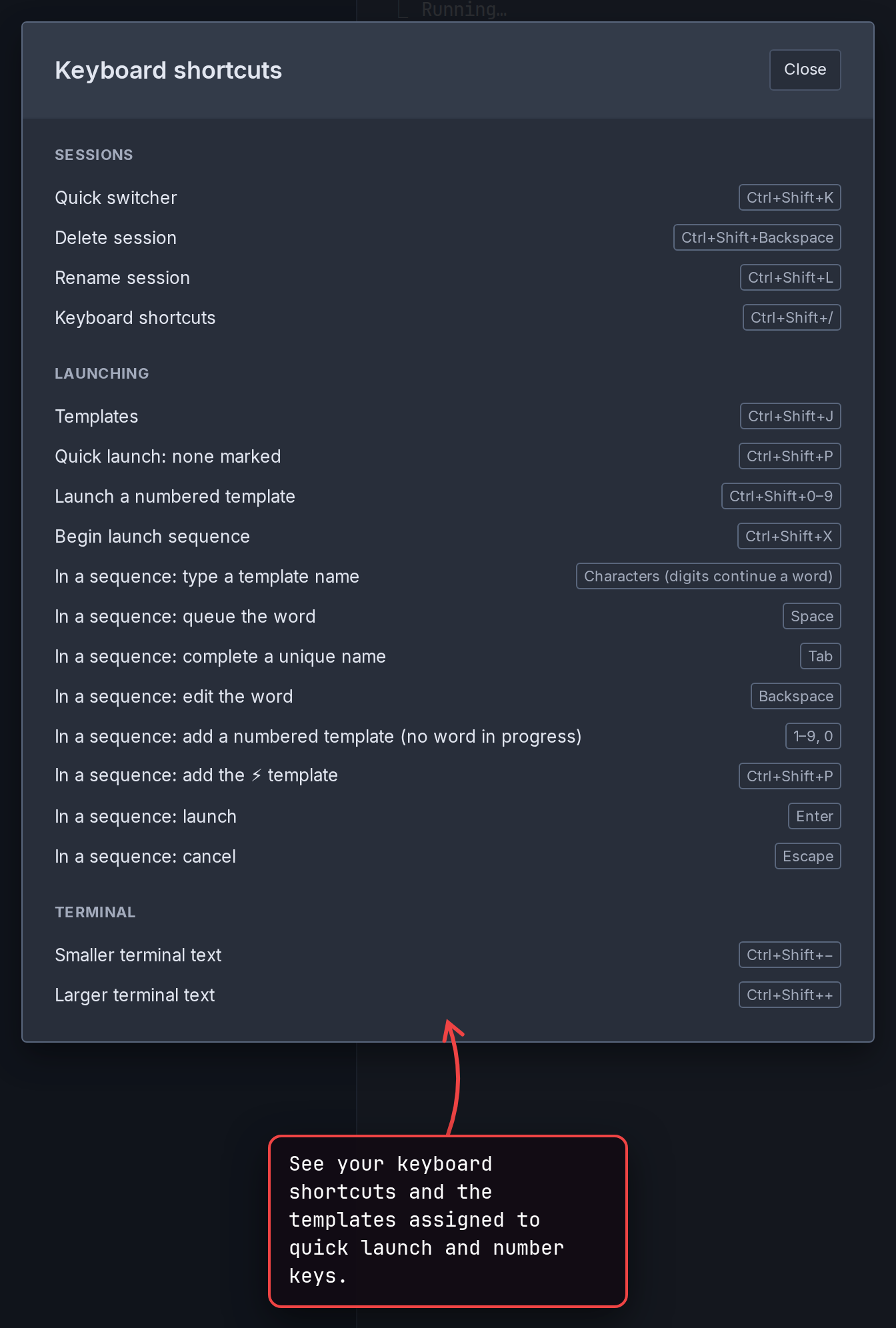
You can now see your keyboard shortcuts, including which templates are on ⚡ and the number keys, with Cmd+/ on a Mac, Ctrl+Shift+/ elsewhere, or Keyboard shortcuts in the Help menu. They are also listed on the keyboard shortcuts page. (#2827)
show screenshot
-
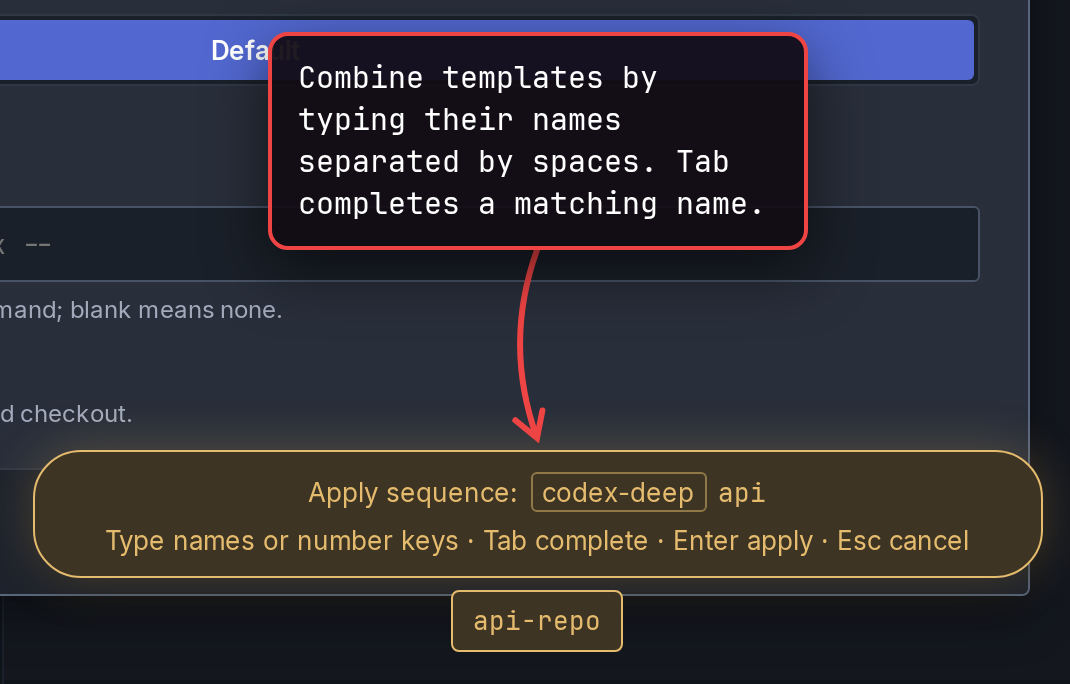
After Cmd+X in the Mac app, or Ctrl+Shift+X elsewhere, you can now combine templates by typing their names separated by spaces, with suggestions as you type and Tab to complete a name, as well as with number keys. New template names cannot contain spaces; existing names with spaces still work. (#2828, #2829)
show screenshot
-
Each host’s supervisor log now shows how long each permanent delete from Trash, and each cleanup of an unused prepared checkout, took, step by step, to help find out why cleanup is slow. (#2839)
🔄 Changed
Section titled “🔄 Changed”-
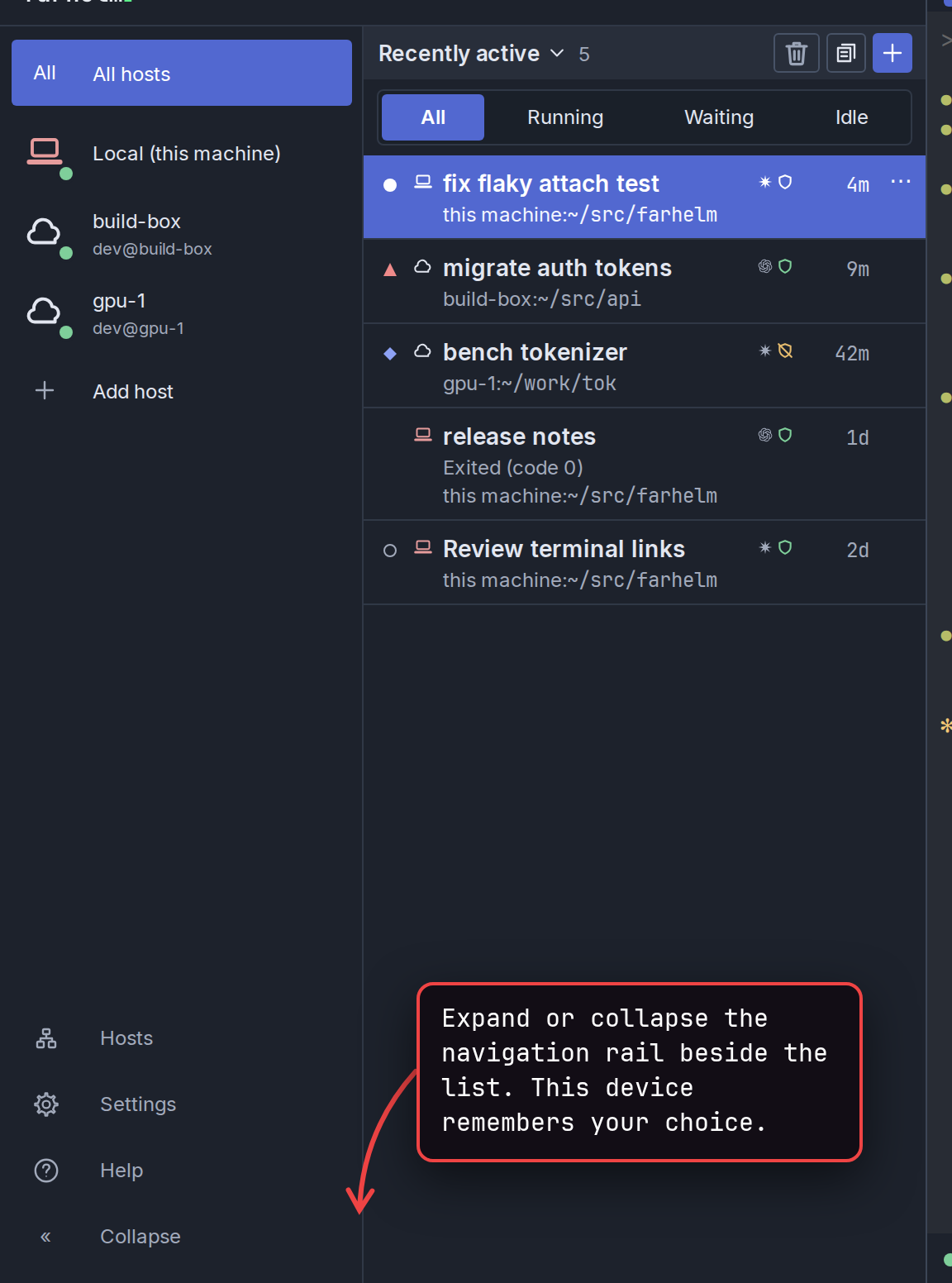
The host rail, the column of icons at the left of the sidebar, is now called the navigation rail and no longer widens when you point at it. Full host names are in each icon’s tooltip, and a new button below Help widens the rail beside the session list; each device remembers the choice. (#2841, #2849)
show screenshot
-
Farhelm no longer waits for the disk after each small change to its saved state, which could hold things up on a busy host, but an OS crash or power loss can now lose the latest changes; earlier ones stay intact. A backup taken while Farhelm runs should also copy the new
-waland-shmfiles next to each database. (#2840) -
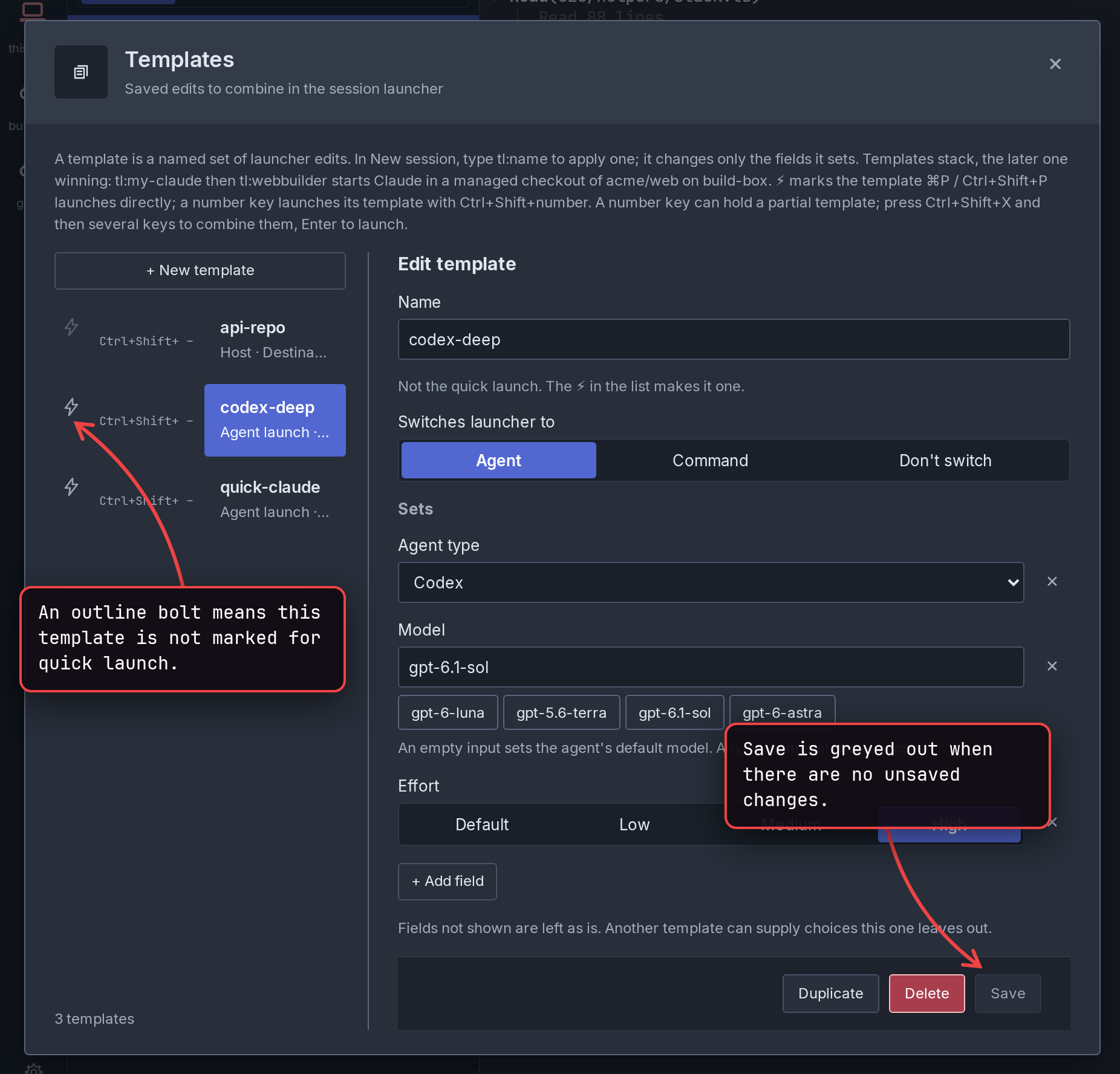
In the template editor, Save is now greyed out when there is nothing to save, so you can tell a save went through. (#2845)
show screenshot
🔧 Fixes worth highlighting
Section titled “🔧 Fixes worth highlighting”- On hosts running tmux 3.8 (on a Mac, that is whichever tmux is installed; the tmux Farhelm ships for Linux is still 3.7c), Restart, Replace, Stop and Delete now work on a session whose agent has exited, and so does closing a terminal tab whose shell has exited. One gap remains on tmux 3.8: if an agent switches to another conversation right before it exits, a later Restart can bring back the earlier conversation. (#2861)
🩹 Misc fixes
Section titled “🩹 Misc fixes”Fixes that would normally be summed up as a single “various bug fixes” line. In the interest of transparency, the complete list is included.
-
Restart and closing a terminal tab no longer act on a different terminal of the same session when the one they meant is gone, and a tab is now closed automatically only after checking again that its shell really has exited. This came out of looking into commands being killed in terminal tabs during heavy output, which is still unexplained. (#2846)
-
When keyboard focus is on a dialog itself, where Enter runs the dialog’s main action, focus no longer jumps to Cancel when the dialog updates. (#2817)
-
The Settings gear is now round, with evenly spaced teeth, instead of looking squashed. (#2826)
-
In the Templates list, the ⚡ is now an outline for ordinary templates and filled amber for the quick-launch one, so you can see at a glance which template quick launch uses. (#2844)
show screenshot
-
Requests that wait for a slow settings save no longer give up slightly before their time limit. (#2816)
v0.32.0
Section titled “v0.32.0”Released 2026-10-29.
💥 Breaking
Section titled “💥 Breaking”- This release requires you to update your remote hosts. (#2786, #2791)
- Codex sessions now need Codex 0.156.0 or later on every host that runs them, and a custom Codex command that puts
{farhelm_args}afterexec, passes--remote, or runscodex agentsorcodex queuenow fails. Farhelm now starts Codex without its shared background server, so with conversation hooks turned off Codex no longer runs one session’s commands in another session’s environment. (#2820)
🚀 Added
Section titled “🚀 Added”-
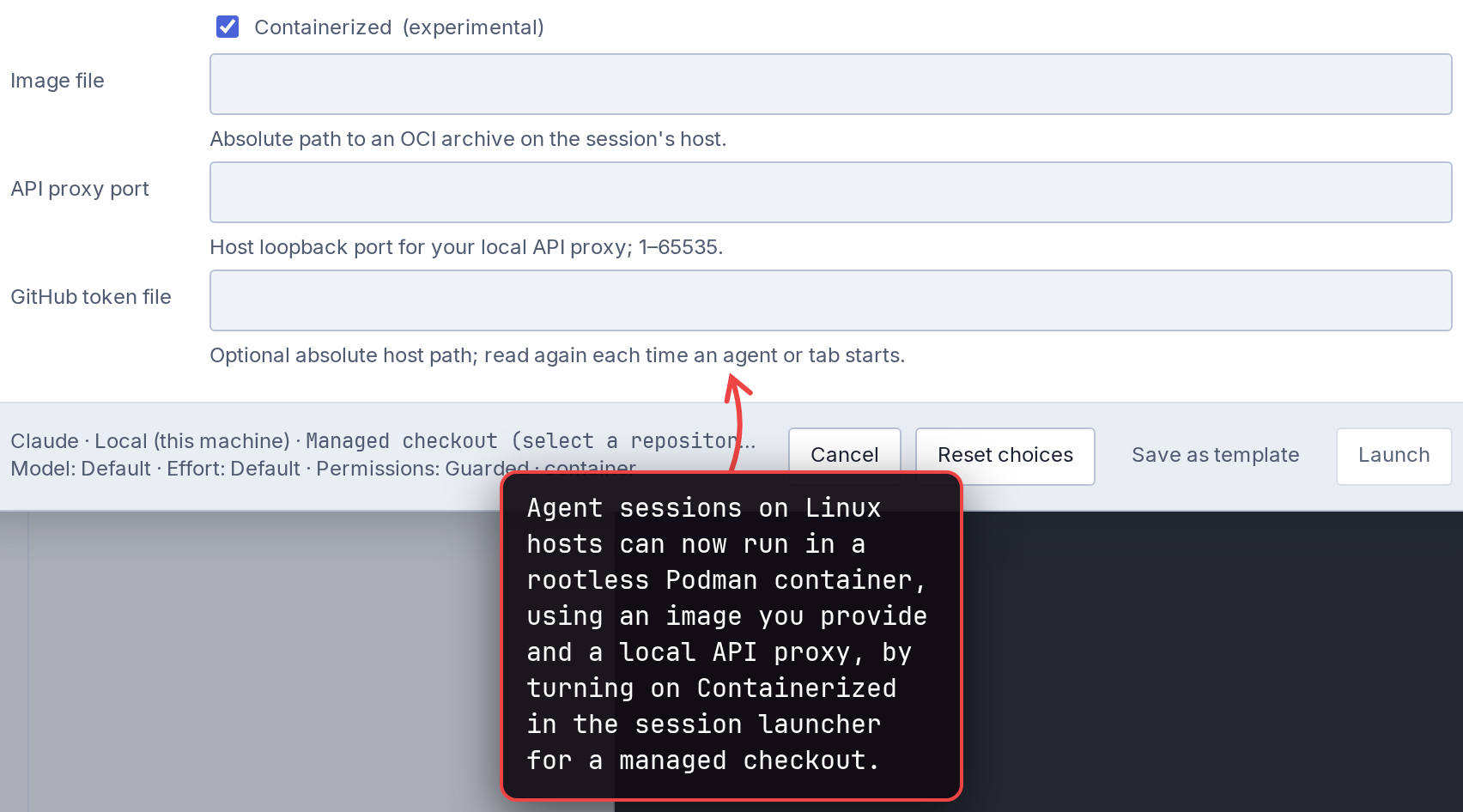
Agent sessions on Linux hosts can now run in a rootless Podman container, using an image you provide and a local API proxy, by turning on Containerized in the session launcher for a managed checkout. This is experimental and may change quickly; the containerized sessions guide covers setup and limits. (#2791, #2793)
show screenshot
-
A containerized session’s terminal tabs run inside its container too, and Stop stops the whole container, tabs included. Restart and agents’
farhelmcommands are unavailable inside the container. (#2791, #2792) -
A containerized session keeps the agent away from the rest of the host’s files, but not from the network or the checkout: anything it writes there, such as Git hooks, can later run with your full access when Git or an agent runs in that checkout outside the container. (#2791, #2793)
show screenshot
-
The Hosts button now marks available remote-host updates, and the session list shows a reminder that can update the hosts it names, as a dismissible card for optional updates or a banner when a required update keeps you from using a host’s sessions. (#2807)
-
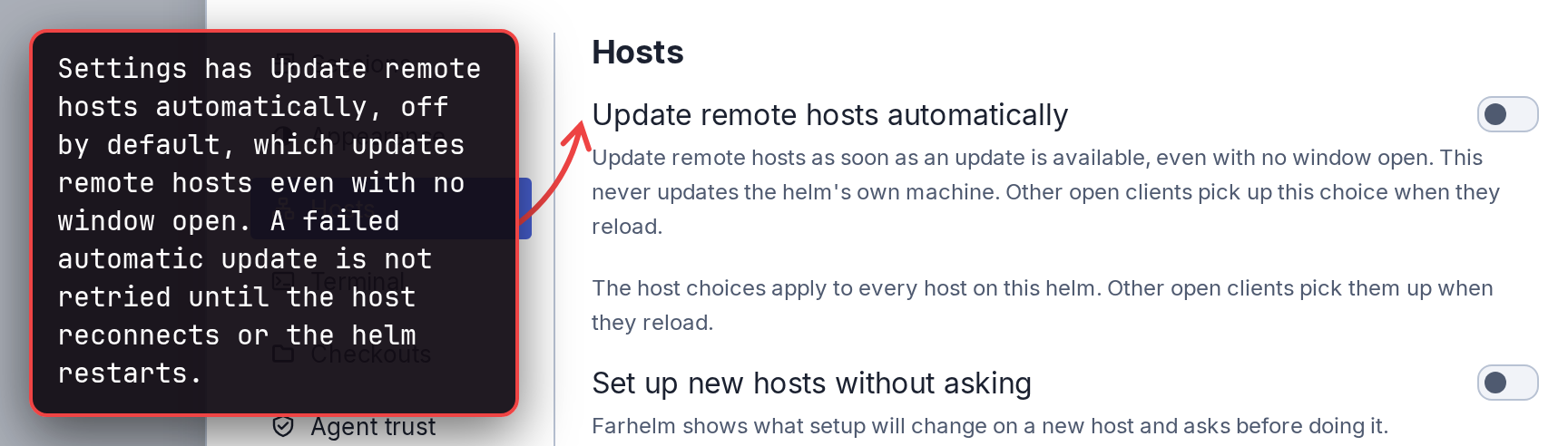
Settings has Update remote hosts automatically, off by default, which updates remote hosts even with no window open. A failed automatic update is not retried until the host reconnects or the helm restarts. (#2808)
show screenshot
-
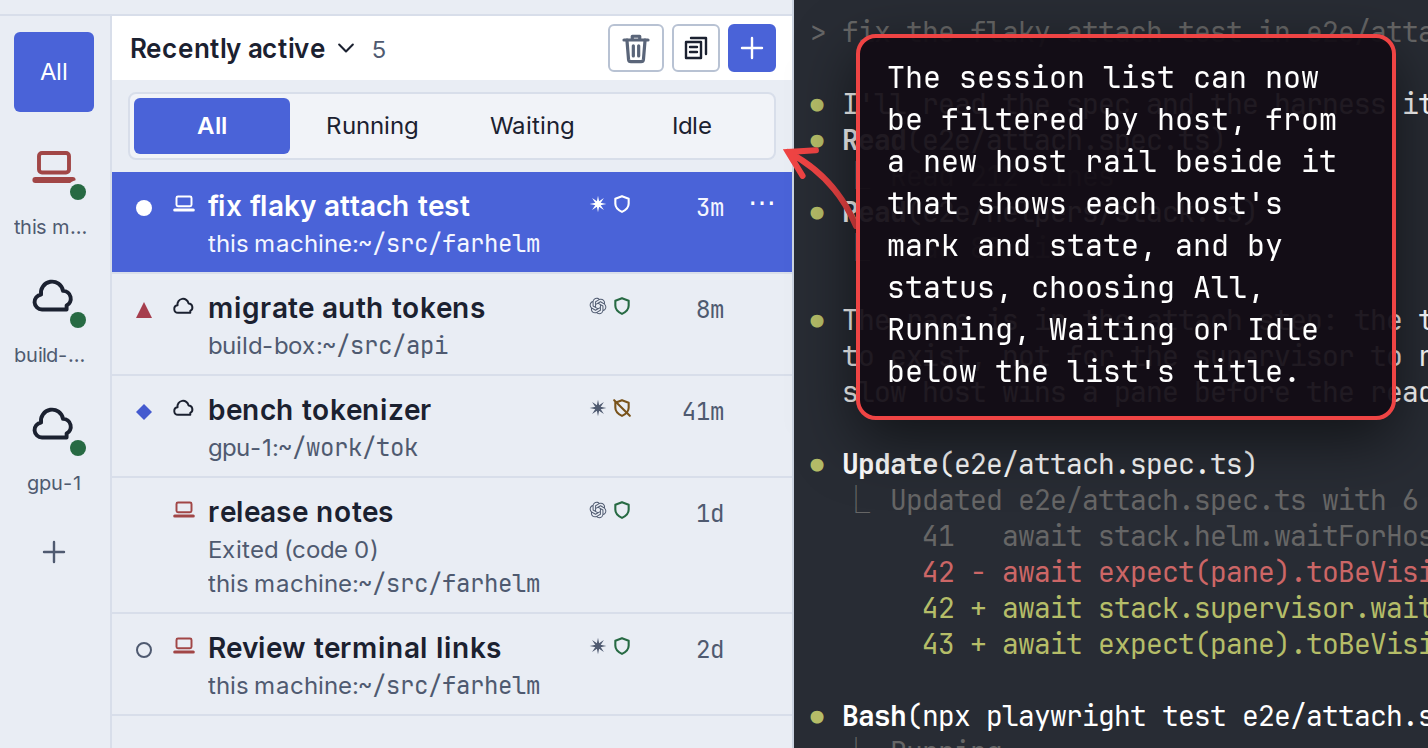
The session list can now be filtered by host, from a new host rail beside it that shows each host’s mark and state, and by status, choosing All, Running, Waiting or Idle below the list’s title. Picking a hidden session in the quick switcher sets both back to All. (#2749, #2750)
show 2 screenshots
-
Hosts without an alias now show a short name, the first part of the hostname or the whole IP address, on the host rail and in session rows. Pointing at the rail or moving keyboard focus into it shows the full names. (#2810, #2811)
-
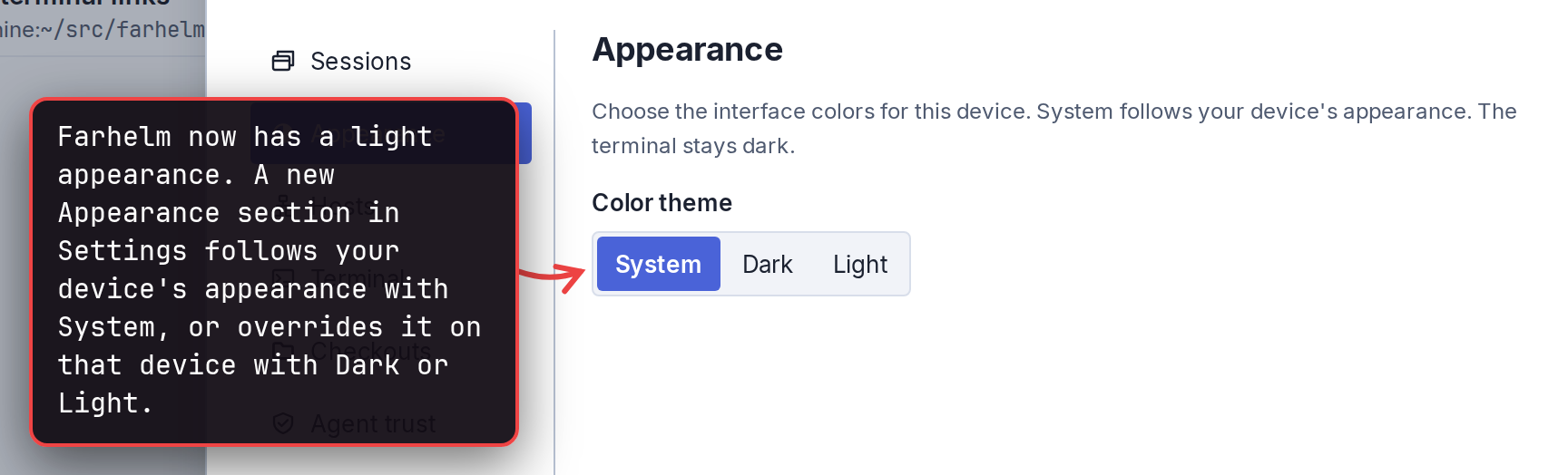
Farhelm now has a light appearance. A new Appearance section in Settings follows your device’s appearance with System, or overrides it on that device with Dark or Light. (#2731)
show screenshot
-
Muse sessions can now resume their conversation with Restart and handle
$farhelmrequests; this needs Muse 1.4.14 or later, and existing Muse sessions must be recreated with Clone or Replace with first. Farhelm also shows when Muse is working, idle or waiting on its folder-trust question, but its other questions and approval prompts may show as idle. (#2788, #2789) -
Templates saved from New, Clone or Restart with can now be used in Restart with when their fixed choices match the session, and Replace with accepts a template that names the session’s own host. A template naming a different agent, host, folder or session name is still refused. (#2711)
🔄 Changed
Section titled “🔄 Changed”-
Farhelm has a new look: a blue-gray palette with solid periwinkle selections, Inter for interface text, and the same compact styling for switches, buttons, menus and dialogs. Terminal text, paths, commands, versions and ages keep their monospace font, and the terminal keeps its colors. (#2729, #2730, #2732)
-
Labels, menus and notices throughout the interface now use sentence case. (#2767, #2771, #2772, #2773, #2774, #2775, #2776, #2781)
-
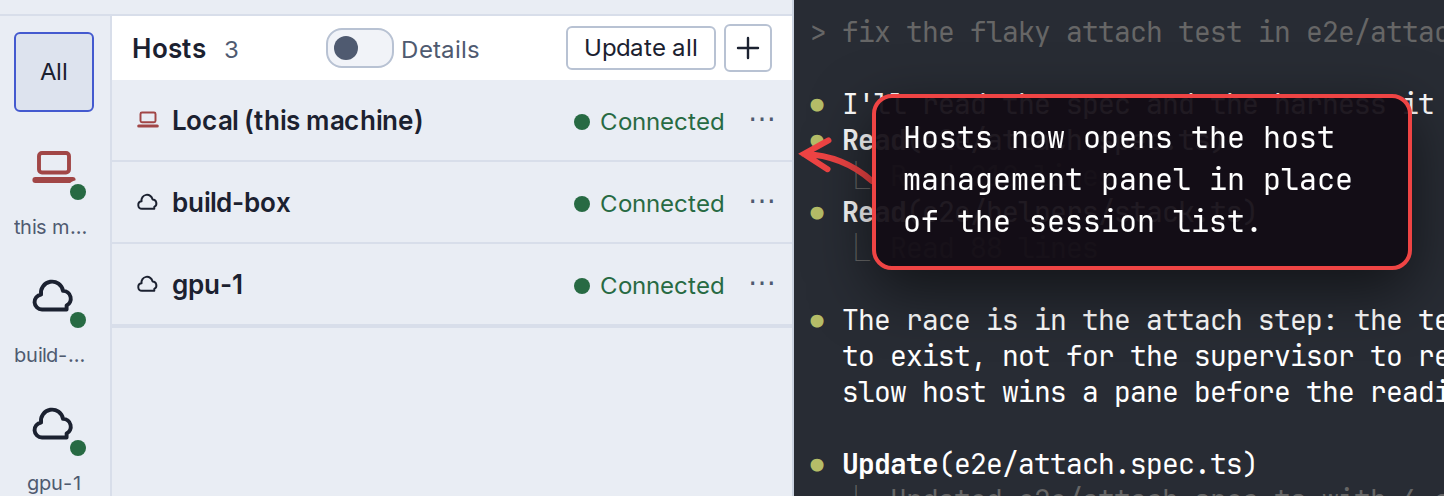
Hosts now opens the host management panel in place of the session list. Host work carries on after you close it, and a failed or uncertain result leaves a warning on that host’s icon in the rail. (#2750)
show screenshot
-
The session list’s sort order is now its title, with Compact in that menu, and Trash, Templates and New are compact icon buttons. Settings and Help sit at the foot of the host rail. (#2747, #2750)
show screenshot
-
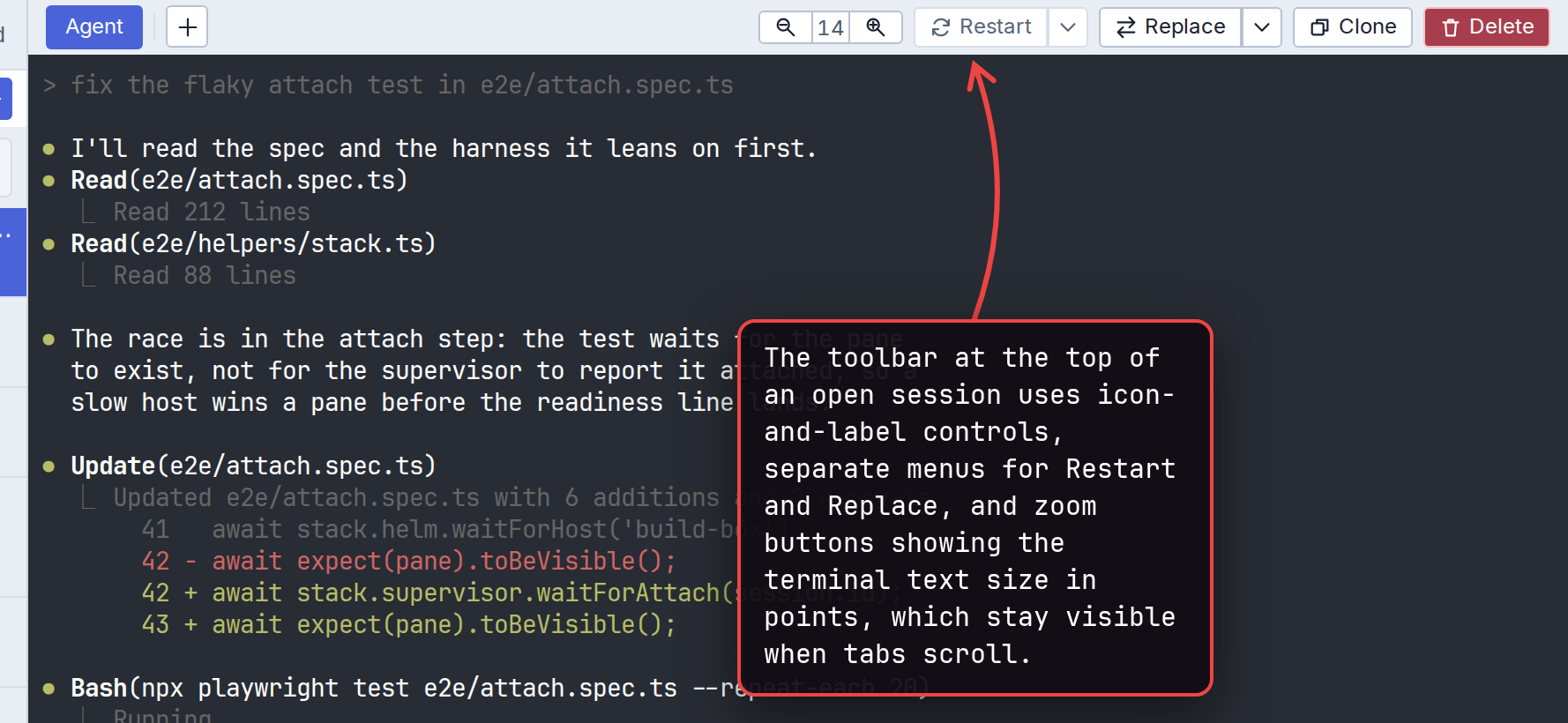
The toolbar at the top of an open session uses icon-and-label controls, separate menus for Restart and Replace, and zoom buttons showing the terminal text size in points, which stay visible when tabs scroll. (#2753, #2806)
show screenshot
-
In the desktop app, tunnels sit beside the tabs in a pill whose list can close one or all of them, even while the host is disconnected. (#2754)
-
The button for opening a terminal is a square + after a divider, so it no longer looks like a tab. (#2805)
-
Settings and dialogs share the same headings, buttons and layout, with Cancel before the main action and the actions in a footer that stays visible while the content scrolls, including in the session launcher and Trash. On phones, Trash’s stacked footer buttons leave less room for the archive list. (#2761, #2762, #2787)
-
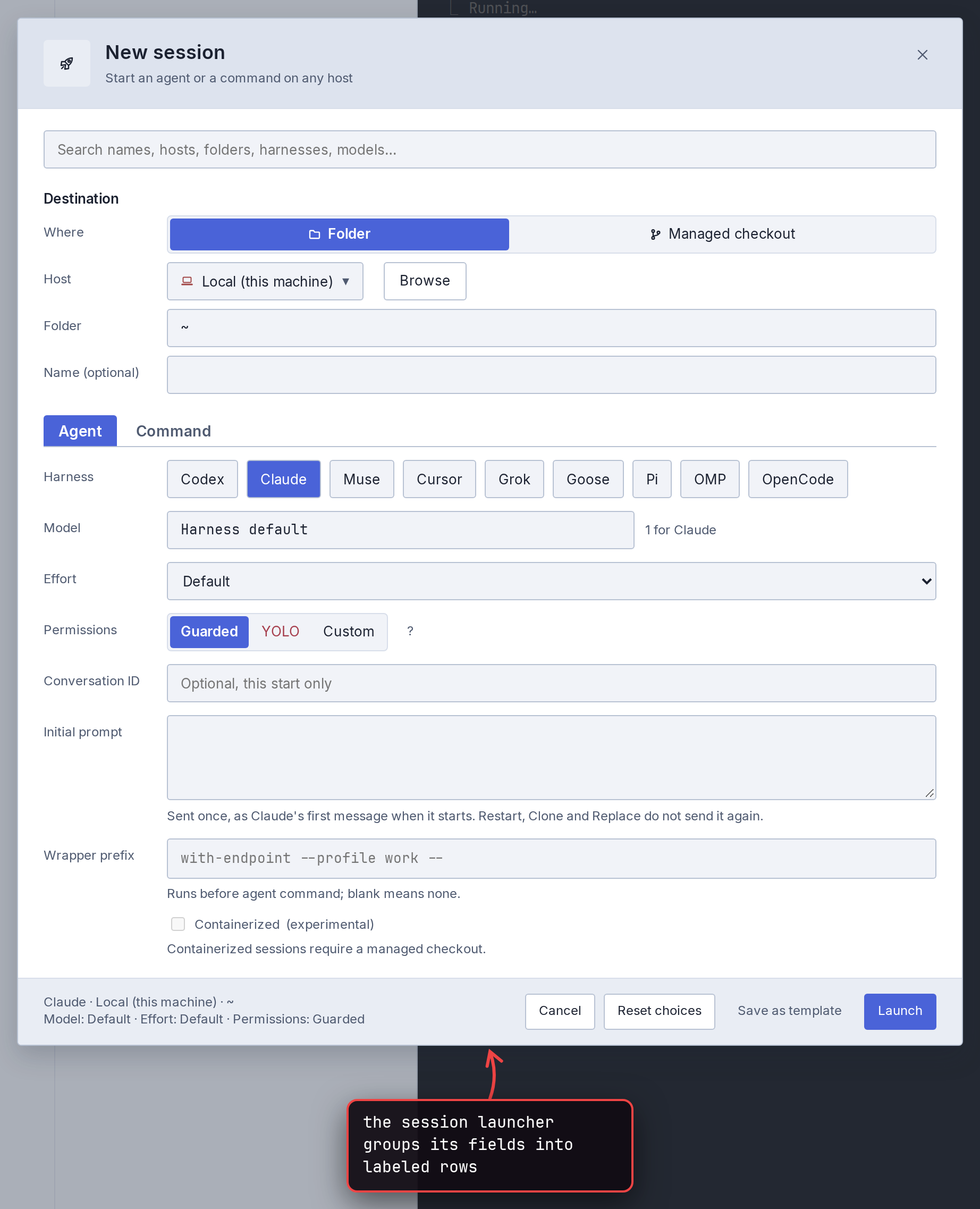
Settings sections have icons, the session launcher groups its fields into labeled rows, and menus of session actions and template number shortcuts describe each choice, with destructive actions set apart in red. (#2756, #2757, #2762)
show screenshot
-
Links in the app are a readable blue and always underlined, including the help link in Settings, which was hard to read on the dark background. Links that open a page outside the app end in ↗. (#2710)
-
Managed checkout trash is now a hidden
.farhelm-trashfolder, and existing trash moves there automatically. Restarting a session that was started inside the old trash location can fail after the move. (#2744) -
A terminal now appears only once its bundled JetBrains Mono font has loaded, so a slow connection leaves it empty for a moment instead of switching fonts after about three seconds. If the font fails to download, the terminal stays empty until the page is reloaded. (#2700)
🔧 Fixes worth highlighting
Section titled “🔧 Fixes worth highlighting”- Updating Farhelm on the Mac no longer deletes a version that is still in use, which could make new sessions, Restart and agents’
farhelmcommands fail until Farhelm was quit and reopened. Afarhelmcommand in a session whose version was removed now runs the installed version instead. (#2058, #2059, #2061, #2065) - Emoji in terminal output now take the same two columns agents use when redrawing status lines, so the text after them stays aligned as output arrives and after reconnecting. (#2723)
- Menus highlight one choice at a time. The pointer and the arrow keys could highlight different choices at once; now arrow keys continue from the choice under the pointer, and Enter runs the highlighted one. (#2803)
- Permanently deleting from Trash now shows progress for each checkout instead of holding the page with no feedback, and gives each checkout up to fifteen minutes to finish before calling the result uncertain. (#2724)
🩹 Misc fixes
Section titled “🩹 Misc fixes”Fixes that would normally be summed up as a single “various bug fixes” line. In the interest of transparency, the complete list is included.
- On the Mac, an interrupted install no longer leaves behind a lock folder that had to be deleted by hand before the installer would run again; the next run finishes the install. (#2065, #2066, #2739)
- The Mac app’s automatic updater no longer reinstalls Farhelm after you uninstalled it, replaces a newer version you installed from Terminal, or installs over an interrupted install or uninstall. After an interrupted one, it pauses with a warning on the version number in the sidebar that gives the command to finish the job. (#2065, #2067)
- Uninstalling Farhelm on the Mac refuses while any program still runs a version of it, naming the version and an
lsofcommand that shows which program, and running uninstall again finishes an interrupted one. An uninstall started from a session still running an older release refuses; quitting Farhelm and running~/.local/bin/farhelm uninstallfrom a terminal outside it works. (#2068) - When uninstalling from a host is refused because its identity changed, the message now points to the host list, where spaces in the identities are visible, instead of quoting values that could look identical. (#2708)
- Restart with no longer automatically trusts Codex or Pi in a managed checkout whose folder was replaced outside Farhelm. (#2738)
- After Restart with chose a different Pi or OMP conversation, a later Restart no longer returns to the old conversation when Farhelm could not set up conversation reporting. Restart stays unavailable until the agent reports its conversation. (#2742)
- Claude sessions started through more than one wrapper program that stays running can now resume their conversation with Restart. Sessions already running when you upgrade need a relaunch before Restart reliably follows the original Claude rather than another one started inside the session. (#2725, #2727)
- The trust reminder for managed checkouts now also appears when Codex’s folder-access question offers Quit. (#2718)
- Settings and the Templates dialog now report failed saves of terminal frame colors, quick-launch naming, terminal link-click behavior, trust hint visibility and the ⚡ quick-launch mark, instead of showing them as saved. A failed Don’t show again brings the trust hint back with an error. (#2713, #2714, #2715)
- Escape in the session launcher’s save-as-template panel closes only that panel, keeping your session setup even after a refused save, which now also returns keyboard focus to the template name. (#2709)
- On Replace’s YOLO question, Cancel stays unavailable while don’t ask again is saving, so a failed save keeps the question open with its reason. (#2707)
- Terminal-link error messages no longer cover the warning when you confirm deleting, restarting or replacing a session. (#2740)
- In the desktop app, clicking plain delete in Templates keeps its Undo offer even if the list changes before the screen updates, instead of deleting the template permanently. (#2745)
- If a template deletion’s reply is lost, Templates now says the deletion may have happened and refreshes the list, without offering Undo. (#2748)
v0.31.0
Section titled “v0.31.0”Released 2026-10-23.
💥 Breaking
Section titled “💥 Breaking”- This release requires you to update your remote hosts. (#2511, #2674, #2681)
- Agent commands now use the full session IDs from
farhelm agent sessions, and discovery JSON uses schema version 7 with UUID host IDs. Scripts using bare session IDs need to use those full IDs; only the caller’s exact ownFARHELM_SESSION_IDremains accepted bare. (#2367, #2368, #2369, #2370)
🚀 Added
Section titled “🚀 Added”-
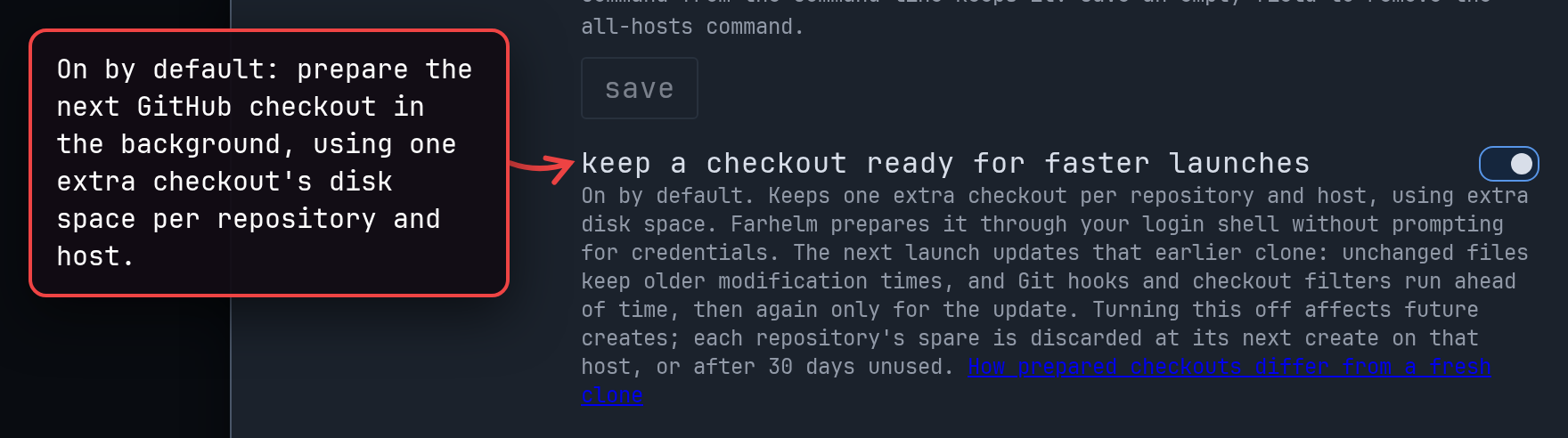
Managed-checkout launches can now reuse a checkout prepared in the background, making the next launch faster. This is on by default under Settings → checkouts and uses one extra checkout’s disk space per repository and host; the prepared-checkout guide explains when hooks and filters run and when Farhelm falls back to a fresh clone. (#2510, #2511, #2512, #2647)
show screenshot
-
The session launcher remembers your last agent-launch folder separately for each host, so switching hosts no longer carries one machine’s path to another. A selected session on the same host still takes precedence, and folders you explicitly choose stay put; command launches and launches into a new managed checkout do not change the remembered folder. (#2669)
-
Agents can ask to add a host, change its alias, icon or color, or remove it. Every request needs your approval, even with Run farhelm commands without asking enabled; removing a host leaves its supervisor and sessions running, and approval to add a host does not mean setup has finished. (#2674, #2680, #2681)
-
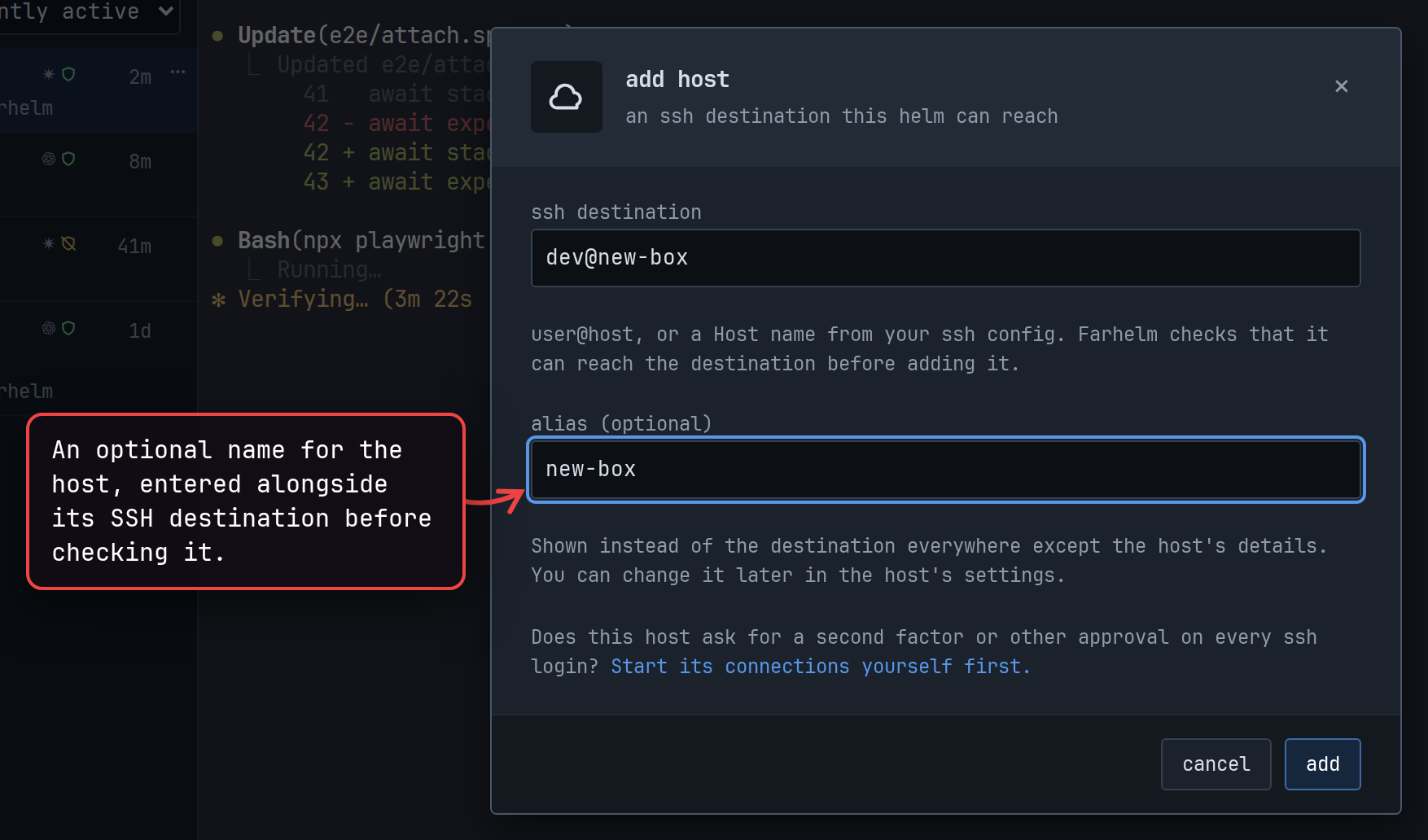
Add host now accepts an optional alias alongside the destination. Adding a destination already in your hosts is refused before connecting, with the existing host named in the explanation. (#2666, #2667)
show screenshot
-
Restart with now uses the session launcher, including search and template shortcuts. It accepts templates that leave the agent/command choice, agent type, host, folder, session name and first message unset; these partial templates can be written through agent commands, but the Templates editor cannot yet create them and templates saved by New or Clone cannot be used as saved. (#2683)
-
The YOLO confirmation in the session launcher and Restart with can now start the same launch in guarded mode instead, when you explicitly chose YOLO and the agent supports guarded mode. (#2506, #2576, #2655)
-
The session launcher warns when a folder does not exist on the selected host, while still allowing Launch. A refused launch shows a prominent Not launched. alert and marks the folder field when the refusal concerns that folder. (#2675, #2677, #2678)
-
Host and unavailable-session details now show which connection step is pending, distinguishing SSH login problems, missing Farhelm, a missing or silent supervisor, and unfinished setup. Failed attempts include the last SSH error lines, while timeouts against older hosts explain what Farhelm could not establish. (#2502, #2505, #2507, #2567)
-
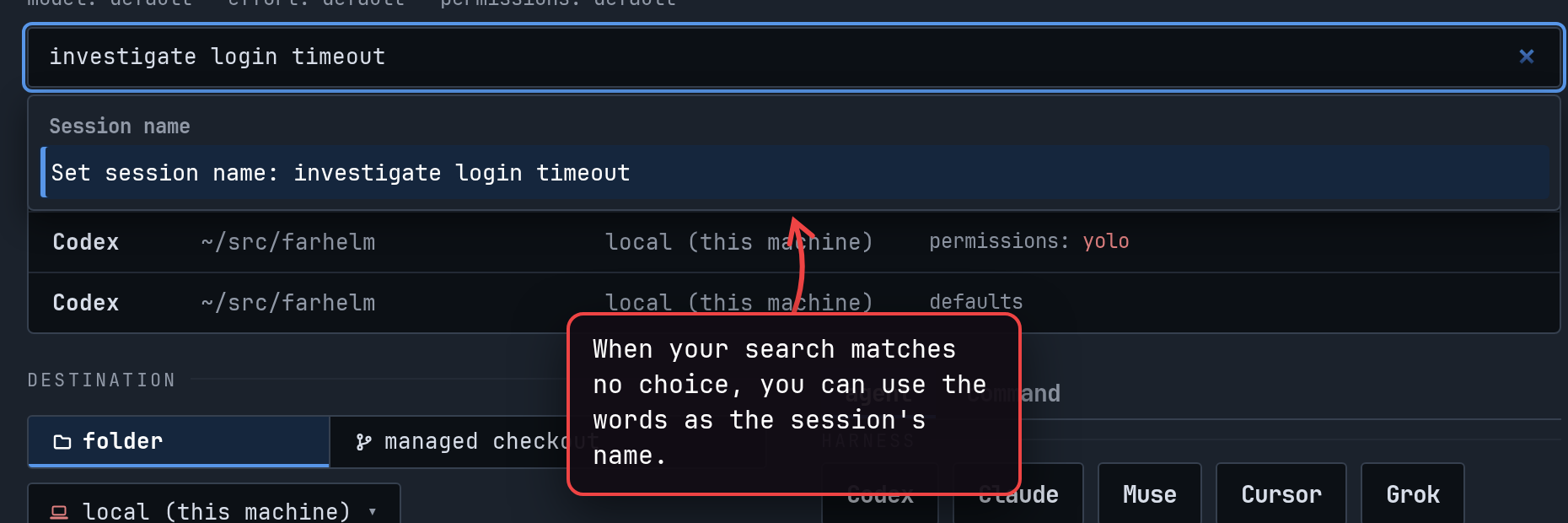
Search in the session launcher offers unmatched text as a session-name choice and explains searches with no choices. Enter reopens hidden search or repository suggestions before choosing one, waits while setup is loading, and gives a specific explanation for invalid custom permission flags. (#2444, #2450)
show screenshot
🔄 Changed
Section titled “🔄 Changed”-
Removing and re-adding a host now starts its pins, seen state and notification marks fresh. The upgrade also clears old viewer state and the last selection when Farhelm cannot tell which host an old session ID belonged to. (#2367, #2368, #2369, #2370)
-
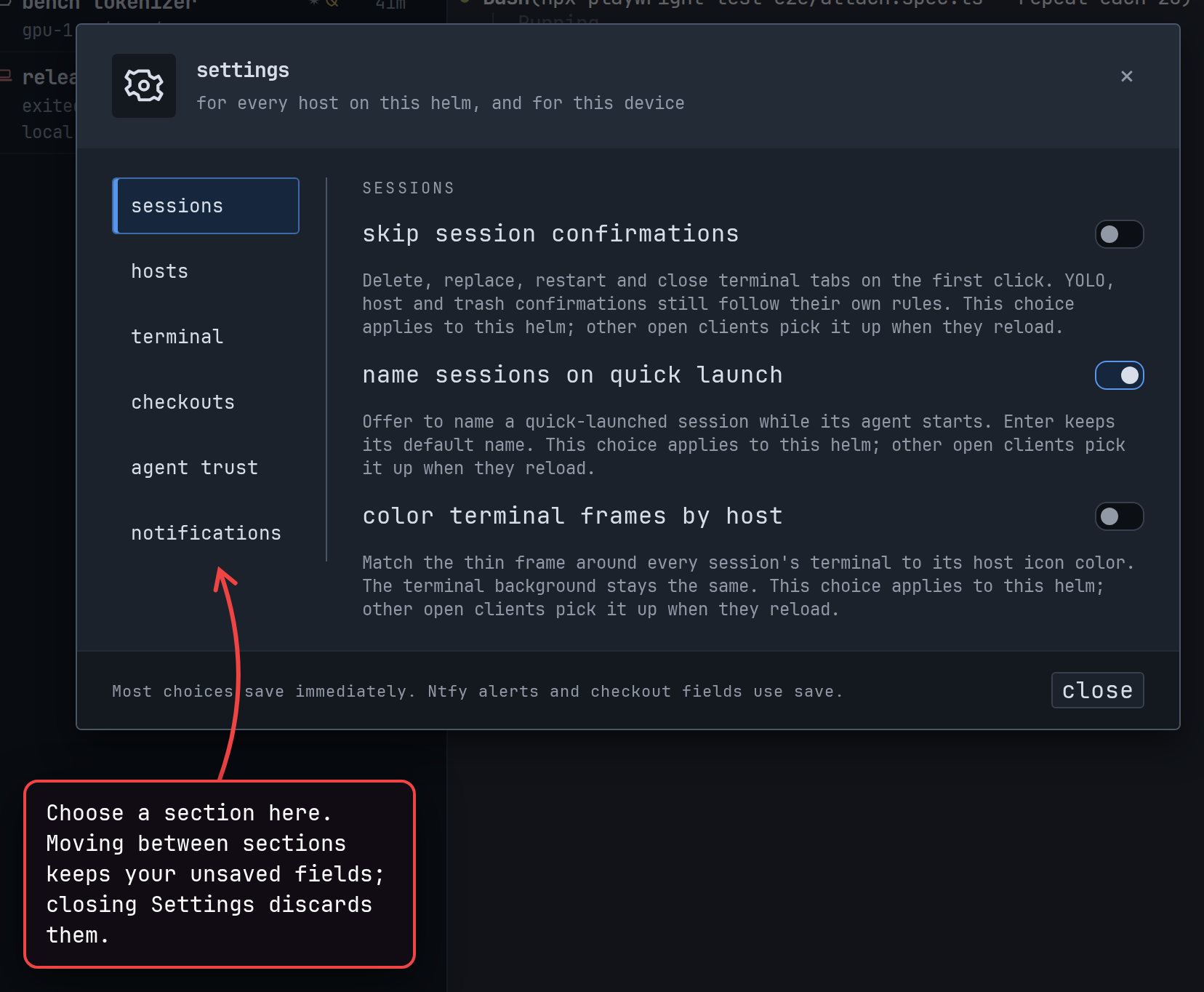
Settings now groups its choices into sections beside a sidebar, with a ‹ settings button on narrow screens. Switching sections keeps unsaved fields and pending saves; closing Settings still discards unsaved fields. (#2447)
show screenshot
-
When the open session goes away, Farhelm returns to the most recently visited session still listed in the sidebar. This history is shared across windows and remembered across reloads. (#2439, #2441)
-
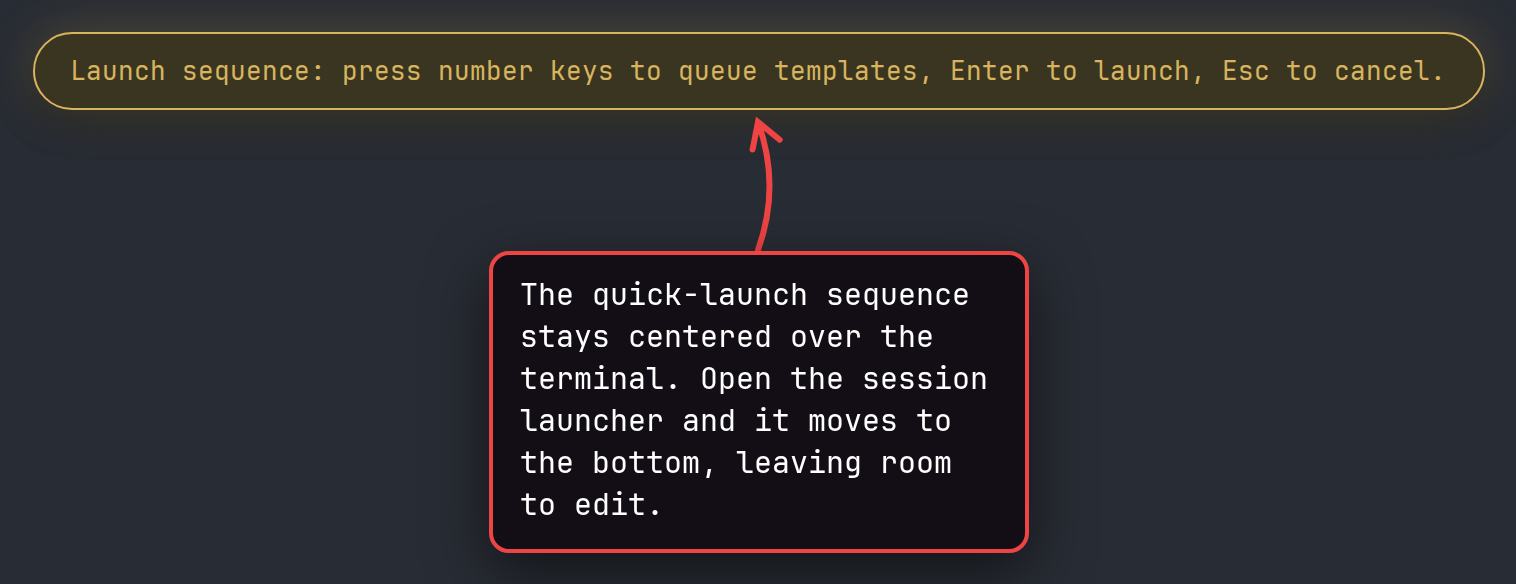
Quick-launch sequences show queued templates in a larger amber indicator centered over the terminal. While the session launcher is open, the indicator stays at the bottom so you can keep editing. (#2426)
show screenshot
-
Repeated managed-checkout launches spend less time copying cached Git history. An occasional launch takes longer while Git consolidates the cache for later checkouts. (#2508)
-
Signing in again after a browser session expires now reloads the page from the helm’s saved state. Open dialogs and unsaved drafts are lost in that reload. (#2614)
-
A setting the app could not save no longer returns later through a silent retry after signing in again. It remains in effect until the app next reads your saved settings, then disappears; failed moves of a template’s quick-launch mark also show the mark where it was actually saved. (#2623)
-
Retrying a session creation with the same key after deleting its session now starts a fresh attempt, with agent approval still required. Refused attempts keep their answer for 24 hours before the key can be used again. (#2497)
-
The helm can finish an authenticated action after its client disconnects while the request is arriving. Uploads, downloads and operations meant to stop when their caller leaves keep that behavior. (#2458)
-
Refused host uninstalls now explain version and identity problems and offer Remove to forget the host without changing it. When another entry reaches the same machine, the explanation names that entry and how to uninstall through it. (#2491, #2605)
🔧 Fixes worth highlighting
Section titled “🔧 Fixes worth highlighting”- Starting a session, checking or recovering a new GitHub checkout, and opening or reconnecting a terminal tab no longer pause typing in other sessions on that host while waiting for another session operation. (#2409, #2456, #2457)
- Localhost tunnels on the Mac now always use a locally chosen port, preventing a remote service from occupying the browser helm’s address and reading its saved sign-in. Remote apps that put their own localhost port into links or redirects now need to be opened through the tunnel’s link. (#2364, #2635)
- On Linux, the helm now rejects certificates from the eMudhra intermediate authorities whose keys leaked in October 2026, even before the system’s certificate package is updated, through the upstream certificate-validation fix. macOS already blocks them through the operating system. (#2464)
- Session confirmation buttons keep focus when a terminal reconnects or a terminal tab disappears, so Enter intended for the question no longer goes to the terminal. (#2357)
- Starting or restarting an agent, replacing a session, or opening a terminal tab now reports an error if its folder cannot be entered, instead of silently using the home folder. Agent launches also return to the session folder if shell startup files change directories; terminal tabs keep normal shell startup behavior. (#2363)
- An agent that exits before it starts now leaves an error showing the failed startup step, exit code and available output, including on macOS hosts. (#2493, #2499)
- Host uninstall refuses while anything is mounted on or inside the folder it would delete, preventing files from another mounted folder from being deleted with Farhelm. (#2646)
🩹 Misc fixes
Section titled “🩹 Misc fixes”Fixes that would normally be summed up as a single “various bug fixes” line. In the interest of transparency, the complete list is included.
- A different folder placed at an old managed checkout’s path no longer inherits its automatic agent trust, and an agent spawning into an ordinary folder no longer carries that trust from its parent. Launch and Restart approval cards now show when checkout hooks, settings and commands will be trusted. (#2349, #2353, #2354)
- Session attachments are restored after an interrupted deletion when the session itself survives, instead of being thrown away at the next startup. (#2640)
- The trash’s delete buttons briefly pause when its list moves, preventing a click from permanently deleting a different checkout that moved under the pointer. (#2651)
- Saving or renaming a template no longer overwrites one an agent or the command line created under that name after the dialog opened. The dialog refuses the save and says the name is taken. (#2658)
- Changing template shortcuts in an already-open Templates dialog no longer restores assignments changed elsewhere. A failed number-key save now reports uncertainty and rereads the assignments instead of silently retrying later and potentially launching the wrong template. (#2431, #2583, #2679)
- Retrying Replace after a lost authentication reply or reapplying unchanged launcher choices no longer starts an extra session when the first launch succeeded. (#2393, #2398, #2536)
- A terminal finishing loading no longer takes keyboard focus from a button you moved to after selecting the session, preventing Enter intended for that button from reaching the agent. Selecting a session and typing immediately still types into its terminal. (#2656)
- Dialogs keep Tab within their controls and prevent interaction with the page behind them, while agent approval cards remain answerable. Closing a dialog releases the page before focus returns or another dialog opens. (#2534, #2535)
- Host setup, uninstall and refusal questions wait for another open dialog to close and then appear one at a time, preventing overlapping questions from ignoring clicks and keys. (#2408)
- Approval answers, host dialogs and session outage explanations stay reachable in short windows. Long outage explanations can be scrolled with the pointer or keyboard while sessions and hosts in the sidebar remain clickable. (#2406, #2411, #2419, #2654)
- The session launcher’s checkout-folder field keeps your draft and keyboard focus when an unrelated settings change arrives while you type. (#2394)
- Saving an unchanged checkout folder or post-clone command in Settings no longer overwrites a change made elsewhere or strips a trailing space from an existing folder name. An edited checkout folder still has surrounding whitespace removed. (#2397, #2663)
- Rerunning the Mac installer repairs a damaged program for that version instead of reporting success over a copy that cannot start. (#2662)
- Updating a host refuses before changing anything when a newer build has upgraded its saved data beyond what the update can read. This needs database-version reporting in the newer build; older development builds without that reporting are still not detected. (#2649)
- Retrying an uninstall while a host cannot connect now refuses if its supervisor is still running, preserving sessions Farhelm cannot check. (#2648)
- Quitting and quickly reopening the desktop app no longer lets the old supervisor’s unfinished cleanup delete the new supervisor’s launch files. The reopened app waits for cleanup and reports that the previous supervisor is still shutting down if it takes longer than about 20 seconds. (#2637)
- Links work again in the frozen terminal screen kept after a refused reconnect or takeover. (#2403, #2597)
- Right-clicking a terminal no longer copies an old selection over newer clipboard contents. (#2399)
- Session and host menus, notification lists, template number menus and the desktop update menu close when updates move their buttons or rows, instead of floating beside a different item. Session menus also close when a failed session list recovers, preserving any pending Delete or Replace question for the next opening. (#2379, #2430, #2544, #2545, #2547, #2548, #2550, #2552, #2555, #2556, #2652)
- Terminal connection notices and upload errors display invisible and direction-changing characters visibly, so host text cannot hide or reorder the explanation. (#2388)
- Session action names for assistive technology spell out hidden formatting characters in titles, matching the visible title. (#2359)
- The warning after copying a session’s command or folder continues to describe the copied value if the details refresh. (#2358)
- The Templates editor shows invisible formatting in names visibly and preserves existing names when saving other edits. (#2428)
- Cloning a session shows invisible formatting in its repository name visibly throughout the launcher, and keeps such an inherited name read-only until cleared. (#2480)
- Shortened folder suggestions no longer show broken fragments of the markers for invisible characters; the full path remains in the tooltip and available to screen readers. (#2473)
- Native startup errors display hidden characters in reported versions and installation identities visibly. (#2471)
- Farhelm refuses to start its supervisor from a program folder containing a colon, which could make sessions search unintended folders for commands. (#2361)
- Agent-requested links using IPv6 forms of local IPv4 addresses, or IPv6 addresses reserved for local use, now need local-network approval rather than counting as public links. (#2630)
- Terminal links refuse clicks while a tooltip, quick-launch indicator or tunnel-error notice covers their destination preview, and the explanation stays above the covering surface. Refusal explanations also stay visible when terminal output redraws the link. (#2348, #2392, #2596)
- Repeated copies of a web link on consecutive terminal rows no longer show a false destination warning. (#2401)
- Bare filenames such as
backup.7zandbackup.001now offer file hover and download without a directory prefix. (#2396, #2575) - A modified click in the desktop app opens a downloaded file only when its hover offered opening, even if another window changed that file type’s setting. (#2351)
- Quitting the desktop app during a download removes its hidden partial files from Downloads; files left by a crash, force-quit or an older build remain untouched. (#2440)
- Closing a tunnel still finishes and updates other clients if the client that closed it disconnects during shutdown. (#2445)
- Saving managed-checkout agent trust or dismissing its hint still updates other clients if the saving client disconnects before completion. (#2443)
- Updating a host first added with an incompatible Farhelm no longer shows a false host changed warning after reconnecting. Real destination or identity changes show both values and advice. (#2501, #2504, #2571)
- Host uninstall works when the home folder is reachable at two paths, while still refusing shared installations and keeping the host’s data. (#2551, #2574, #2668)
- Uninstall refuses before confirmation when the host’s default data path contains control characters or invalid text, instead of stopping after disabling its supervisor. (#2650)
- Setting up, updating or removing a host stops waiting after a few seconds if a local SSH helper keeps output open after the remote command finishes. Sending files during setup or update can still wait that way. (#2415, #2664)
- Removing a host and confirming its setup, update or uninstall act on the host and plan shown in that confirmation, even if input was queued while the question changed. (#2586, #2590)
- Focus stays on a usable control when a host setting finishes saving or SSH help finishes loading, and closing SSH help returns focus to Add host. (#2407, #2424)
- Dialog text remains reachable with Tab while a request leaves no usable controls, and a delayed SSH help reply preserves focus on an agent approval answer. (#2537)
- Automatically closing a notification list returns focus to its bell when the list held focus. (#2427)
- Menu arrow keys no longer take focus back after you have moved it elsewhere. (#2438, #2569)
- When an update installs while its check button has focus, focus moves to the restart control. (#2405)
- The help for Run farhelm commands without asking now says that it also permits agents to delete sessions and templates. (#2661)
- The session hover summary includes observed YOLO as well as the stored launch setting. (#2378)
- A queued quick-launch sequence uses the template names shown when Enter was pressed, even if another client changed the shortcut assignments. (#2355, #2598)
- Incomplete quick launches explain what still needs completing without asking you to repeat a prefix already entered, and pick up changed shortcuts and deleted templates. (#2425)
- Opening the template list refreshes shortcut labels changed by an agent; changes while it stays open still appear at the next opening. (#2382)
- The
farhelm agent templatestable shows custom permission flags with quoting that keeps separate arguments visible. (#2433) - The Templates dialog keeps edits when a stale Discard click arrives after keep editing. (#2593)
- Choosing a custom model keeps a compatible reasoning effort while custom permission flags are empty or unfinished. (#2391)
- Selecting the current agent again keeps custom permission flags, including unfinished quotes and spacing. (#2389)
- Reset choices discards custom permission flags so choosing another agent cannot bring the old flags back. (#2523)
- Editing custom permission flags while a launch is in progress no longer changes the pending setup or its retry. (#2515)
- New, Clone and Replace with can retry after a refused launch’s folder is restored, without editing or reopening the launcher. (#2390)
- Applying a template that changes a launch clears its previous YOLO question. (#2538)
- Replace from the sidebar and the top of a session can no longer leave two YOLO questions for the same session. (#2410)
- Replace with’s recent-setup rows say replace and announce the same running-session warning as the replace button. (#2653)
- In the desktop app, Replace with preserves the old session if it starts running between your action and the launch; the launcher reports when both sessions now exist. (#2595)
- A retry of an interrupted session creation no longer removes, stops or relaunches a session that has since been restarted. (#2570, #2638)
- Farhelm clears temporary launch files after refused session creation and avoids repeating completed cleanup when stopping an agent that could not start. (#2518)
- Existing repositories appear in launcher suggestions when the host selects a separate Git configuration file. (#2412)
- With conversation hooks disabled, Restart with forgets the previous conversation when choosing another, so a later Restart cannot reopen the one you left. Plain Restart remains unavailable until Farhelm learns the current conversation; Restart with can still use a conversation you name. (#2636)
- A second Grok or OMP running inside an existing session no longer takes over which conversation Restart resumes when the outer agent uses an unfamiliar Grok program name or runs OMP’s entry file directly through Bun. Unrecognized Grok launches leave Restart unavailable. (#2639, #2641)
- Recovering an interrupted Delete no longer leaves an intact checkout missing from the trash list. (#2374)
- The trash keeps unknown archive sizes marked partial and no longer says it is empty when some folders could not be inspected. (#2402, #2404)
- On filesystems without folder creation times, session deletion leaves checkout folders where they are and the trash refuses to delete them, because Farhelm cannot distinguish a replacement folder at the same path. Common Linux and macOS filesystems are unaffected. (#2634)
- Farhelm’s private Linux tmux now finds terminal definitions in normal system locations, fixing manual attachment from a terminal and avoiding reads from its vanished build folder. Sessions in the app were unaffected. (#2657)
v0.30.0
Section titled “v0.30.0”Released 2026-10-18.
💥 Breaking
Section titled “💥 Breaking”-
This release requires you to update your remote hosts. (#2192, #2206, #2227, #2255, #2257, #2265, #2271, #2273, #2325)
-
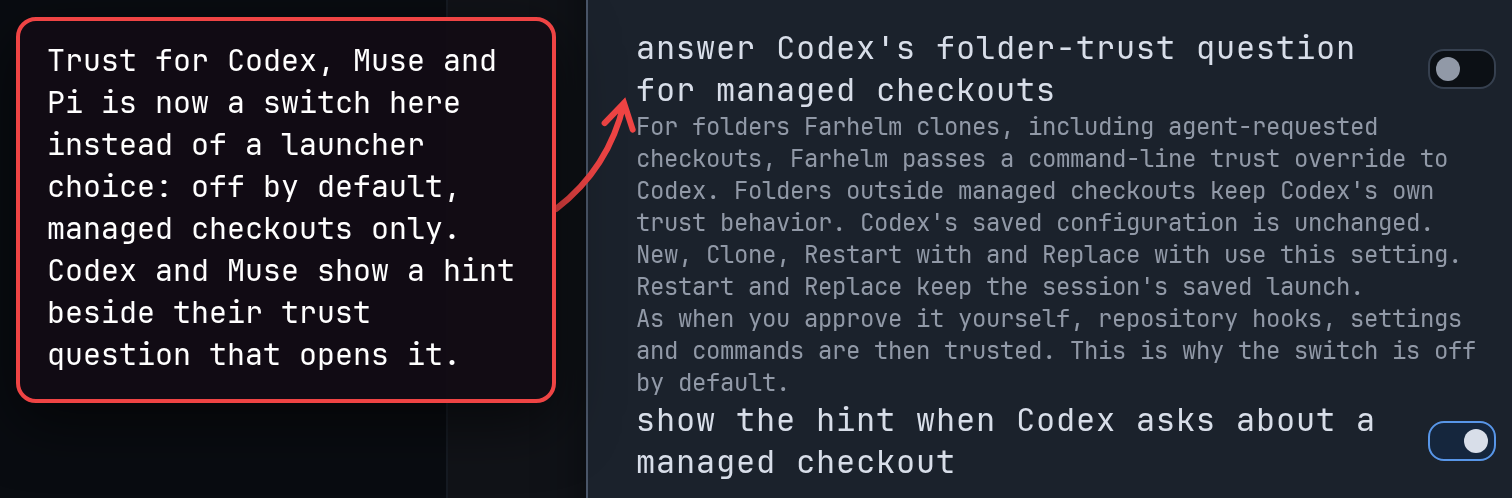
Workspace trust, which lets Codex, Muse and Pi load a project folder’s own settings and extensions without asking first, is no longer chosen in the session launcher. It now comes from separate Settings switches, off by default, that apply only to managed checkouts. The
--trustcommand-line option is gone, so scripts that pass it need it removed, and the trust saved in older templates is ignored. Codex and Muse show a hint beside their trust question that opens the matching setting. (#2255, #2256)show screenshot
🚀 Added
Section titled “🚀 Added”-
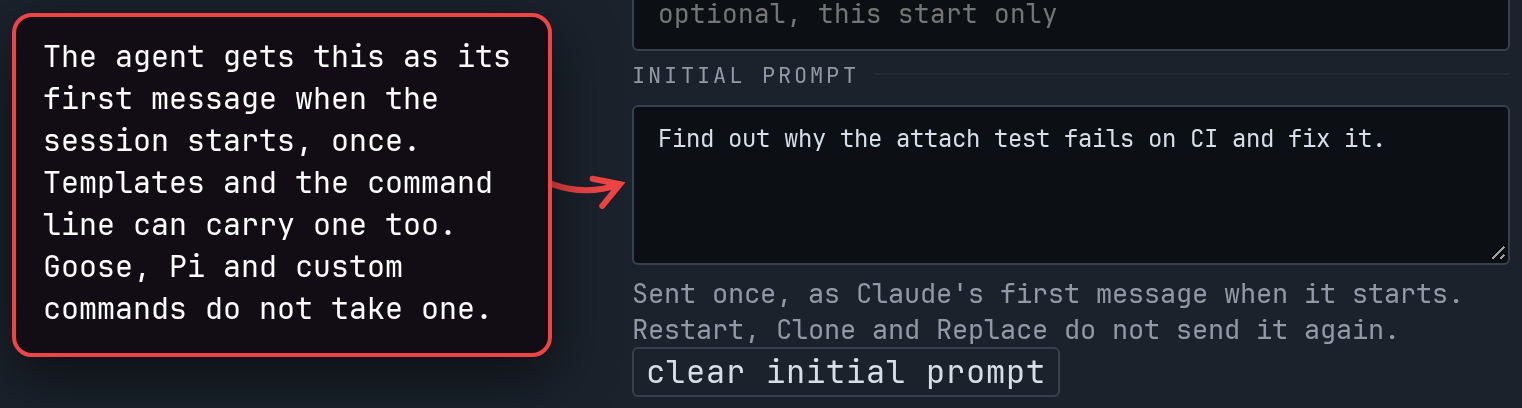
You can now give a new session an initial prompt in the session launcher, in a launch template or on the command line, and the agent receives it once when it starts. Goose, Pi and custom commands do not take prompts. (#2200, #2202, #2203, #2238, #2295)
show screenshot
-
You can now set a wrapper prefix, a command that runs the agent for you (for example
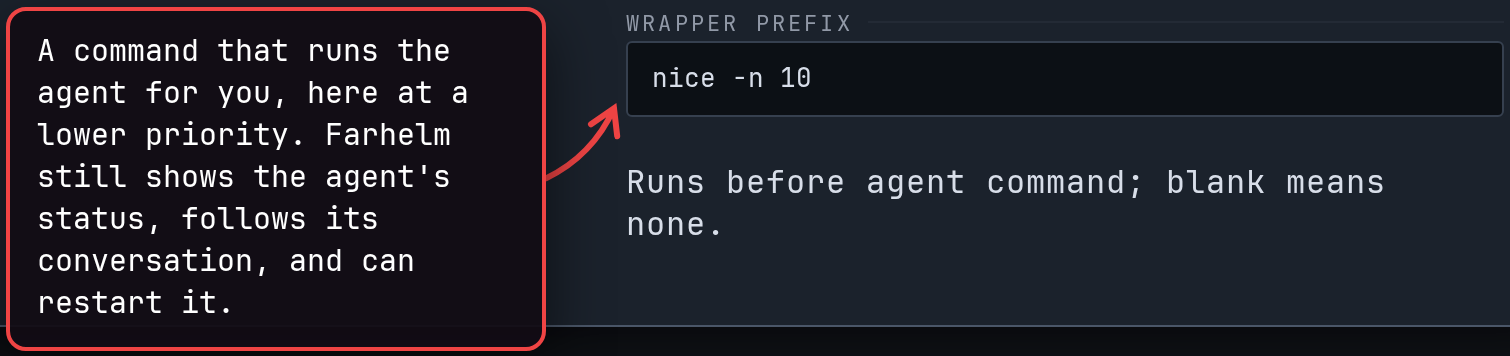
nice -n 10, to run the agent at a lower priority), in the session launcher or a launch template, and keep Farhelm’s agent status, conversation tracking and Restart. Agents can pass--wrappertoo; on hosts that ask before YOLO launches, a wrapper an agent supplies needs your approval. (#2271, #2272)show screenshot
-
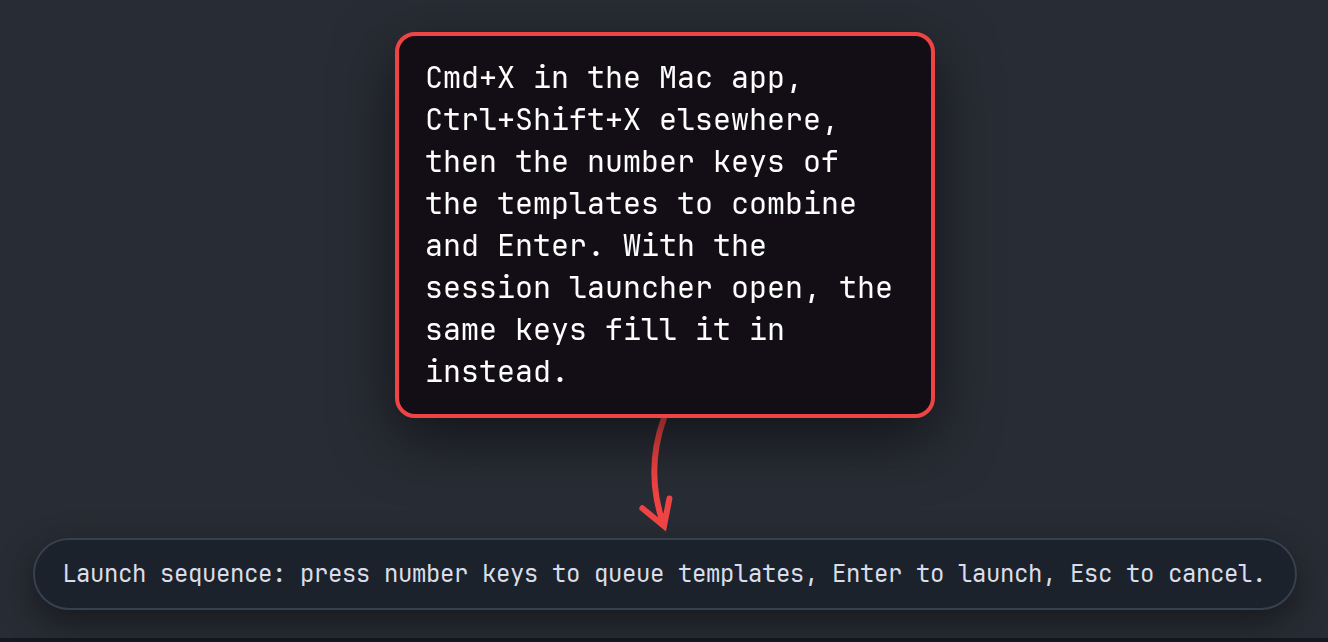
You can now combine launch templates from the keyboard: Cmd+X in the Mac app, or Ctrl+Shift+X elsewhere, followed by their number keys and Enter. A template that leaves some choices open can have a number key too; pressed alone, it opens the session launcher. (#2225, #2228)
show screenshot
-
Your template shortcuts now also work while the session launcher is open: each press fills in that template’s choices, and nothing starts until you choose Launch. (#2310)
-
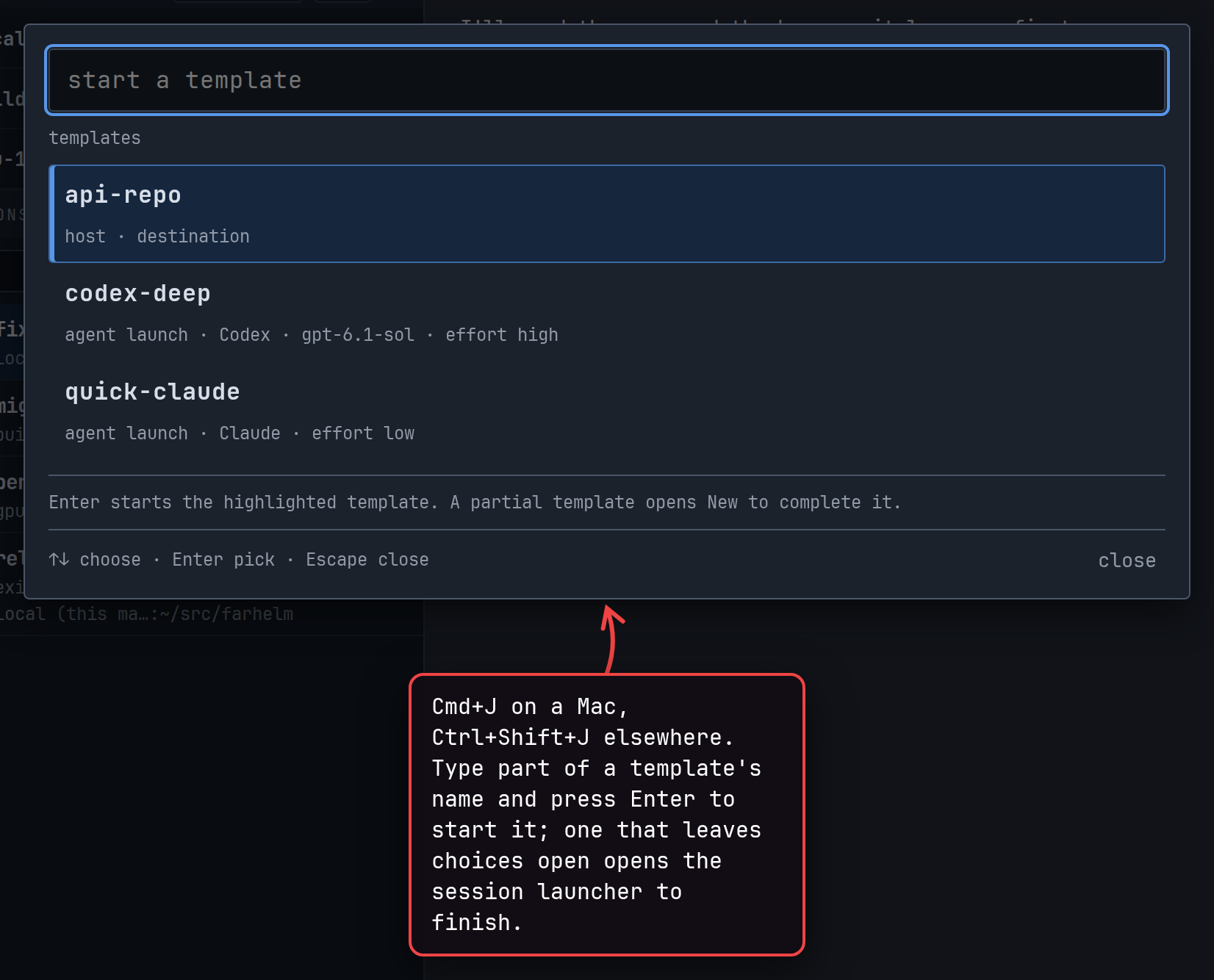
Cmd+J on a Mac, or Ctrl+Shift+J elsewhere, opens a list of your templates: type a name and press Enter to start from that template. Browsers may keep the key for their own shortcut; the desktop app does not. (#2316)
show screenshot
-
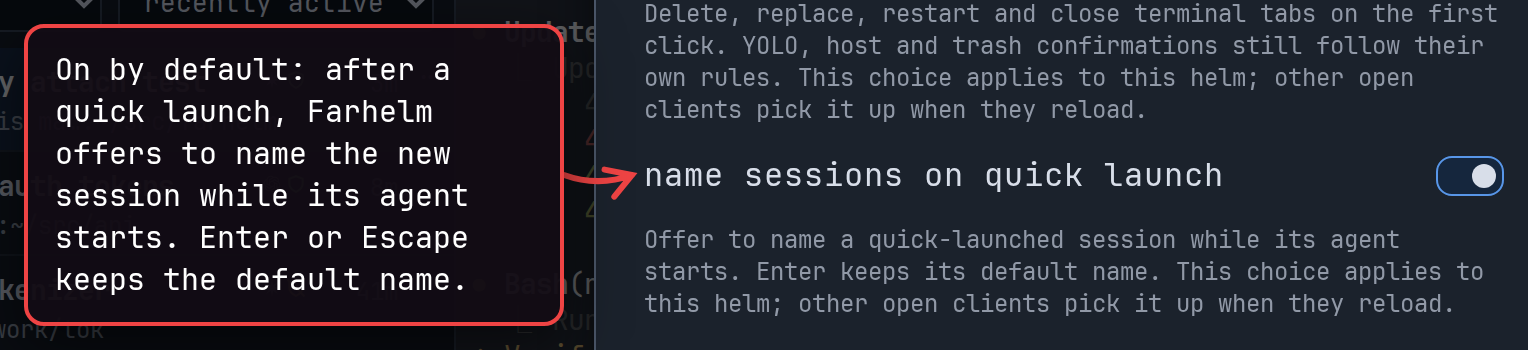
Quick launch now offers to name the new session once it has already started, so naming never holds up the launch. Enter or Escape keeps the default name, and a Settings switch turns the offer off. (#2233, #2234)
show screenshot
-
Cmd+W in the Mac app, or Ctrl+Shift+Backspace in a browser, now deletes the open session, with the same confirmation as its Delete button. Cmd+L, or Ctrl+Shift+L in a browser, renames it. Cmd+W no longer closes the Mac app; the close button and Cmd+Q still do. (#2221, #2230)
-
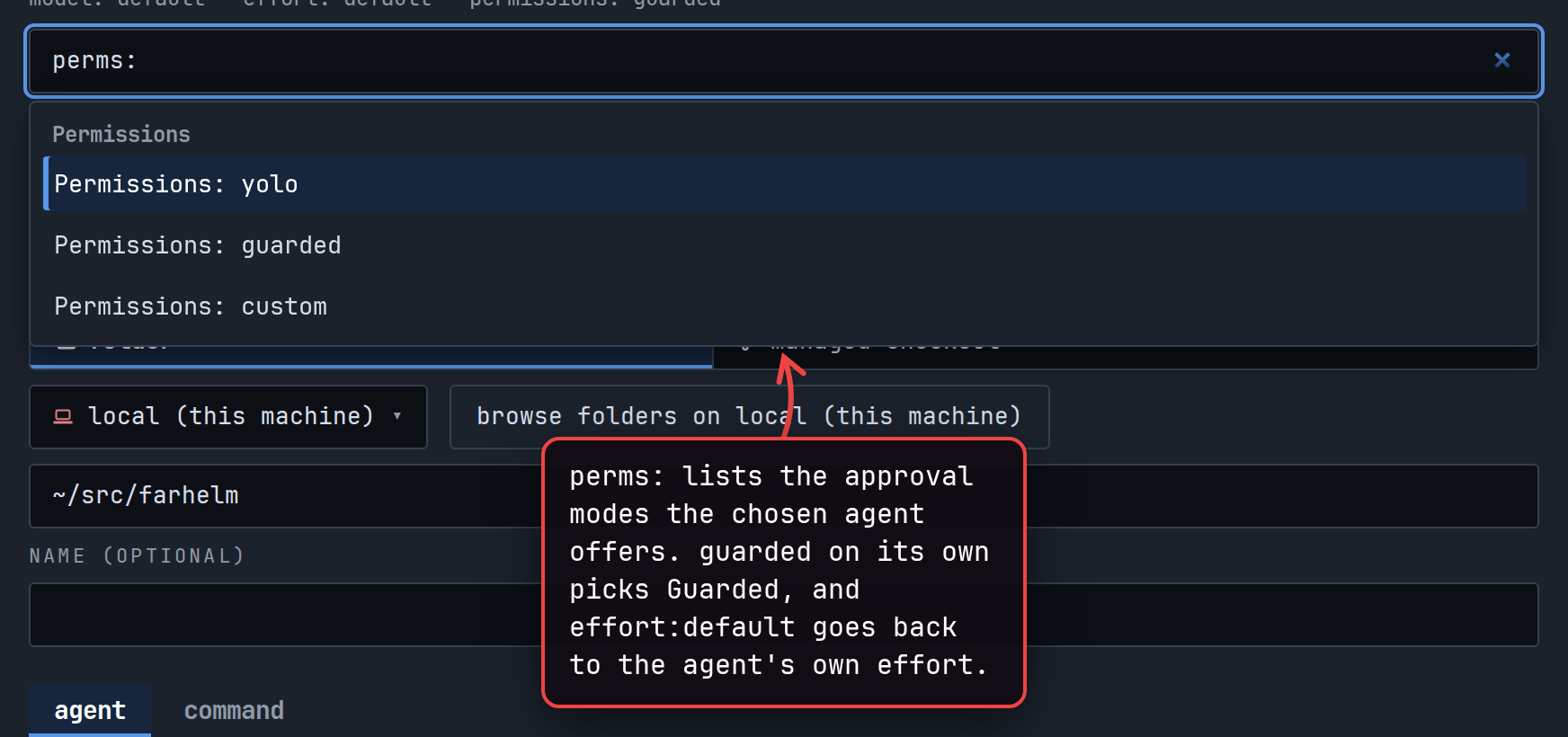
In the session launcher, you can now type
guardedto pick Guarded permissions,perms:to find the approval modes your agent offers, andeffort:defaultto go back to the agent’s default effort. (#2297, #2301)show screenshot
-
Agents can now delete other sessions with your approval, and stop their agent first when they ask to. (#2192)
-
Agents can now assign the ⚡ quick-launch mark and number keys when they create or edit launch templates; the approval card names the template a shortcut moves from. (#2273, #2274)
-
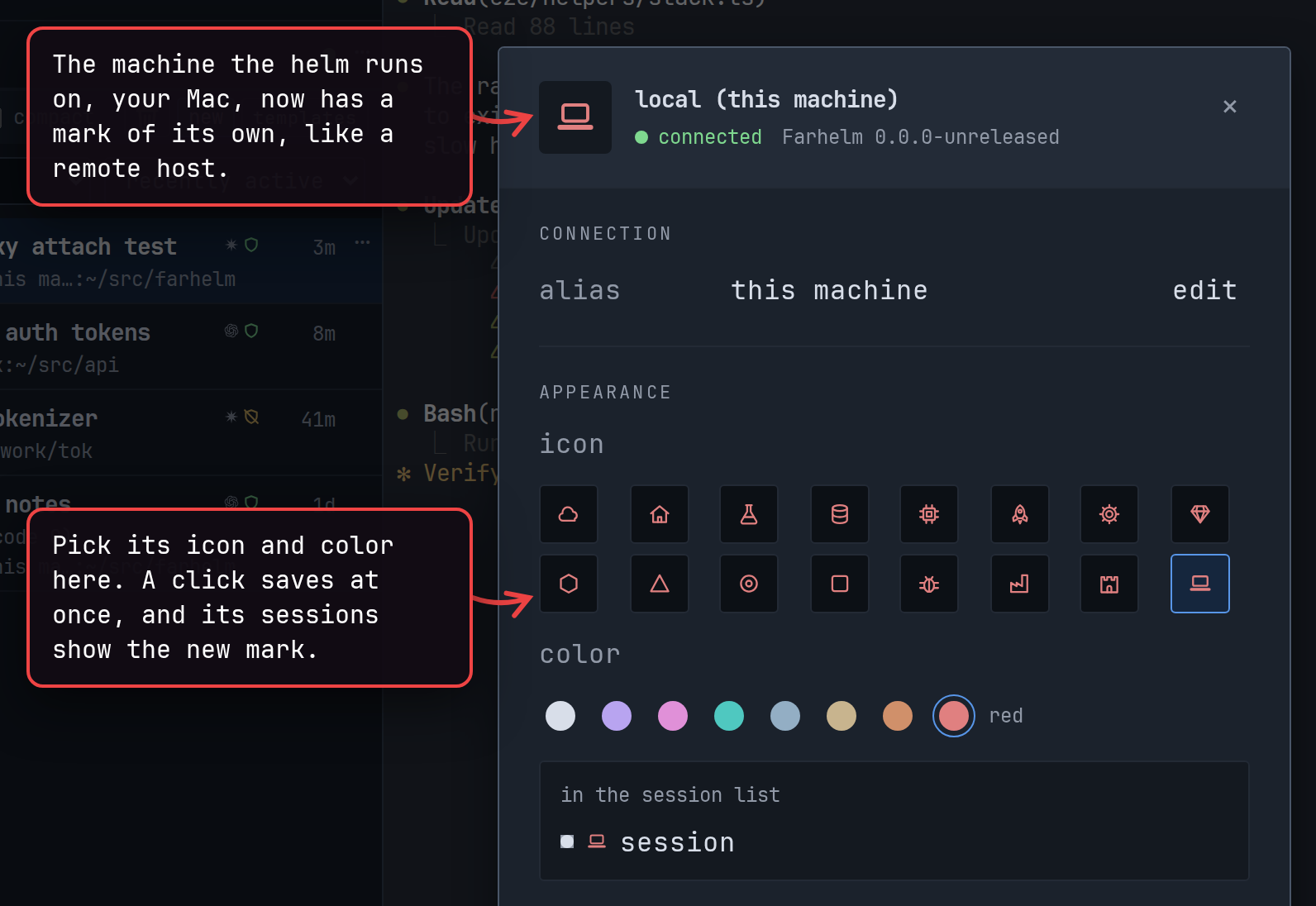
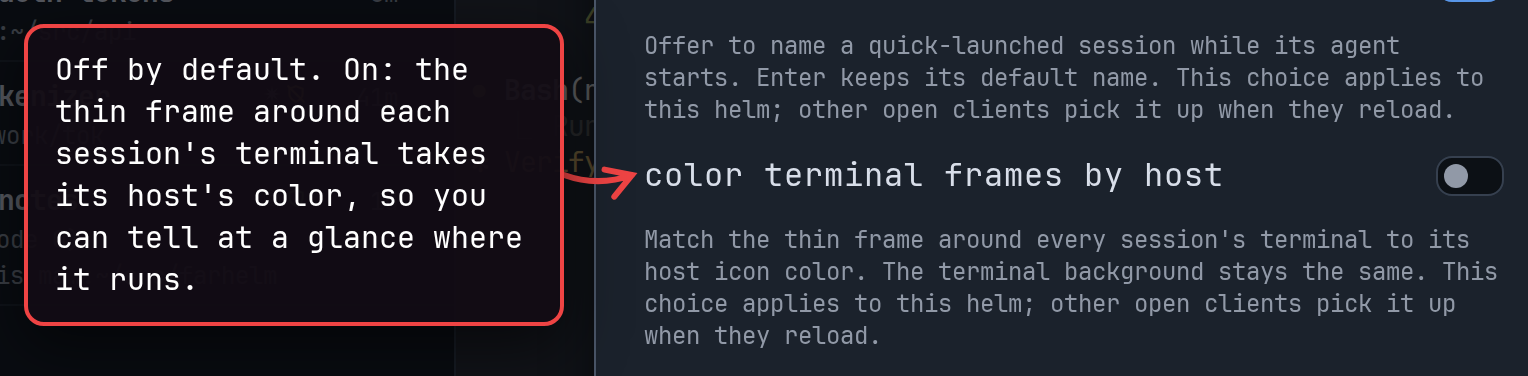
Your Mac can now have its own icon and color, like a remote host. A Settings switch, off by default, colors each terminal’s thin frame to match its host, and the session launcher’s host list shows each host’s mark. (#2266, #2269)
show 2 screenshots
-
In the Mac app, Cmd-clicking a localhost link in a remote session, or choosing Tunnel and open on its link card, now opens that service through a tunnel to the host. Tunnels are off until you accept a security warning, last until you close them, delete the session or quit the app, and can be turned off again in Settings. (#2227, #2229, #2231)
-
In the desktop app, Cmd-click (Ctrl-click on Linux) can now open downloaded JSON files, alongside Markdown and plain text, and Settings lets you choose which file types open this way. (#2296, #2299)
🔄 Changed
Section titled “🔄 Changed”-
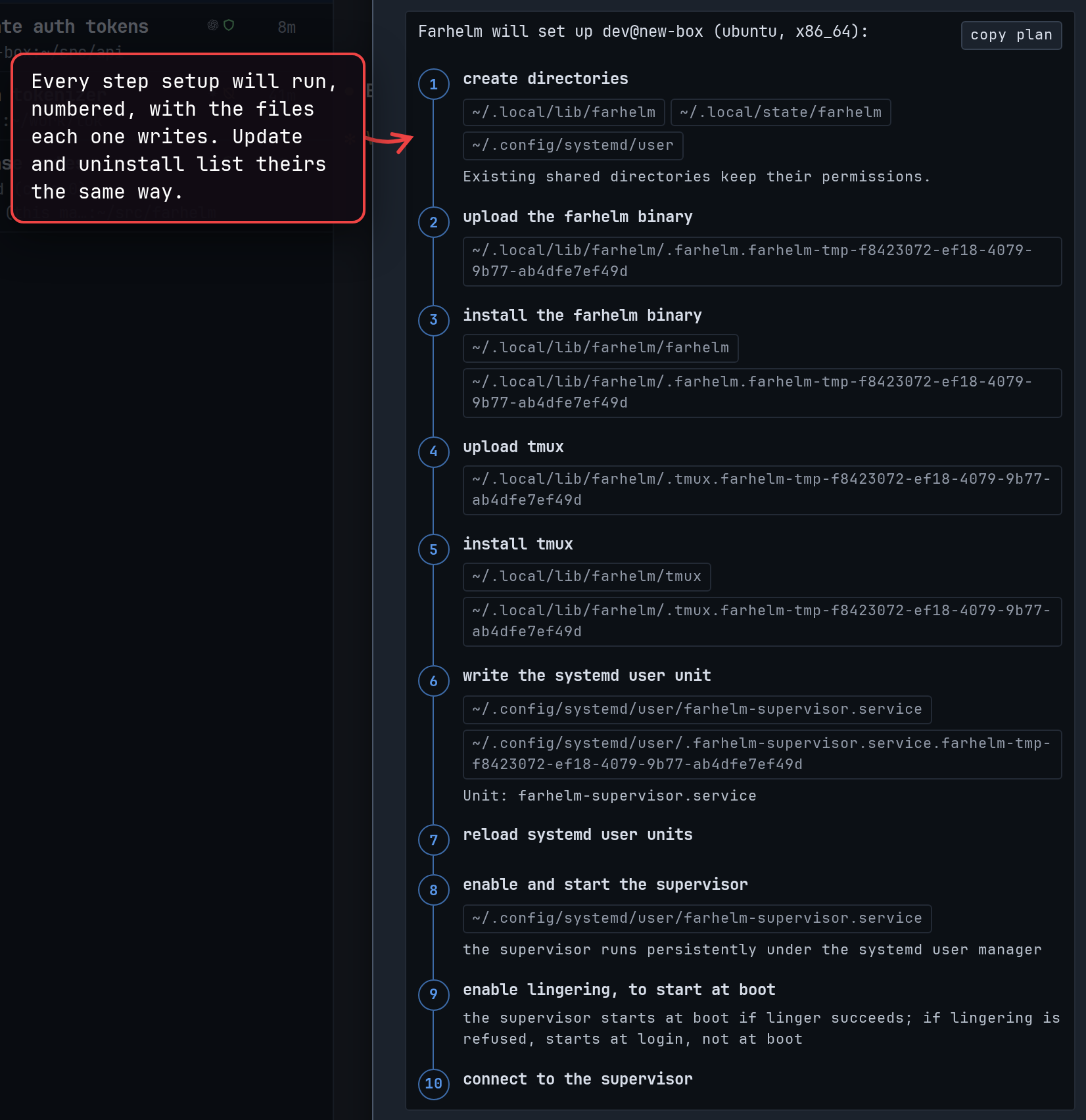
When you add, update or uninstall Farhelm on a remote host, the confirmation now lists every step it will run, and the host row shows the same steps while they run. If Farhelm cannot plan the work or refuses it, a dialog shows the reason. After an uninstall, a short notice names the removed host and where its data remains. (#2298, #2303, #2305, #2307, #2311, #2317)
show screenshot
-
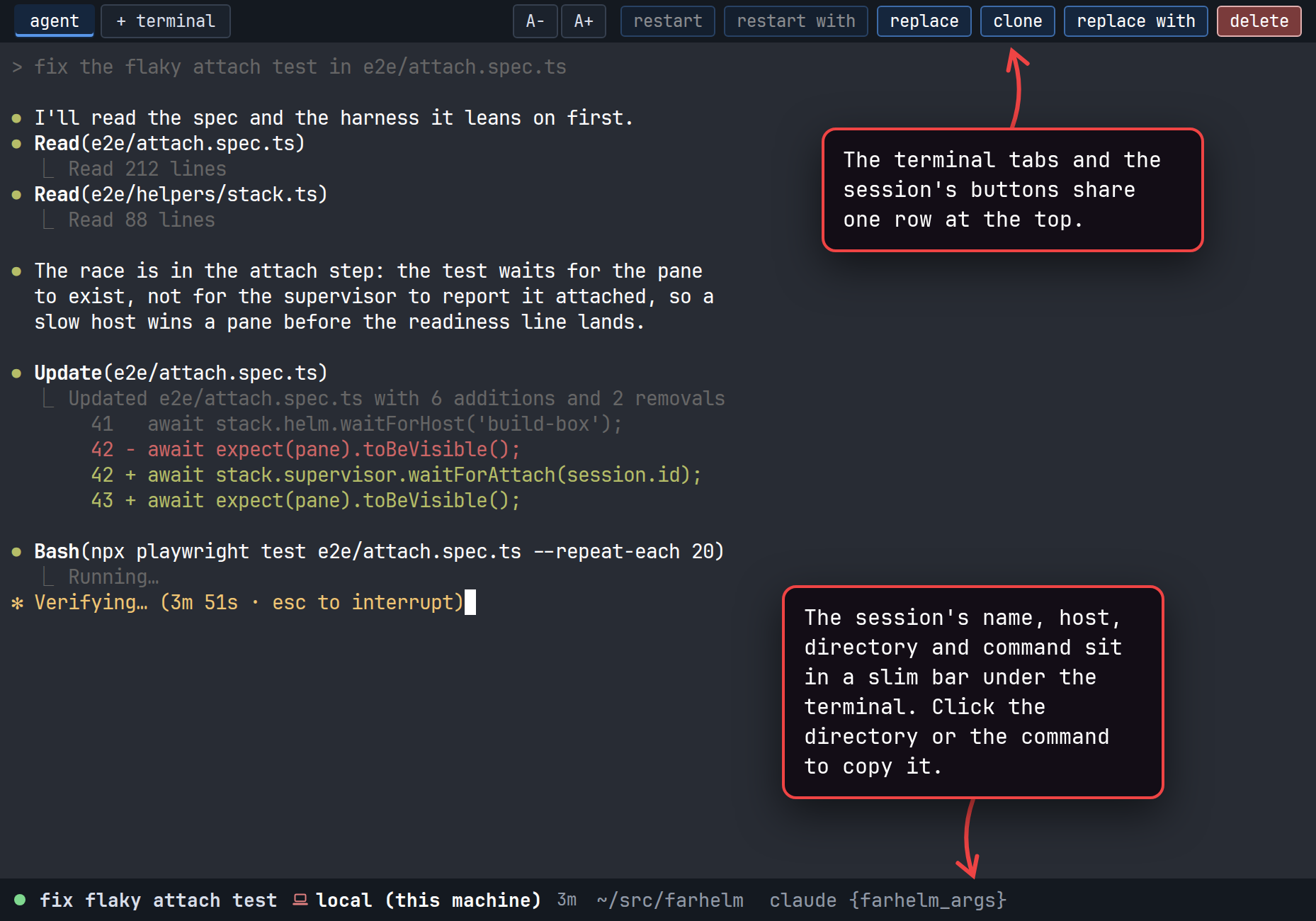
The session’s name, host, directory and command now sit in a slim bar under the terminal, and the terminal tabs and action buttons share one row at the top. (#2253)
show screenshot
-
Hovering a session in the sidebar now shows one summary with its full name, host, directory, agent, status and activity times. (#2300)
-
When a session’s host is unreachable, one calm card now explains why, and an open terminal keeps its last screen dimmed and reattaches by itself when the host returns. (#2198)
-
Once Farhelm sees an agent running without safety checks, its shield now stays YOLO until that agent is restarted, even if the agent later asks before acting. (#2251)
-
Links on pages served from other local ports can no longer open the browser helm; opening it from the address bar or a bookmark still works. (#2219)
🔧 Fixes worth highlighting
Section titled “🔧 Fixes worth highlighting”- You can now press the same quick-launch key several times in a row to start several sessions from one template, even when the template clones into a managed checkout. Each new session gets its own checkout and the template’s name with a number added, such as
review-2; before, the second press was refused because the folder was taken. This applies to existing templates too; a template set to a fixed name still reports the clash. (#2325, #2328, #2330, #2332) - Sessions in fresh GitHub checkouts failed to start on hosts where Git’s
safe.bareRepositorysetting isexplicit, a security setting that stops Git from using a bare repository unless it is named outright. Farhelm keeps a bare copy of each repository to clone from, and now names it outright, so these sessions start without you having to relax the setting. (#2199) - Retrying Replace from another button, or after reopening the session, no longer starts an extra agent when the first attempt had already created the replacement. (#2205)
- Terminal links whose destination hover is covered by an approval card, or cut off by the window, now refuse to open, so you always see where a link goes before it opens. (#2254)
- On a Mac with a Force Touch trackpad, dragging the window by its header now works every time. (#2318)
- You can now move the Mac app’s window by dragging anywhere along its top edge, and double-click there to zoom it, like any other Mac window. (#2319)
🩹 Misc fixes
Section titled “🩹 Misc fixes”Fixes that would normally be summed up as a single “various bug fixes” line. In the interest of transparency, the complete list is included.
- After Replace fails because the session’s folder is missing, restoring the folder and trying again now works from both the sidebar and the top of the open session. (#2206)
- Escape now cancels the Restart, Replace and Delete questions at the top of an open session and returns to its terminal. (#2218)
- Clicking empty space in the session launcher or another dialog no longer loses your place, and Enter uses the dialog’s main action when the dialog itself has focus. (#2267, #2294)
- Open menus now keep keyboard focus when a session’s terminal appears, which also stops the help menu closing by itself in narrow desktop windows. (#2315)
- Menu arrow keys now follow focus more reliably during a quick burst of presses. (#2232)
- Host setup and uninstall plans, the trash list, SSH connection help, host removal details and a few other panels can now be scrolled with the keyboard in the Mac app and Safari. (#2190, #2191, #2222)
- In the Mac app and Safari, pressing Enter or Escape to finish typing with an input method less often submits or closes the dialog. (#2194)
- The template editor now shows invisible and direction-changing characters in older templates’ session names. (#2204)
- Starting Farhelm no longer waits on Claude’s settings lock to tidy up its managed-checkout trust entries. (#2201)
- Cancelling a terminal file download before it starts no longer holds on to a little helm memory. (#2197)
v0.29.0
Section titled “v0.29.0”Released 2026-10-16.
💥 Breaking
Section titled “💥 Breaking”- This release requires you to update your remote hosts. (#1992, #1995, #2012, #2070)
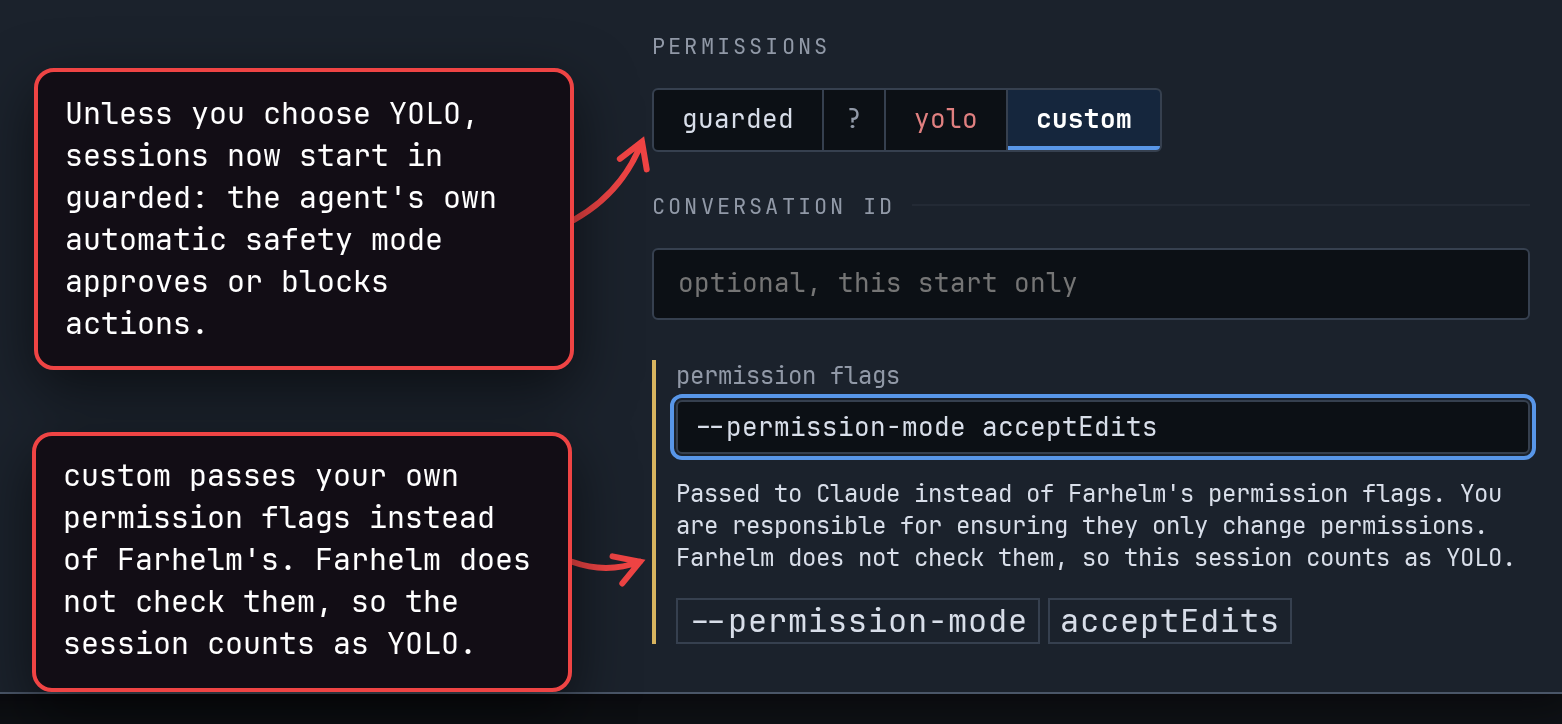
- The permission choice when you start a session is now guarded or YOLO, replacing default and YOLO. Default left permissions to the agent’s own configuration, which could itself be set to skip every check. Guarded instead passes each agent the flags for a mode that checks its actions (
--permission-mode autofor Claude and Grok,-a on-request -s workspace-writefor Codex,--permission-profile :auto-reviewfor Muse), so a guarded session should not be YOLO even if your agent is configured that way. Farhelm cannot guarantee it: these modes can still approve some actions on their own, your agent’s own allow rules still apply, and the agent can be switched to another mode after it starts. Sessions started before this release without a permission choice count as YOLO until you relaunch them with Clone, Replace with or Restart with. (#1992)
🚀 Added
Section titled “🚀 Added”-
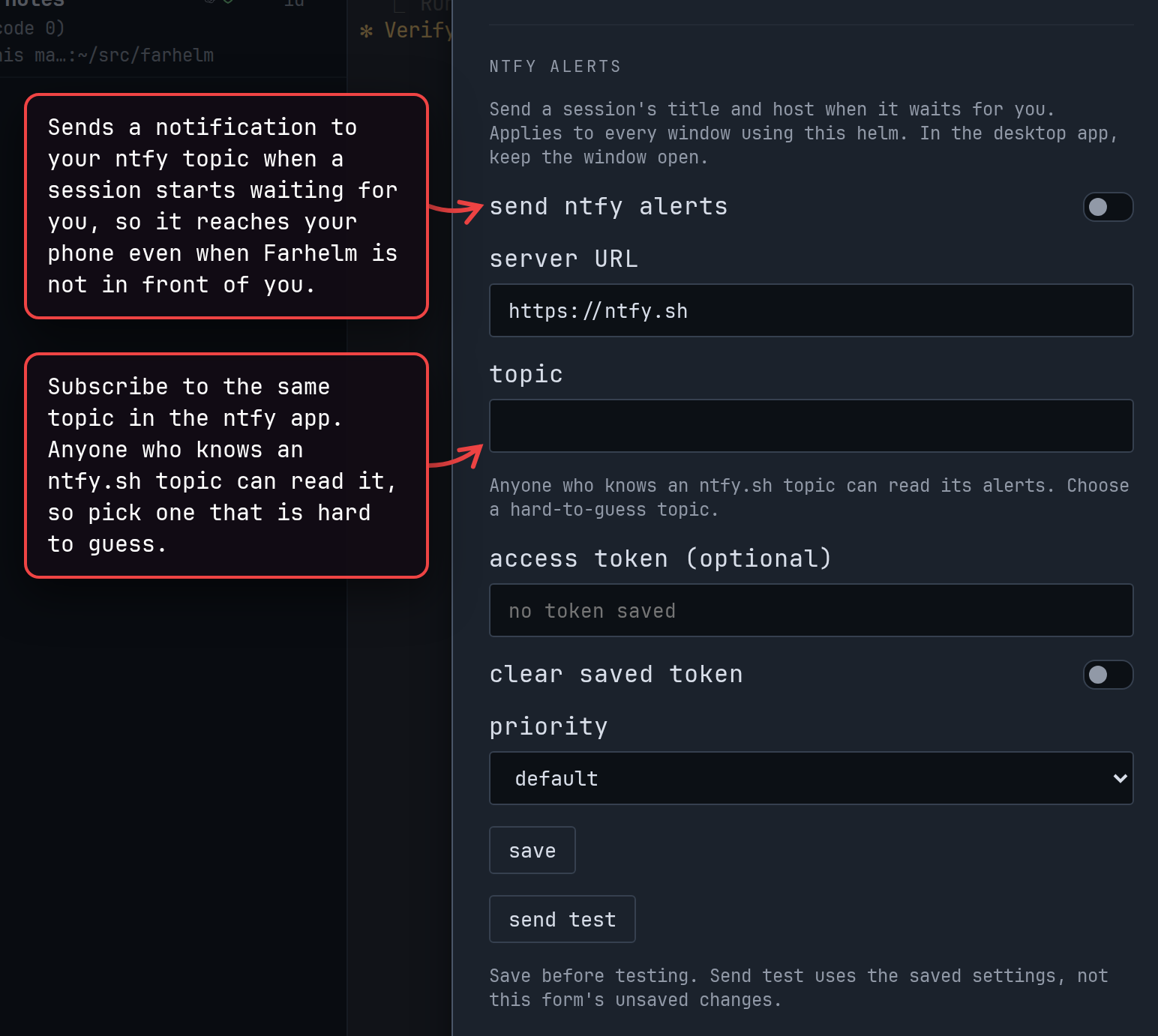
You can now get ntfy alerts, set up in settings, when a session needs you, even away from Farhelm. In the desktop app, alerts are sent only while its window is open. Anyone who knows an ntfy.sh topic can read its alerts. (#1986, #2098, #2013)
show screenshot
-
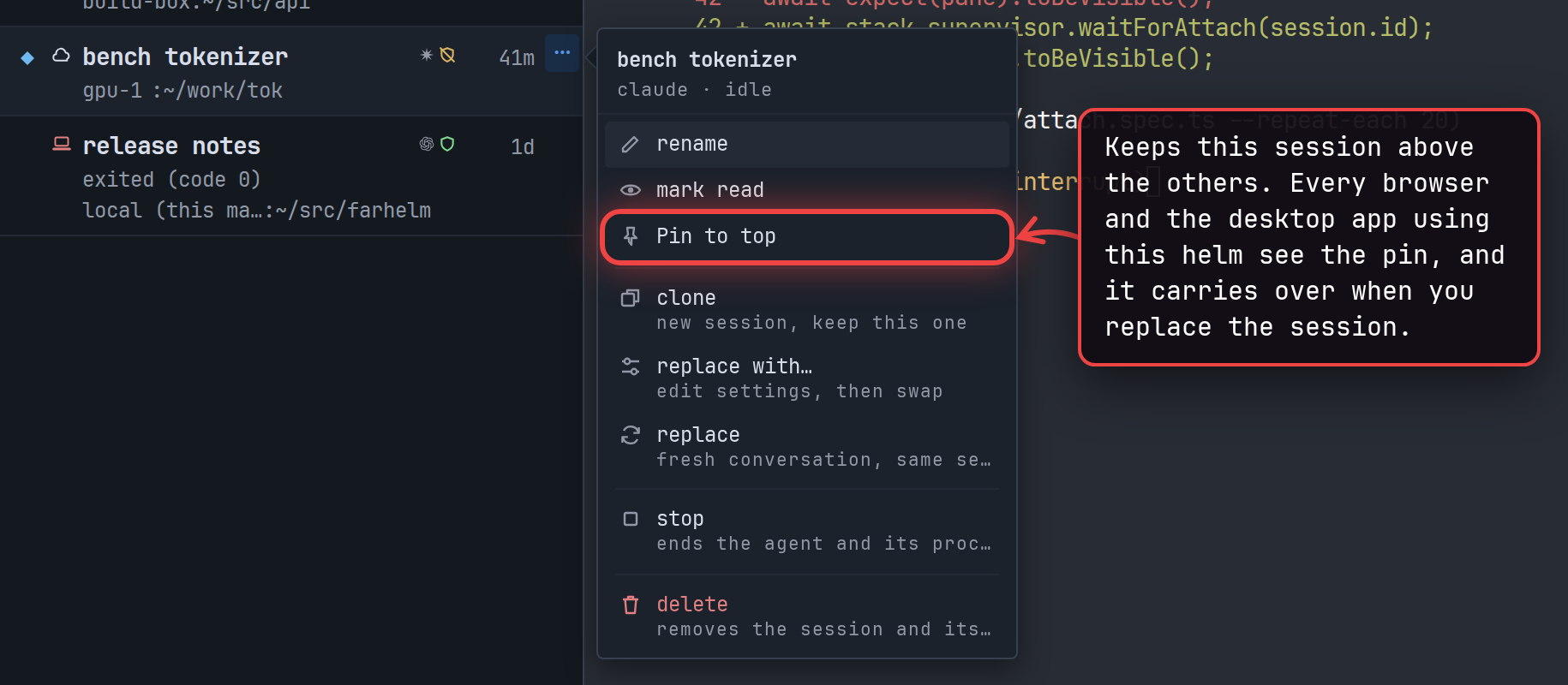
You can now keep a session above your other sessions with Pin to top in its menu. (#2064)
show screenshot
-
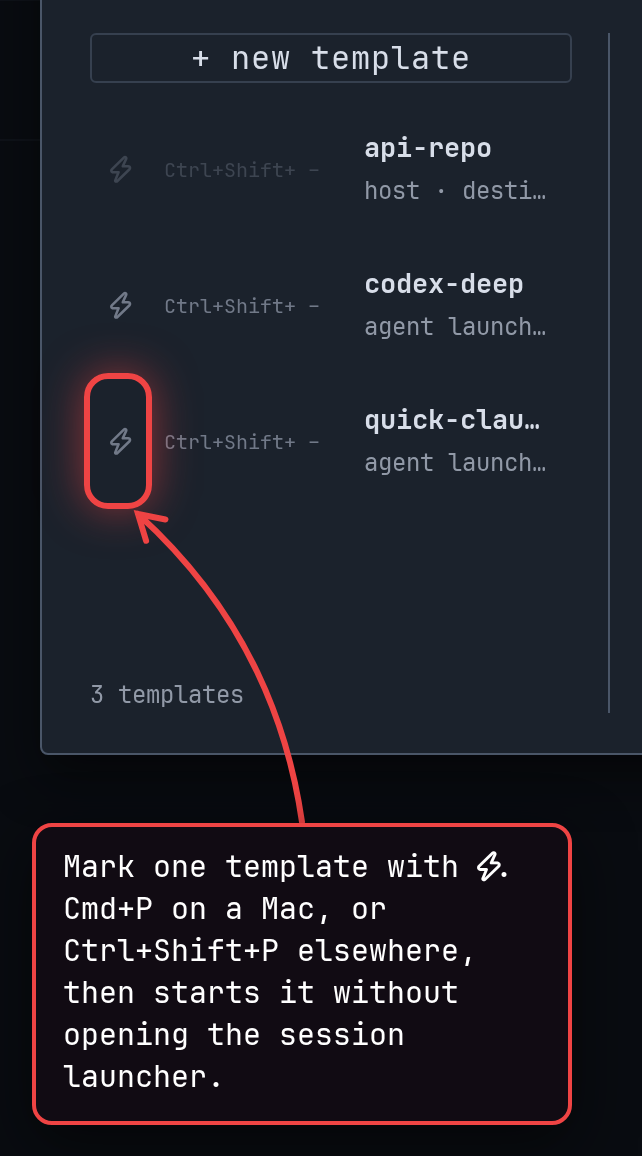
You can now mark one template with ⚡ and start it with Cmd+P on a Mac, or Ctrl+Shift+P elsewhere, without opening the session launcher. (#1994, #2062)
show screenshot
-
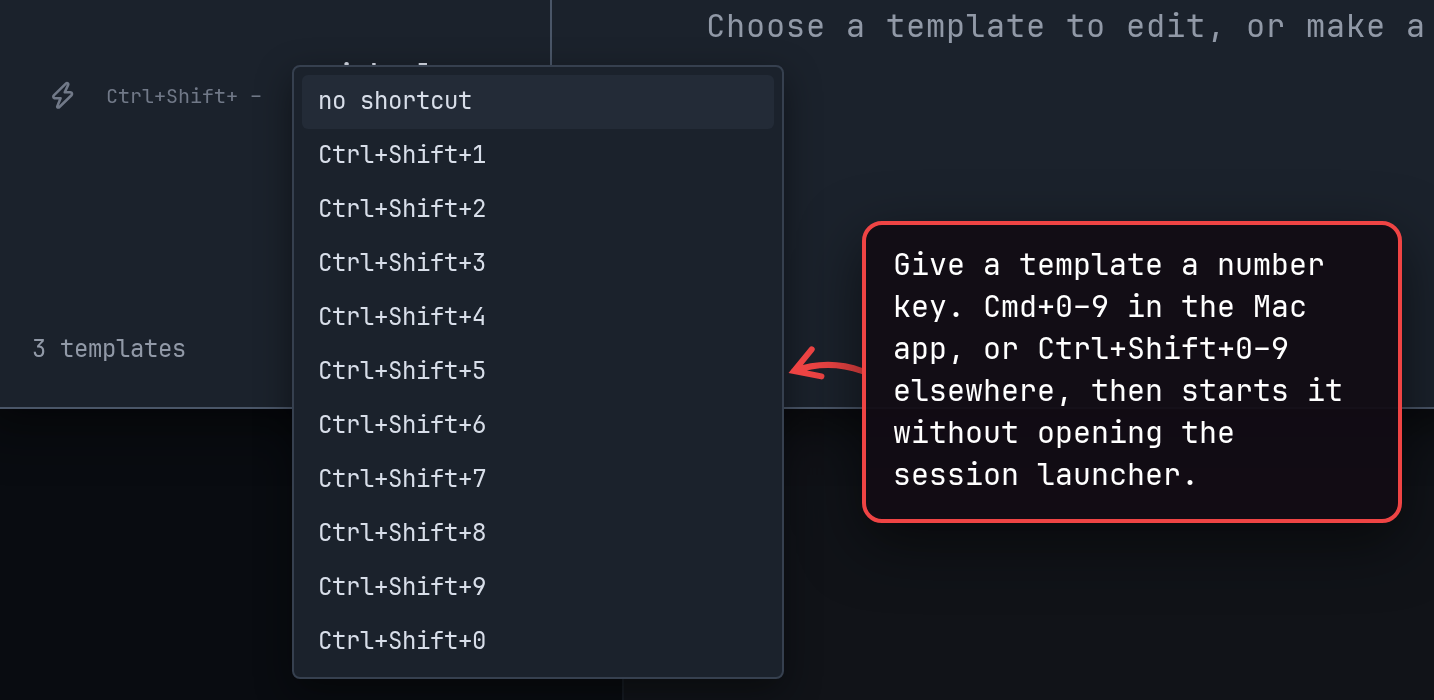
You can now give a template a number key in Templates and start it with Cmd+0–9 in the Mac app, or Ctrl+Shift+0–9 elsewhere. (#2008, #2013)
show screenshot
-
You can supply your own permission flags for Claude, Codex, Grok, Muse, Cursor and OMP. Farhelm does not check them and always treats such sessions as YOLO. (#1995, #2163)
show screenshot
-
You can now start, restart or clone a session in a specific agent conversation by giving its session ID. This is useful to adopt a session you started outside Farhelm, or when Farhelm had trouble tracking which conversation your agent is in. (#2012)
-
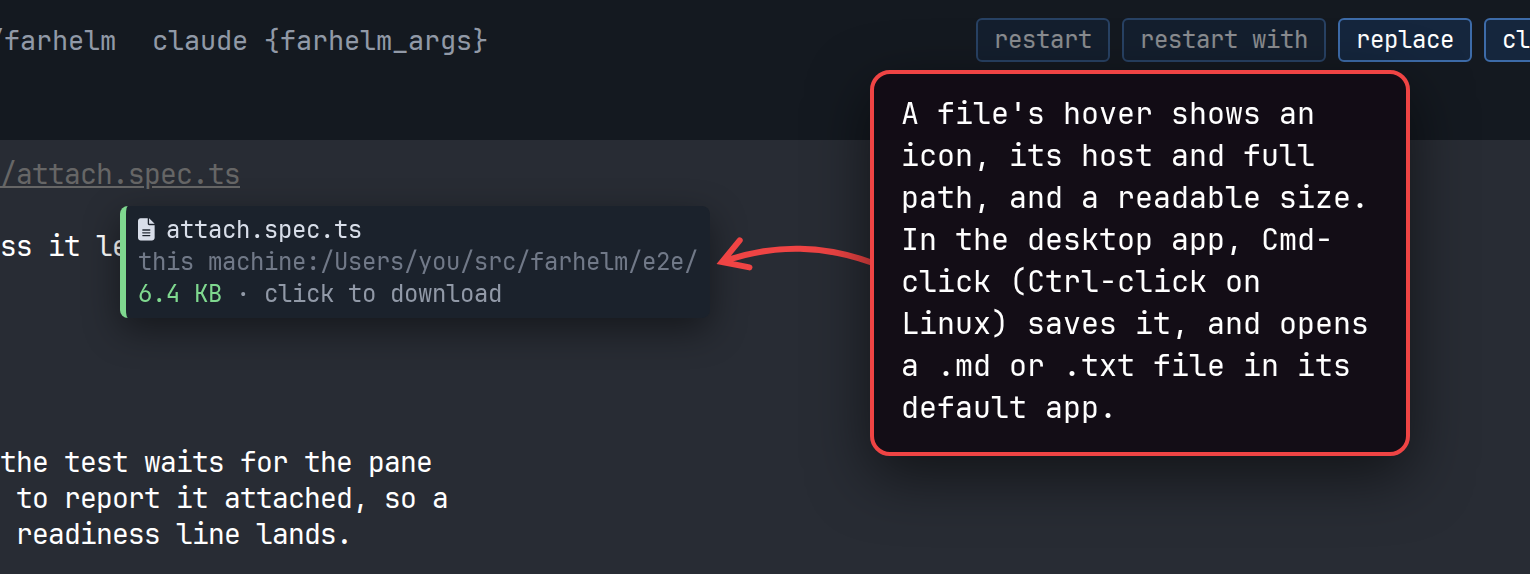
In the desktop app, you can now Cmd-click a file path in a terminal (Ctrl-click on Linux) to save it and open it in its default app; only .md and .txt files open. File hovers now show a file icon, a clearer path and a readable size. (#2034, #2085, #2092, #2095)
show screenshot
-
The session shield now tries to notice when Claude, Grok, Muse or Cursor switches itself into a no-checks mode, and turns to YOLO with the observed mode named on hover. This is best effort. (#2063)
-
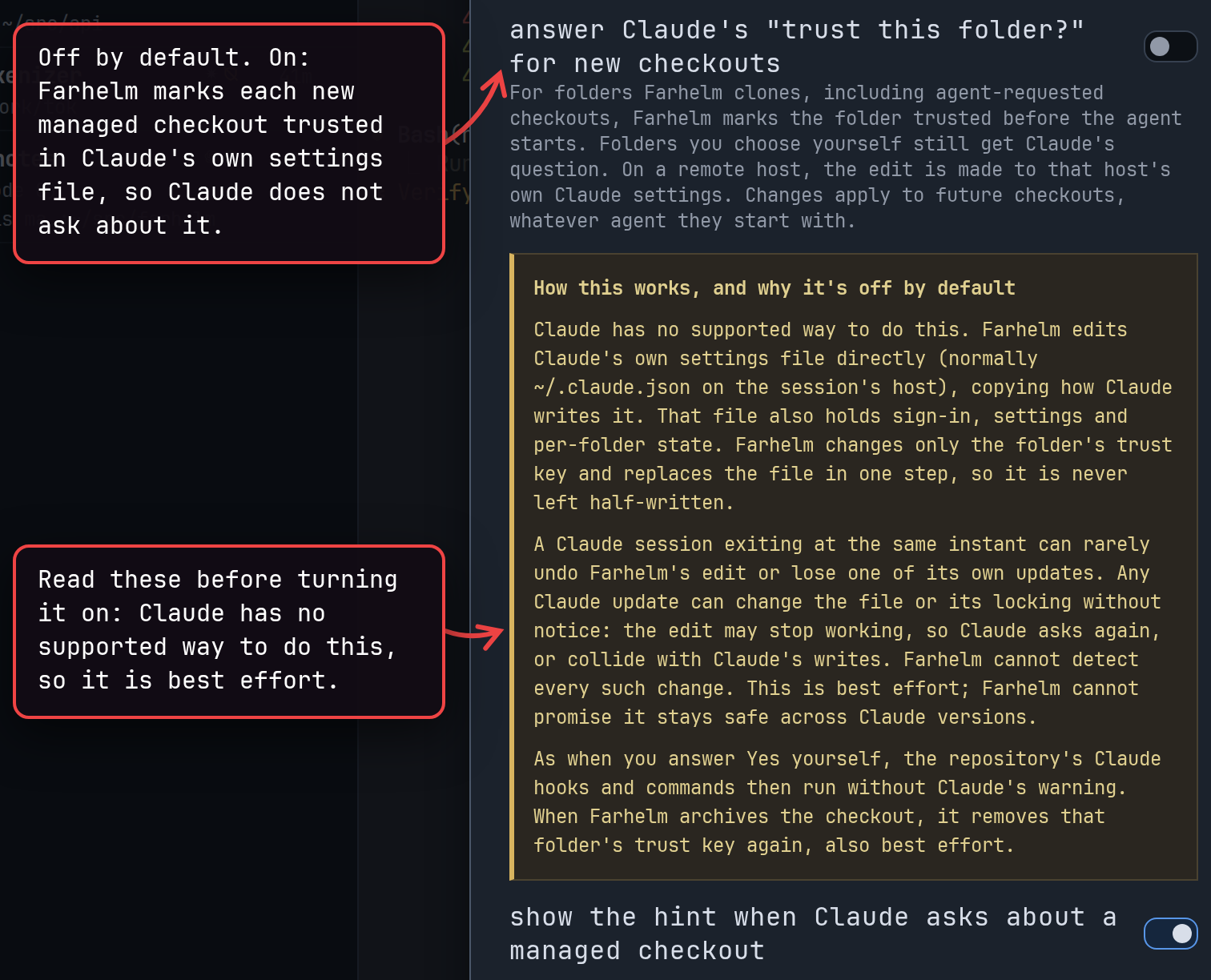
If you turn it on in Settings, Farhelm answers Claude Code’s question about whether you trust the folder for each new managed checkout ahead of time, so Claude does not stop to ask. It is off by default. (#2070, #2089)
show screenshot
-
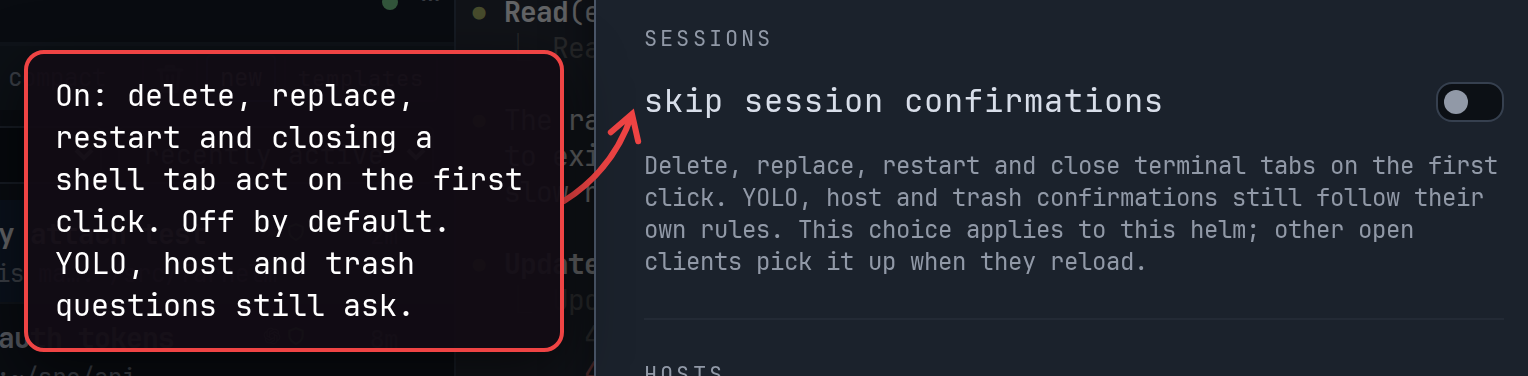
Settings has a new skip session confirmations option, off by default, so delete, replace, restart and closing a shell tab act on the first click. YOLO, host and trash questions still ask. (#1993, #2054)
show screenshot
-
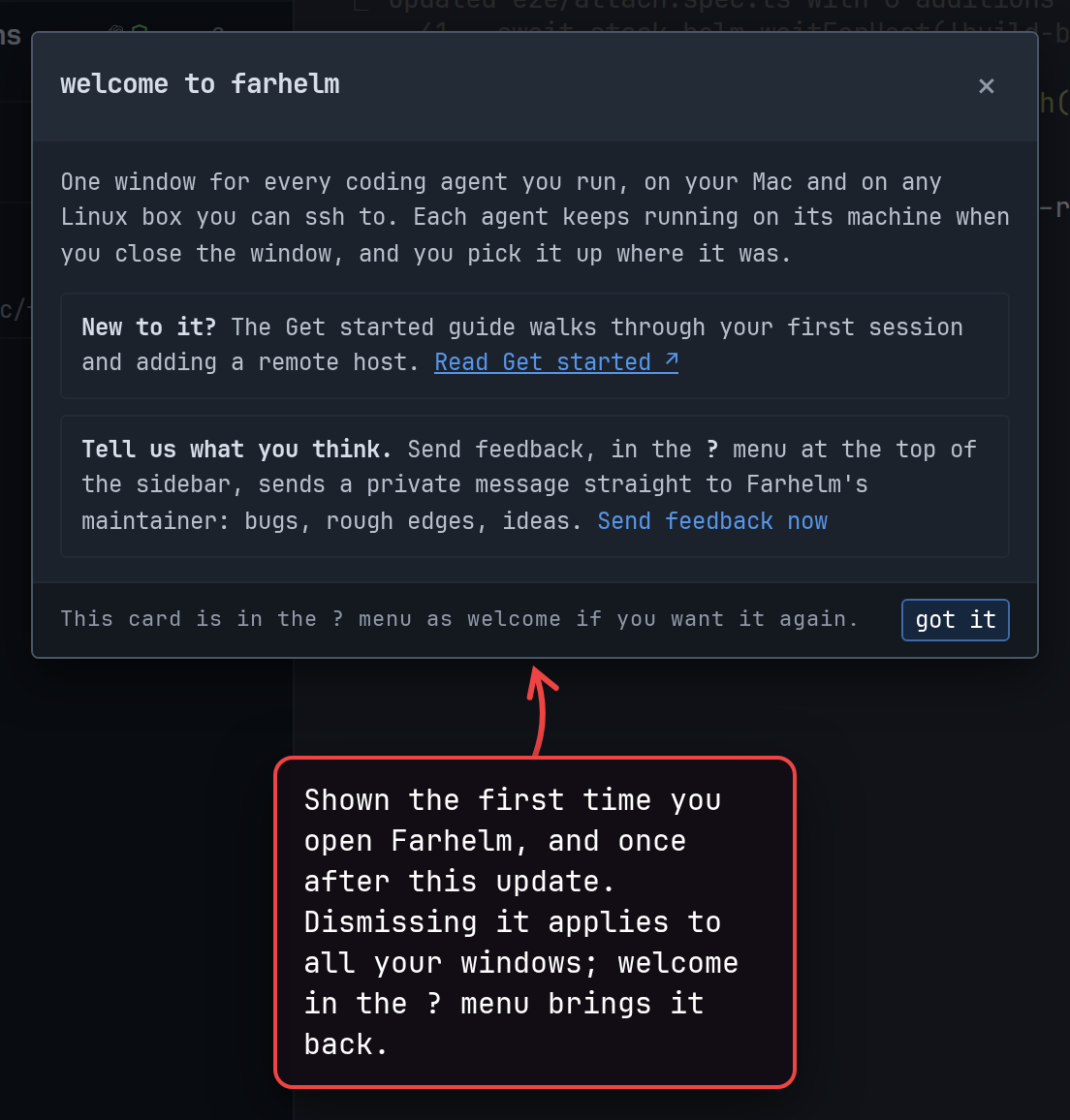
A welcome card points you to Get started and to private feedback the first time you open Farhelm, and once after this update. Dismissing it applies to all your windows; welcome in the ? menu brings it back. (#2014, #2015)
show screenshot
-
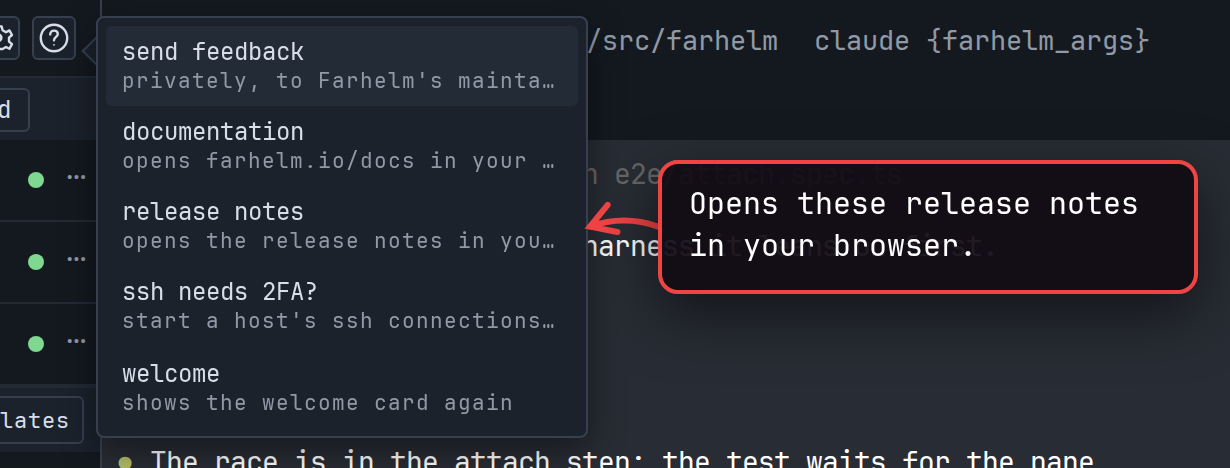
The ? menu has a new release notes item, which opens the release notes in your browser. (#2006)
show screenshot
-
For hosts that ask for a second factor on every ssh login, ? → ssh needs 2FA? shows the two commands to start Farhelm’s connections yourself. The Add host dialog links to the same help. (#2018)
-
In the desktop app, you can now click the version in the sidebar to check for updates. (#1988)
-
The desktop app shows a failed automatic update beside its version, with the reason on hover, and warns after three days of failed update checks. (#1989, #2105)
-
The Mac app warns when a Farhelm release has been revoked by the maintainer, and does not install a revoked release as an update. This is intended to minimize the impact if a release ever ships with a serious bug. (#2010)
🔄 Changed
Section titled “🔄 Changed”-
New OMP sessions also start in Guarded mode. Farhelm cannot tell when OMP is waiting for approval, so such a session shows as running or idle and sends no waiting alert. Switching agents in the session launcher now warns, with Undo, when the switch makes the permission mode riskier. (#2055)
show screenshot
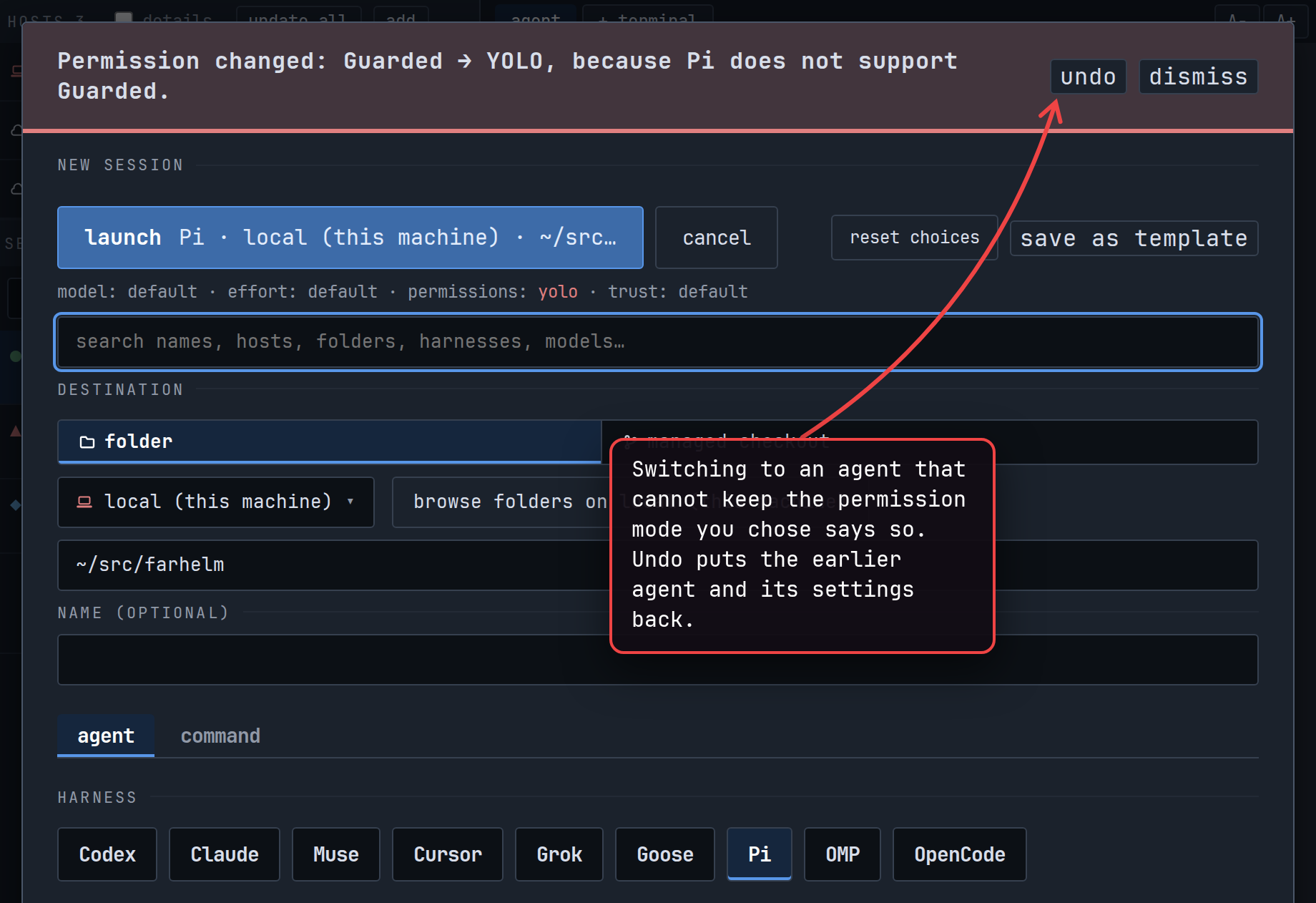
-
Session, host and trash confirmations now let you press Enter to go ahead. The YOLO question and the Restart with dialog still start on Cancel. (#1990)
-
The terminal links choices in settings explain each option on hover. (#2013)
🔧 Fixes worth highlighting
Section titled “🔧 Fixes worth highlighting”- The helm starts again on a Linux machine with no CA certificates installed. Adding or updating a host still needs them: install the
ca-certificatespackage and restart the helm. (#2116) - Dragging across a link or file path in a terminal no longer opens the link or downloads the file when the program in the terminal handles the mouse. (#2078)
- Web links that wrap across terminal rows no longer show a false mismatch warning on hover. (#2156)
🩹 Misc fixes
Section titled “🩹 Misc fixes”Fixes that would normally be summed up as a single “various bug fixes” line. In the interest of transparency, the complete list is included.
- An agent on one host can no longer finish creating a session in a managed checkout by reusing an approval you gave to another host’s session, including after the helm was recovered with a fresh database. An agent request that was being retried while you upgraded asks for approval again. (#2086, #2172)
- Emptying the trash now warns that entries Farhelm could not check can be deleted for good, losing any work in them that was never committed or pushed. Before, the confirmation said they would stay in place. (#2080)
- Removing a remote host now also works, as a best-effort improvement, on Linux hosts whose basic command-line tools come from uutils or BusyBox; BusyBox hosts remain unsupported. A removal that was interrupted part-way can be finished with Retry. (#2096, #2100)
- While one host updates, Settings for your other hosts stays usable. (#2032)
- Stopping a session while its managed checkout was still being cloned, or while its post-clone command ran, now shows it as stopped instead of as an error. (#2117)
- An open notification list no longer closes and marks its entries read when a session’s terminal finishes loading in the background. (#2132)
- In the session launcher, picking a repository in the repository field now clears an earlier
gh:search so Launch becomes available, and arrow keys keep the highlighted repository in view. (#2161, #2164) - Clearing the checkout folder elsewhere brings the checkout setup back in a session launcher that is already open. (#2162)
- Retrying a launch from a template that resets the agent’s permissions, after its reply was lost, no longer asks the YOLO question again or starts a second session. (#2160)
- Closing and reopening Settings while a post-clone command is still saving can no longer let that older save overwrite a newer one. (#2062)
- Settings refuses to save a post-clone command containing a carriage return, instead of silently turning it into a newline. Change such a command with
farhelm helm checkout-config set-post-clone, or clear it in Settings. (#2053) - The template editor shows hidden and direction-changing characters in a template’s model, folder, repository and commands as visible codes such as
<U+200B>. Such a field, and an older template’s command containing a newline, can no longer be edited in place, which could save something different; remove it with ✕ and add it again. (#2051, #2087) - Deleting an older template that can no longer be saved under current rules says up front that it is deleted permanently, instead of offering an Undo that always failed. (#2052)
- Downloading a file from a terminal path no longer fetches an old target after the path on screen was partly redrawn, and is refused when the window cuts off the file details. File details show hidden characters and repeated spaces. (#2085, #2092, #2095)
- Downloading a file whose very long name already exists in Downloads no longer fails; the copy’s name is shortened and keeps its extension. (#2114)
- The notice that a drag in a terminal copied nothing stays readable when you narrow the window. (#2111)
- In the trash, each host’s summary counts the entries Farhelm could not check and marks its size as partial. Deleting permanently acts only on the entries the confirmation showed. (#2118, #2171)
- The prompt to adopt a changed host installation keeps different installation identities visibly distinct. (#2083)
- When a new checkout’s folder cannot be used on a host, the error also says how to change a folder set for just that host (
farhelm helm checkout-config). (#2119) - After
farhelm helm setupwithXDG_STATE_HOMEset only for that command, the sign-in command it prints names the right state directory. (#2110) - When an update you started fails to install, hovering check failed says what went wrong. (#2105)
- Pressing Escape to dismiss an input-method candidate while naming a template in save as template no longer closes it. This does not yet work in the Mac app or Safari. (#2115)
- Screen readers now hear the folder of a session in a managed checkout. (#2113)
- In the host picker, typing İ repeatedly cycles through matching hosts. (#2107)
- Popup menus’ arrow keys step from the item that actually has focus after you move focus with the mouse or a screen reader. (#2176)
v0.28.2
Section titled “v0.28.2”Released 2026-10-13.
🔧 Fixes worth highlighting
Section titled “🔧 Fixes worth highlighting”- Creating a session in a managed checkout no longer fails at the clone step with “unable to parse commit” on hosts with Git older than 2.55. The failure was common with the Git built into macOS and rare, but possible, on Linux. The cause is a bug in Git itself, fixed in Git 2.55 (upstream fix). Farhelm still uses the Git already on the host and works around the bug by turning off one Git optimization (the commit-graph) for that clone, so you do not need to upgrade Git. (#1968)
v0.28.1
Section titled “v0.28.1”Released 2026-10-13.
🔧 Fixes worth highlighting
Section titled “🔧 Fixes worth highlighting”-
Clicking a web link in a terminal opens one browser tab instead of two when the program in it, such as Codex, also opens links. Farhelm now keeps that click from reaching the program; if a program needs link clicks, choose open in Farhelm and also pass the click on or pass the click on only under terminal links in settings. (#1962)
show screenshot
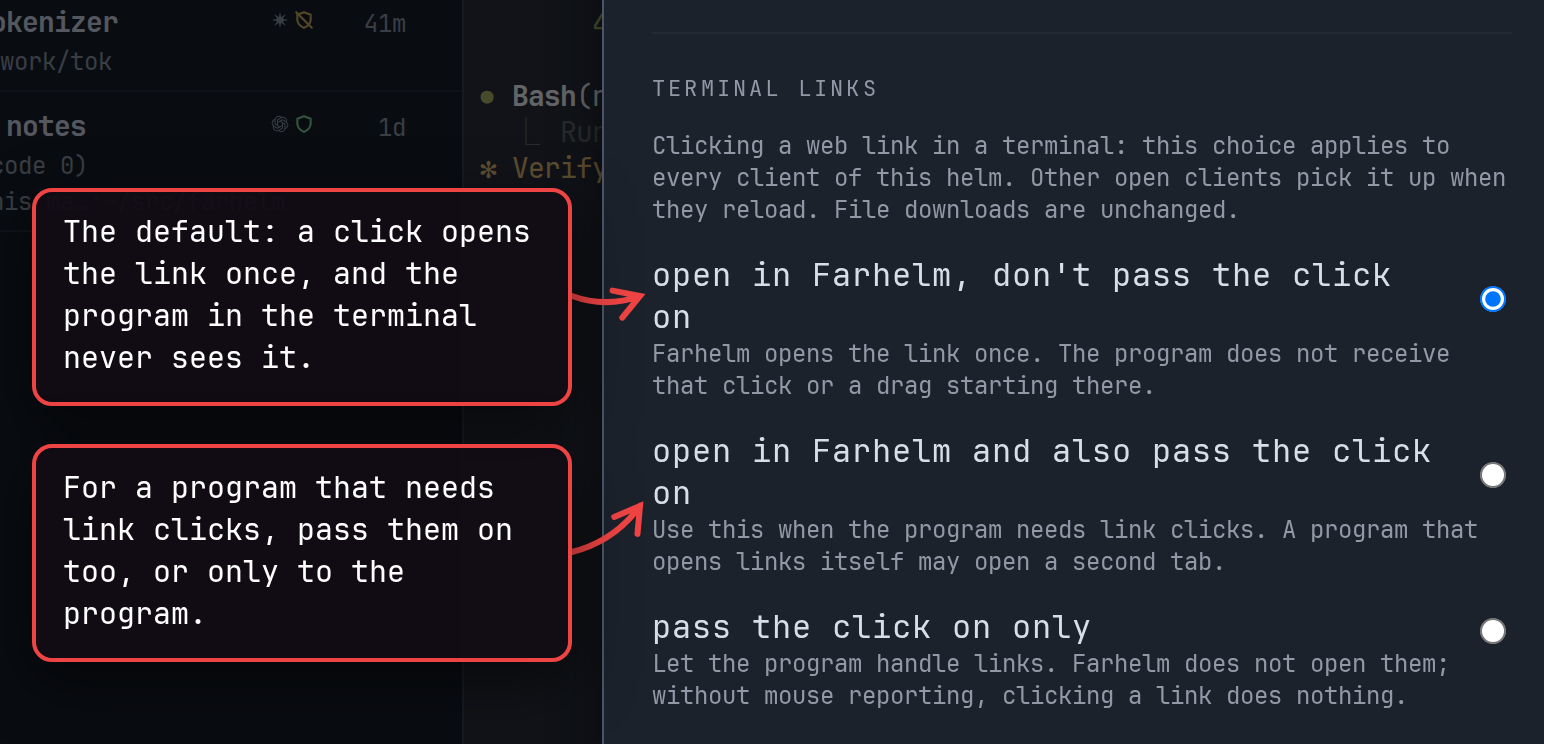
v0.28.0
Section titled “v0.28.0”Released 2026-10-13.
💥 Breaking
Section titled “💥 Breaking”-
This release requires you to update your remote hosts. (#1948, #1950)
show screenshot
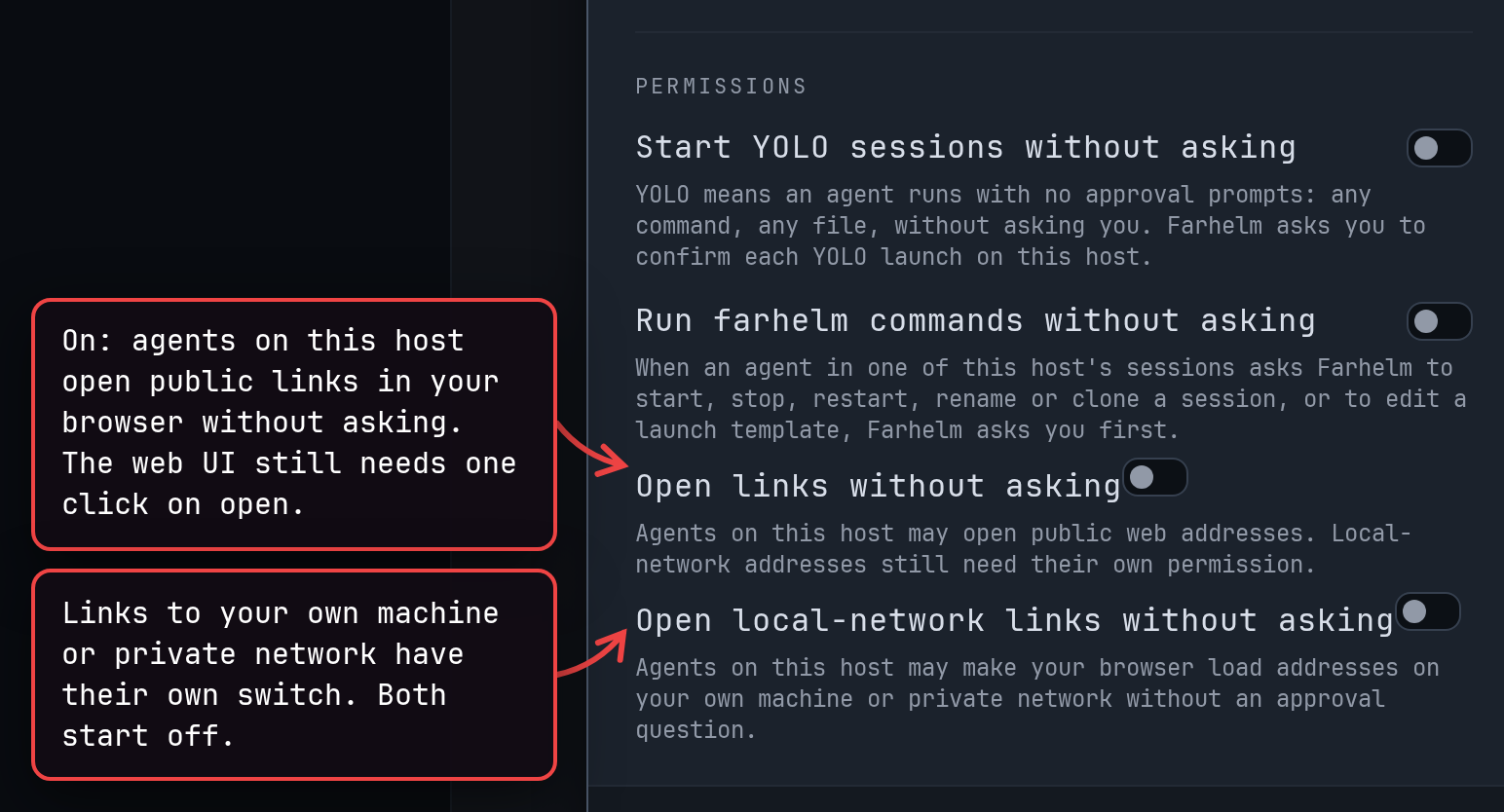
🚀 Added
Section titled “🚀 Added”-
On remote hosts, agents and new terminal tabs now get a
BROWSERsetting, so programs that open web links through it open them in your browser once you approve the link. Agents already running get it at their next launch. Login flows that call back tolocalhoston the remote host still need another way to reach it. (#1950) -
Agents can also ask to open a link with
farhelm agent open-url. Host settings can allow public links without asking, with a separate permission for links to your own machine or network. (#1948)show screenshot
🔄 Changed
Section titled “🔄 Changed”-
Adding or updating a host, checking for app updates and sending feedback now trust the certificates your operating system trusts and, on macOS, follow its proxy settings, so they work behind a proxy with its own certificate. On Linux, the helm does not start unless its machine has CA certificates installed (usually the
ca-certificatespackage). (#1909) -
In the Mac app, checking for updates shows its progress beside the version number. A failed check stays until you dismiss it, with the reason on hover; automatic checks stay quiet. (#1889)
-
App settings keeps its heading and close button in view while you scroll, and groups its settings into sections for hosts, managed checkouts, sounds and, in the Mac app, updates. (#1949)
show screenshot
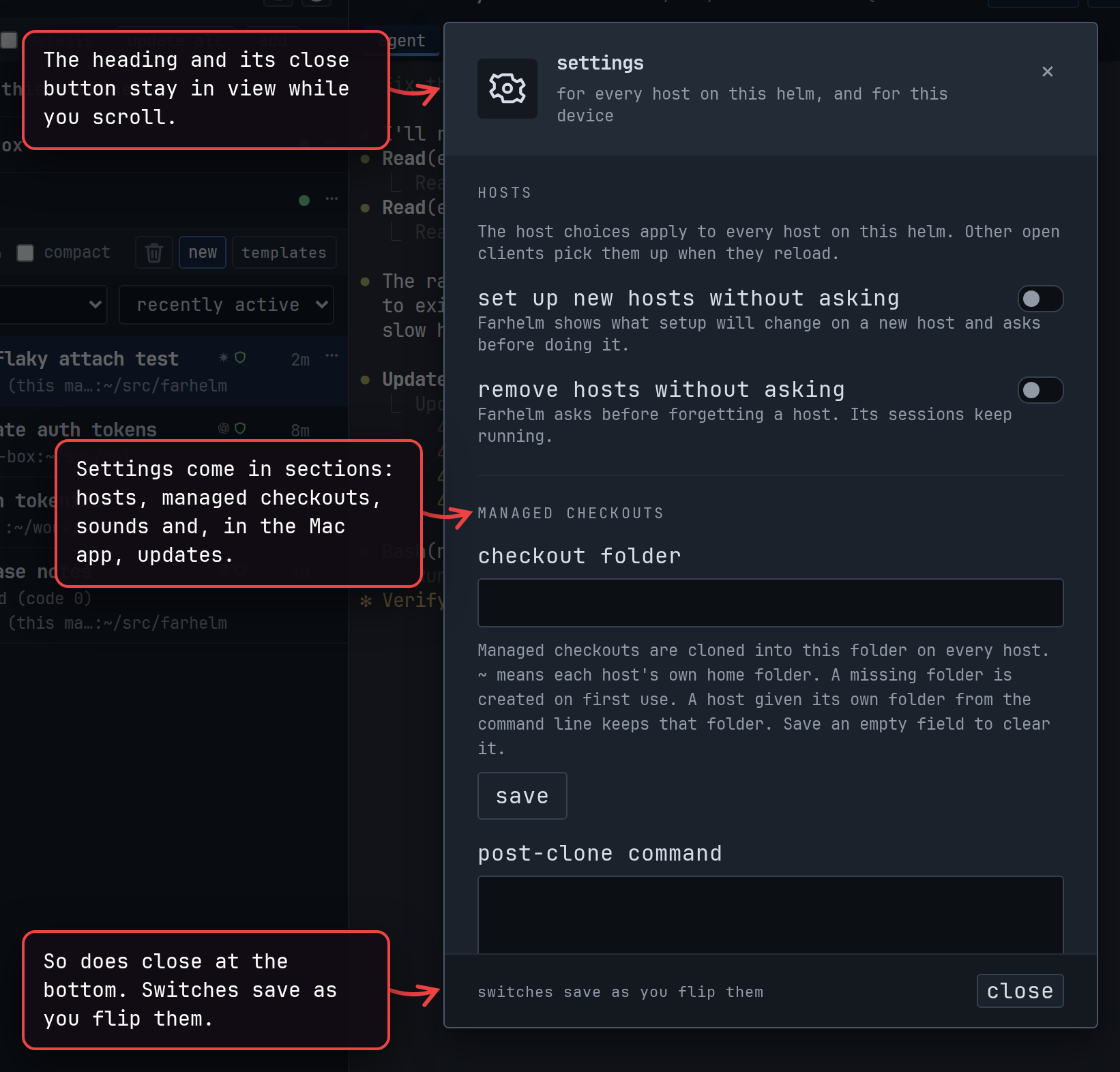
🔧 Fixes worth highlighting
Section titled “🔧 Fixes worth highlighting”- After the helm is updated, a window you have not reloaded no longer takes terminals away from your other windows; new terminals wait for you to take control. (#1932)
- Codex sessions started through your own
codexwrapper, or another launcher that keeps running alongside Codex, now have their conversation tracked, so Restart resumes them. Before, Farhelm never learned which conversation such a session was in, and Restart was unavailable. (#1945)
🩹 Misc fixes
Section titled “🩹 Misc fixes”Fixes that would normally be summed up as a single “various bug fixes” line. In the interest of transparency, the complete list is included.
- Retrying Replace or a launch after a lost reply no longer starts a second agent. (#1936, #1908)
- When a paste leaves out an image because it looks like the clipboard’s copy of another file, the terminal now says which item it left out and why. (#1936)
- The session launcher’s
tl:search shows a template that failed to load with a Retry button, instead of an empty list or a claim that the template was deleted. (#1908) - Selecting text in a terminal snapshot kept after a failed reconnection copies it again. (#1908)
- After the helm is updated, Restart and Replace at the top of an open session refresh the session list. (#1932)
- Marking a session read or unread always saves your latest choice. (#1932)
- Host menus stay reachable in a narrow sidebar, and ended-session actions in a narrow window. (#1932)
- Repeated failures to refresh sessions now say that what is shown may be out of date. (#1932)
- Host settings waits while an uninstall plan is being prepared, and puts a switch back when a permission change is refused. (#1932)
- Rename shows hidden characters in a title without changing an untouched one. Saving a template whose session name contains hidden characters, including joined emoji, is now refused; existing templates still launch. (#1932)
- Approvals-only templates keep every approval choice without an agent type, and deleting a template waits for its saved version to finish reloading. (#1932)
- While the reload notice is showing, closing a session’s notification list turns its bell grey, Clear removes the bell, and mark read / mark unread update the row without a reload. (#1907)
- Session status stays current while Farhelm cleans up a terminal tab whose programs have exited. (#1933)
- When reading Pi’s conversation fails, Farhelm’s reporter inside Pi skips that report quietly instead of passing the error to Pi. The helm also closes its host connections cleanly when it shuts down. (#1934)
- The Mac installer refuses to update the app when a file it replaces has become a folder, instead of reporting success with a broken app. An install without a pinned version refuses an incomplete answer about the latest version, instead of possibly installing an older release. (#1906)
- The web UI and Mac app now include the full license texts for the bundled terminal font and clipboard add-on. (#1906)
- The send feedback window matches the rest of the app, and its buttons stay in view in short windows. (#1946)
v0.27.0
Section titled “v0.27.0”Released 2026-10-11.
🚀 Added
Section titled “🚀 Added”-
Agents can start a session in a fresh GitHub checkout with
farhelm agent create --gh owner/repo. The approval card shows the repository and the folder the checkout goes in. (#1886) -
Set the command that runs in each fresh GitHub checkout before the agent starts, in Settings. A change applies to checkouts made after it. (#1858)
show screenshot
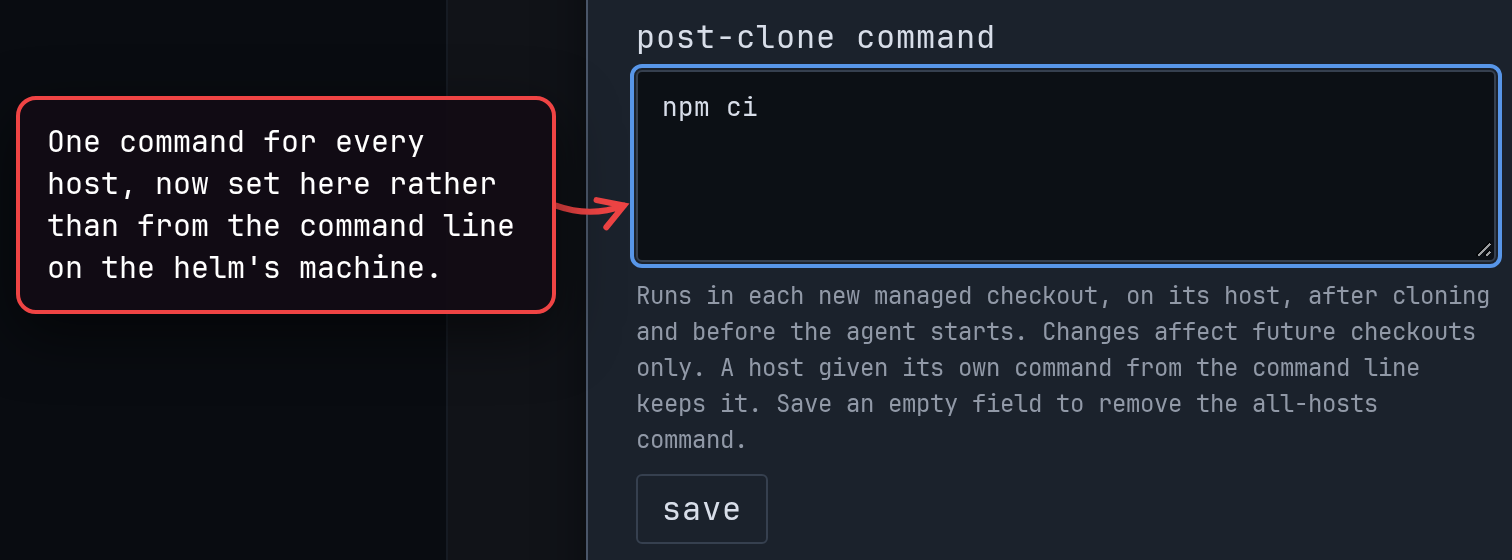
-
The trash shows which hosts are still deleting, so a slow cleanup no longer looks stuck. (#1864)
-
Delete a single checkout from the trash with its own delete button. It deletes at once, without asking. (#1888)
show screenshot
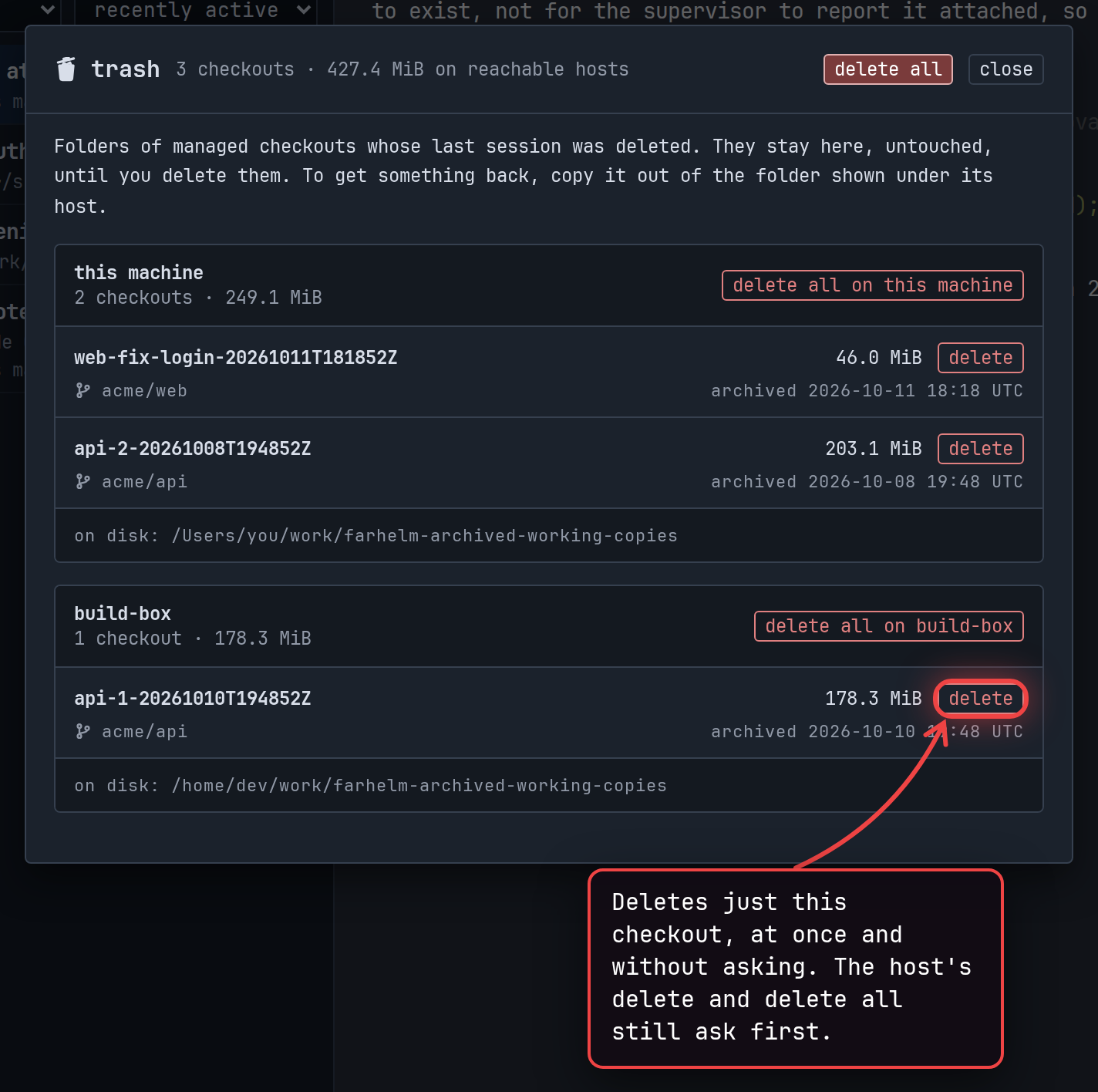
🔄 Changed
Section titled “🔄 Changed”-
The session launcher’s folder field now offers your recent folders, and your home folder on the host or on this machine, in a dropdown. Typing filters the list. (#1874)
show screenshot
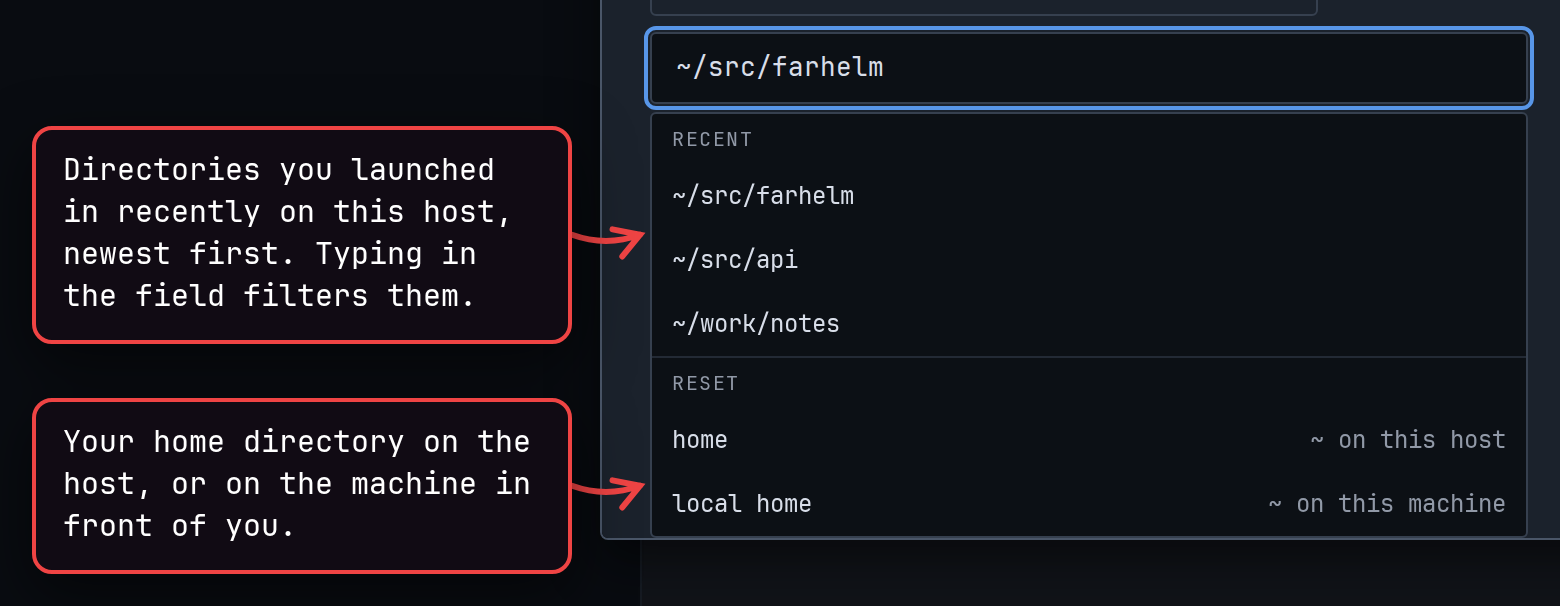
-
Dialogs leave space above and below them, even in short windows. Host settings and the trash keep their heading and buttons in view while you scroll. (#1860, #1862, #1863)
-
The dialogs for adding, setting up and removing a host, and for uninstalling Farhelm from it, are laid out more clearly, with their answers always in view. Two answers are renamed: set up, don’t ask again and remove, don’t ask again. (#1866, #1867)
show 2 screenshots
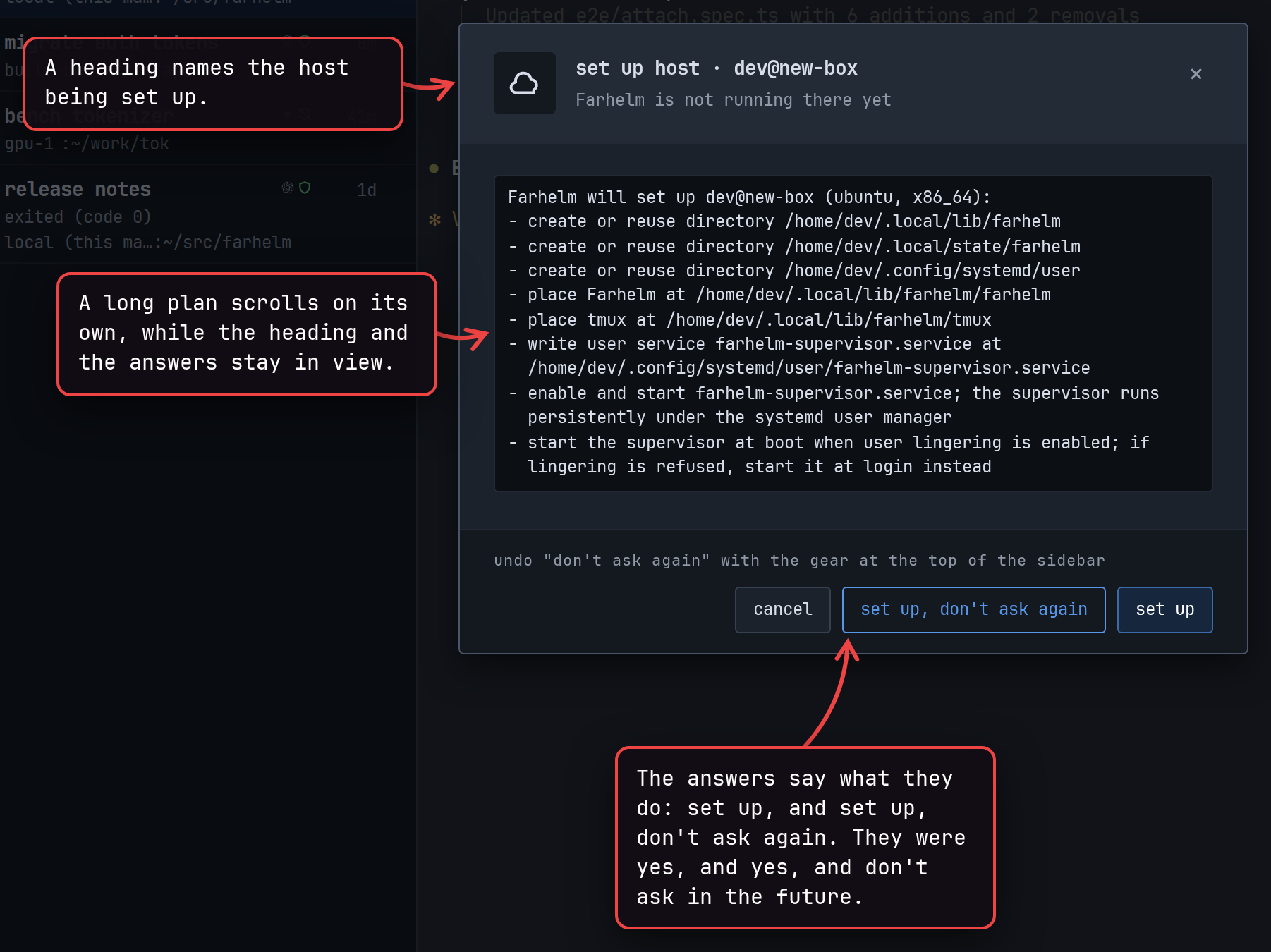
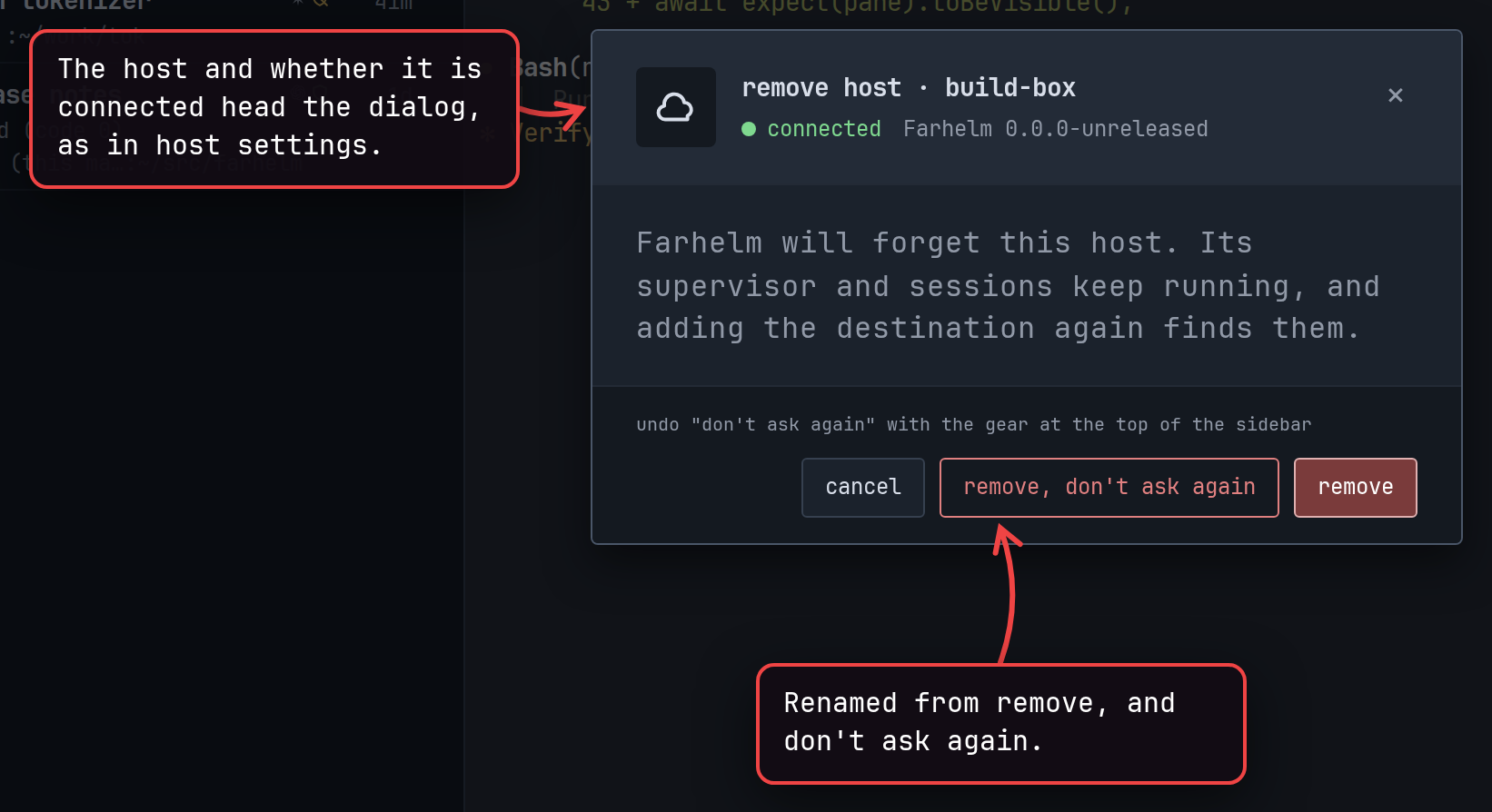
🔧 Fixes worth highlighting
Section titled “🔧 Fixes worth highlighting”- Text fields across the app, such as template commands, no longer spell check or autocorrect what you type. (#1859)
- Hovering a file path in a terminal no longer flickers while the terminal updates. (#1879)
🩹 Misc fixes
Section titled “🩹 Misc fixes”Fixes that would normally be summed up as a single “various bug fixes” line. In the interest of transparency, the complete list is included.
- When a host confirmation opens, its cancel button no longer shows a tooltip over the other answers. (#1868)
- The Save button for where fresh GitHub checkouts go, and its Retry button, now explain themselves on hover. (#1859)
v0.26.1
Section titled “v0.26.1”Released 2026-10-10.
💥 Breaking
Section titled “💥 Breaking”- This release requires you to update your remote hosts. (#1787, #1769)
- If a Codex session was already running when you update, and you start a new conversation in it with
/clear, relaunch that session once so that Restart can resume the new conversation later. (#1738)
🚀 Added
Section titled “🚀 Added”-
Click a file path in a terminal to download that file from the session’s host. Files up to 100 MB can be downloaded. (#1769, #1771, #1773)
-
Sessions working in a fresh GitHub checkout are now marked in the session list. When you delete the last session in such a checkout, the checkout goes to a new trash next to New, where you can see how much space it takes and delete it for good. (#1785, #1786, #1787, #1788)
-
Choose where fresh GitHub checkouts go, in Settings or right in the session launcher. Farhelm creates the folder if it does not exist yet. (#1828, #1830, #1831)
show screenshot
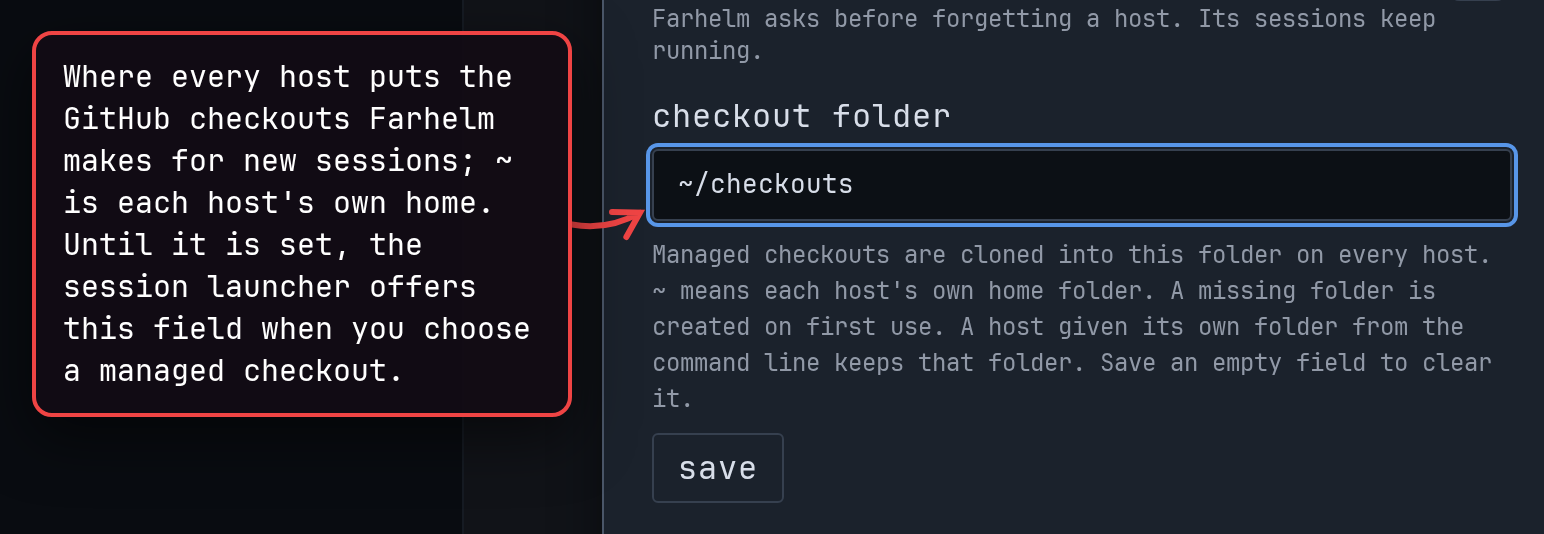
-
Give each remote host its own icon and color, so you can tell its sessions apart at a glance. (#1770, #1775)
show screenshot
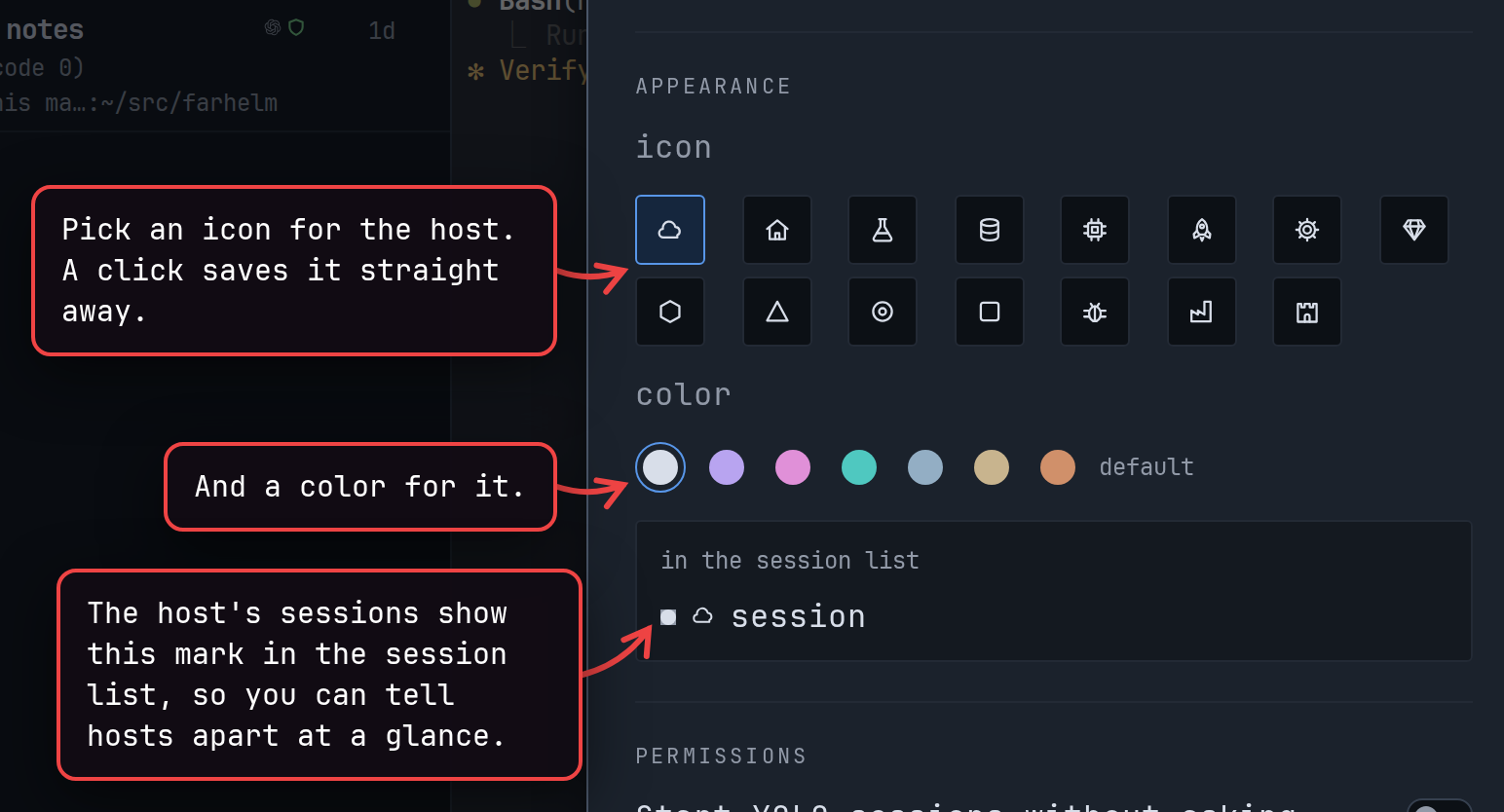
-
Farhelm can play a sound when a session is waiting for your answer or an agent asks for approval, and optionally when an agent finishes. Each sound can be turned off in Settings. (#1768)
show screenshot
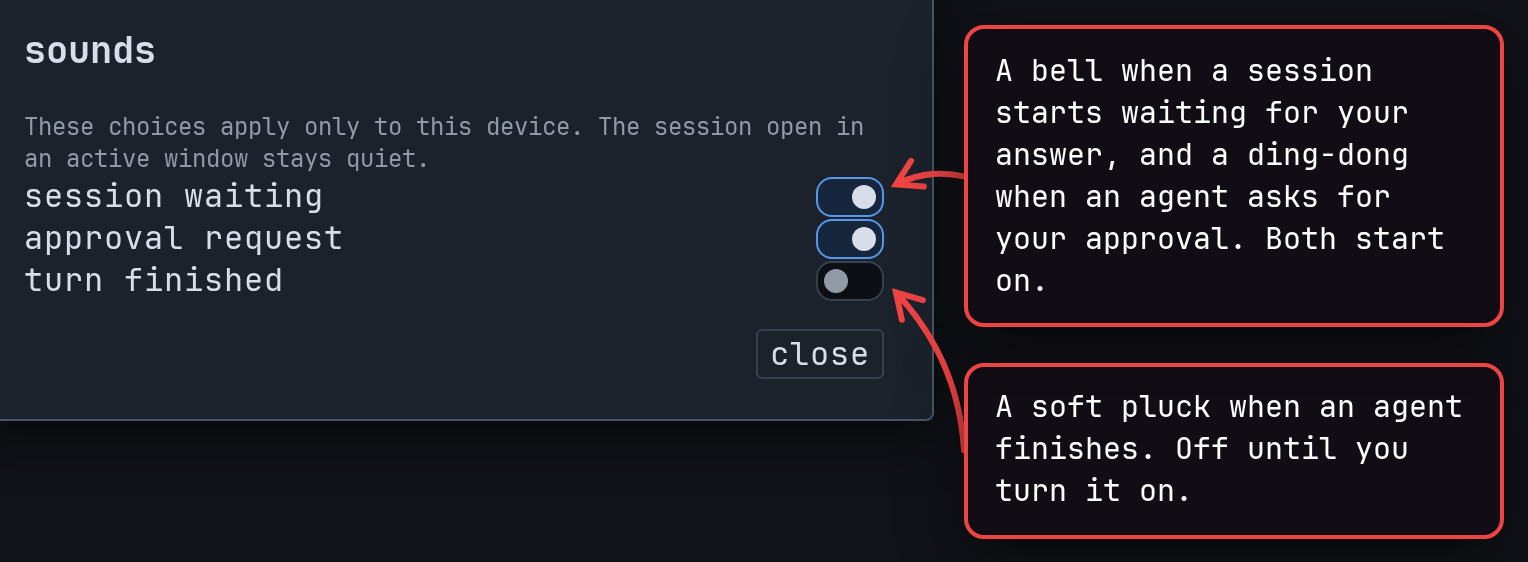
-
Save the session launcher’s current setup as a template. (#1717)
show screenshot
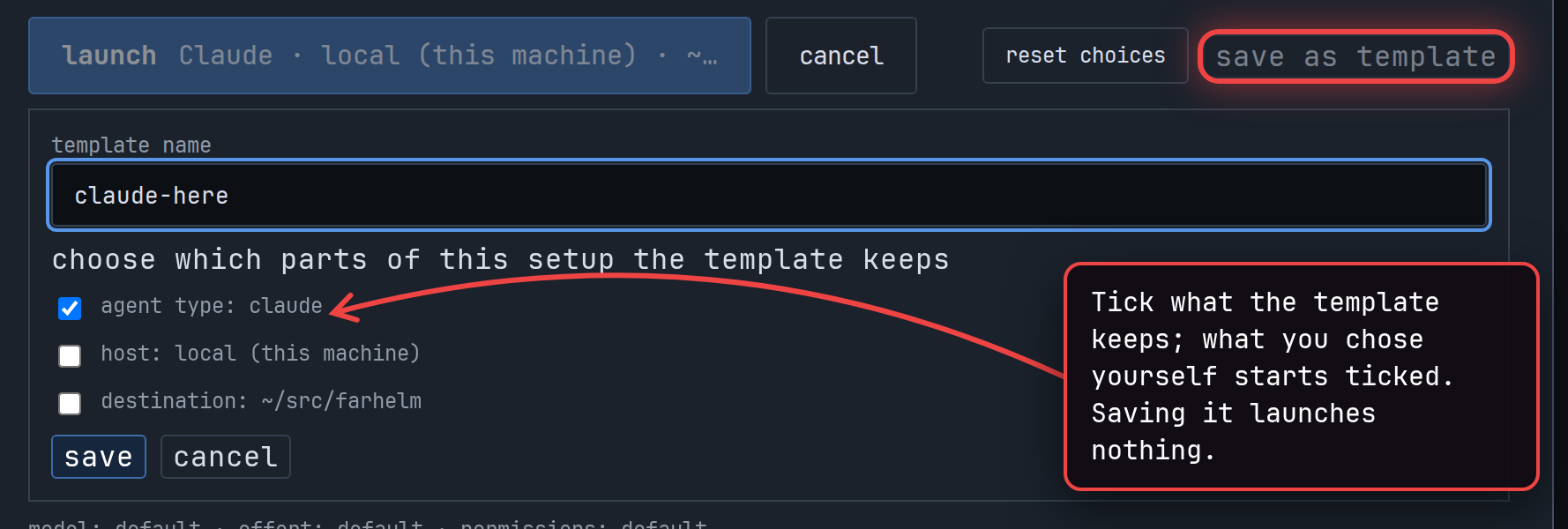
-
Drag the edge of the session list to make it wider or narrower. (#1759)
-
In the Mac app, hovering over New shows its ⌘N shortcut. (#1714)
🔄 Changed
Section titled “🔄 Changed”-
Agent approval requests now show as a compact card at the top of the window, instead of covering the sidebar and the terminal. (#1760)
-
Pressing Enter on a choice in the session launcher or in Restart with now launches or restarts right away. If the agent is busy, restarting stops it first. (#1735, #1737)
-
When the session launcher cannot launch, it now says why next to Launch. (#1729)
-
A fresh GitHub checkout of a repository you have checked out on that host before is faster. Farhelm keeps a copy of each repository on the host to make this work. (#1720)
-
Farhelm uses less CPU while sessions sit idle. Some updates, such as Restart becoming able to resume, can take a couple of seconds to show. (#1761)
-
Farhelm picks up which conversation an agent is in sooner. (#1776)
-
The warning that Farhelm does not know a session’s conversation now says what to check. (#1723)
-
Uninstalling Farhelm from a remote host now also stops the tmux it ran that host’s sessions in. (#1781)
-
Hovering the version number now tells you in plain words which Farhelm you are running and whether an update is waiting. (#1733)
-
In the Mac app, when an update is waiting, what’s new in the red version number’s menu now opens the release notes on the Farhelm website instead of GitHub. (#1709)
-
The hint shown when dragging in a terminal copied nothing is easier to see and to dismiss. (#1731)
-
Settings and host settings use switches, and host settings are laid out more clearly. (#1765, #1826)
show screenshot
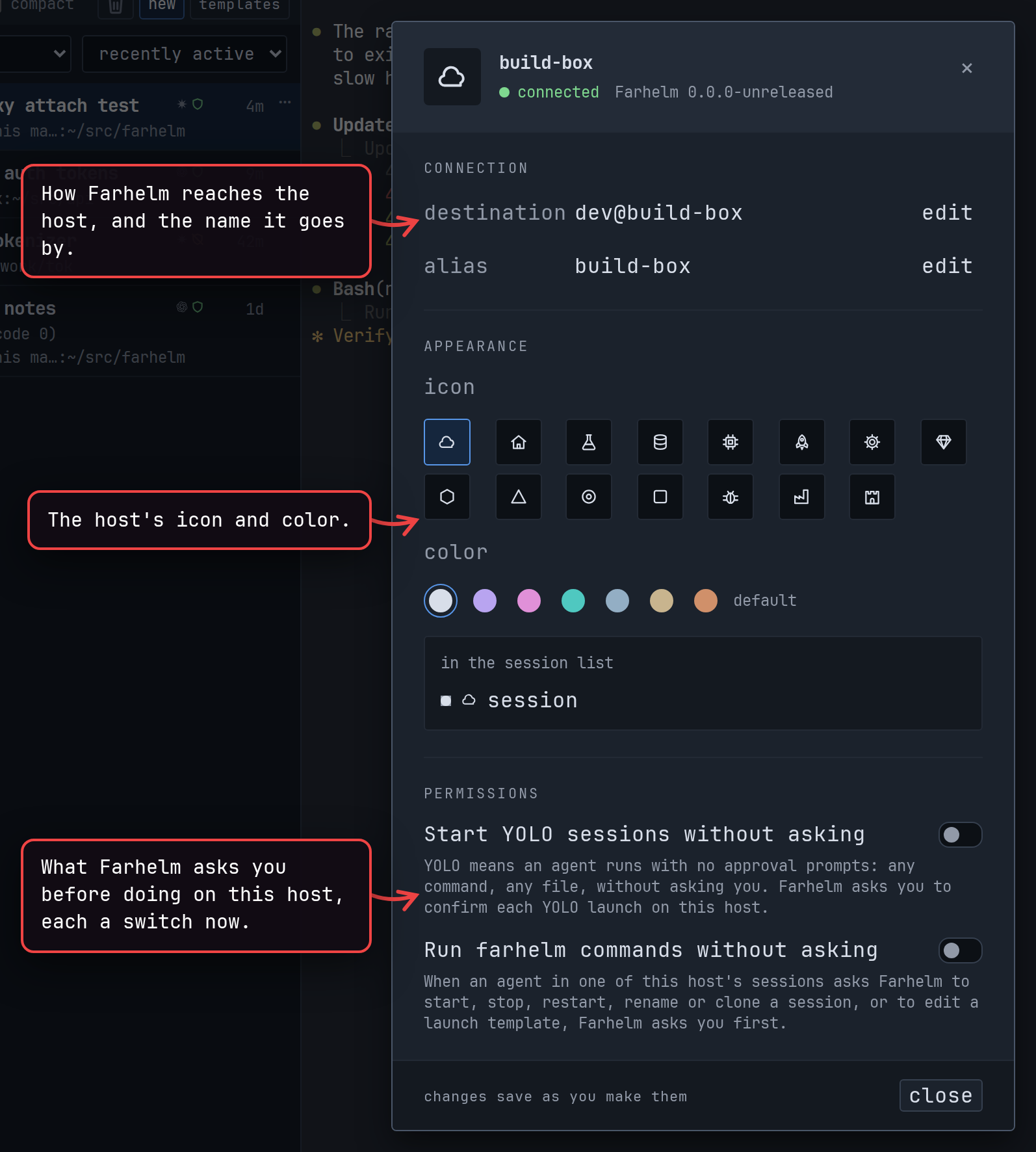
🔧 Fixes worth highlighting
Section titled “🔧 Fixes worth highlighting”- Text pasted into a terminal can no longer smuggle in hidden keystrokes. Templates whose commands contain hidden characters still launch, but must be fixed before you can save changes to them. (#1811)
- Claude sessions show as Running while Claude compacts its conversation. (#1774)
- In the Mac app, session rows with a notification bell no longer show garbled characters. (#1724)
🩹 Misc fixes
Section titled “🩹 Misc fixes”Fixes that would normally be summed up as a single “various bug fixes” line. In the interest of transparency, the complete list is included.
- Starting a session in a fresh GitHub checkout can no longer change a different repository on the host, which could happen with some shell setups. (#1798)
- Opening or replacing a session no longer occasionally closes it again right away. (#1832)
- Template search puts an exact name first, and selecting text inside a link in the terminal no longer opens the link. (#1832)
- Closing the page while feedback is sending no longer cancels it, and closing it during a host update no longer leaves the update half done. (#1813)
- With a custom state folder, the sign-in command Farhelm suggests after setup now points at the right helm. (#1813)
- A Codex message you have typed but not sent no longer makes the sidebar say the session needs an answer. (#1813)
- Clicking in a terminal no longer copies an old selection again, and arrow keys in the session menu no longer skip around. (#1812)
- The warning that Farhelm does not know a session’s conversation now still works after Farhelm restarts, and no longer comes too early after you answer an agent’s own question, such as Codex asking whether to trust a folder. (#1722, #1725)
- OMP sessions started with a custom command no longer risk offering to resume the wrong conversation. (#1779)
- Adding or updating a remote host no longer hangs forever when the upload stalls on some ssh setups. (#1728)
- Setup refuses to install Farhelm in a folder whose path contains
$, instead of setting up a service that cannot start. The advice for clearing a stuck install lock now works with unusual folder names. (#1817) - On Linux, setup and uninstall no longer misjudge which Farhelm a hand-edited service belongs to. On a Mac, agents with very large environments no longer keep Restart from resuming. (#1796)
- Text from a host can no longer use hidden characters to disguise itself in a session’s status or folder. (#1797)
- Session names in approval cards no longer wrap needlessly. (#1824)
- The save-as-template checkboxes line up with their labels. (#1825)
- Checkout notes in the session launcher now match its other help text. (#1827)
- On the Farhelm website, headings are readable in light mode. (#1809)
v0.25.0
Section titled “v0.25.0”Released 2026-10-07.
🚀 Added
Section titled “🚀 Added”-
Press Cmd+K on a Mac, or Ctrl+Shift+K elsewhere, to find a session on any host by typing part of its name and jump to it, even while a terminal has focus. Sessions whose name matches come before ones that match by host or folder, and recently active sessions come first. Escape takes you back to where you were. Type a name for a new session, or
tl:and part of a template’s name, to open the session launcher already filled in; check it and press Launch to start it. (#1691, #1692, #1699)show screenshot
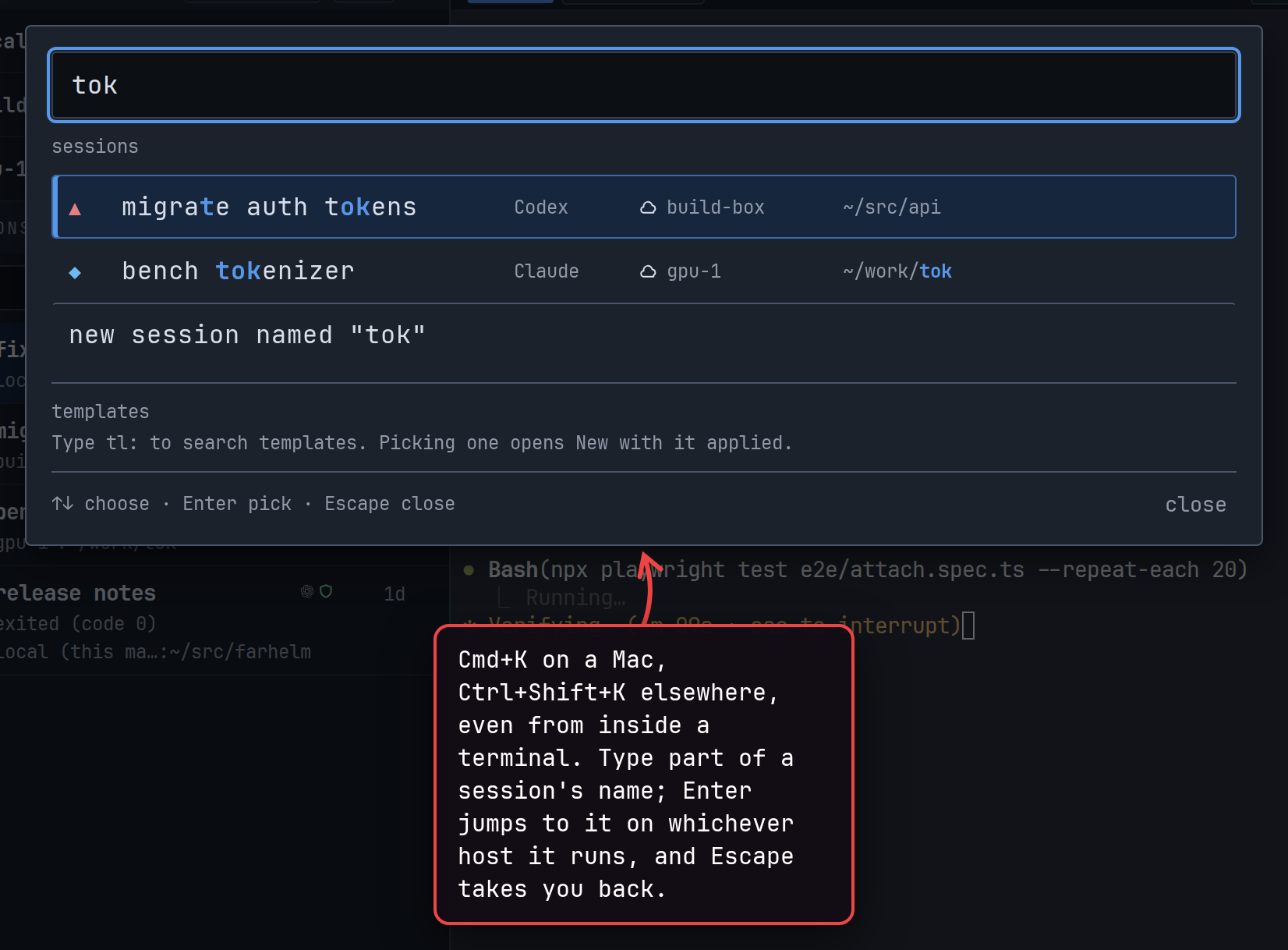
-
In the Mac desktop app, Cmd+N opens the session launcher, the same as New, even while a terminal has focus. It does nothing while a dialog is open or New is unavailable. In the web UI, Cmd+N still opens a new browser window. (#1675)
-
Send feedback can remember how to reach you, so you do not have to type it again next time. The contact is kept by your helm, so the desktop app and the web UI share it. Re-use for future feedback starts checked; unchecking it, or emptying the field, forgets the contact once the feedback is sent. A send that fails changes nothing. (#1689)
show screenshot
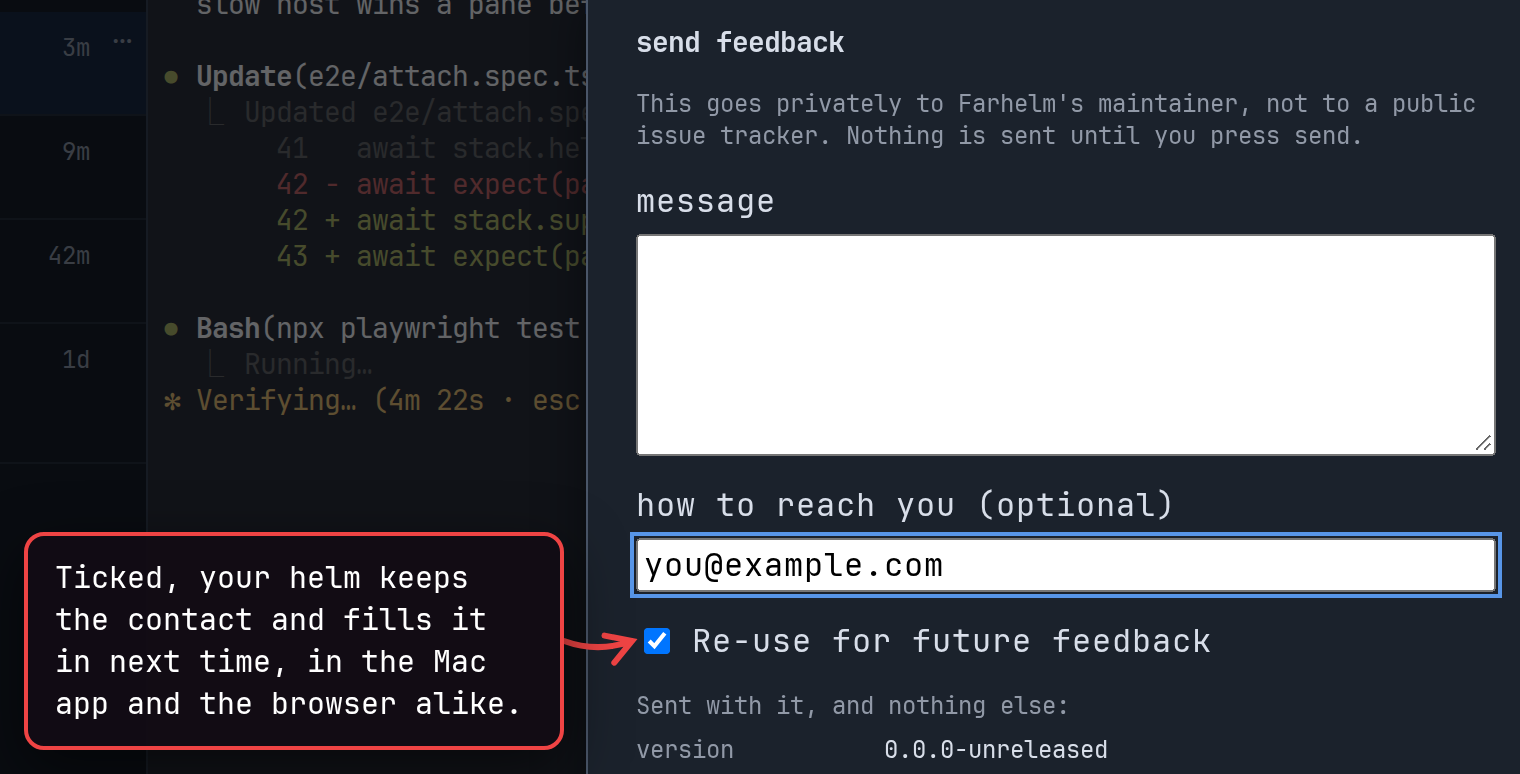
-
A fresh install now ends by inviting you to send private feedback from the app’s ? menu, or to open a public GitHub issue. Updates end with the same message as before. (#1674)
🔄 Changed
Section titled “🔄 Changed”-
Clone on a session that works in a GitHub checkout now makes a fresh checkout of the same repository for the copy, instead of sharing the original’s folder. The new checkout is named after the original with
-cloneadded, then-clone-2,-clone-3and so on if that name is taken. Choose use existing folder to share the original’s folder and name as before. Replace with, Replace, andfarhelm agent clonestill use the existing folder. (#1684) -
A session’s warning that its conversation has gone missing, or that its agent never said which conversation it is in, now stays in the bell’s list marked resolved once Restart can resume the conversation again, and no longer turns the bell red. If the same problem comes back before the agent is relaunched, the warning shows as new and unread again, even if you had cleared it. (#1690)
-
The Templates dialog now shows your templates in a list beside the one you are editing. Its settings are labeled fields you can add or remove, the approval choices offered follow the agent type, changes are saved only when you press save, and closing with unsaved changes asks what to do. Templates can be duplicated, and after deleting one you can undo it for about ten seconds while the dialog stays open. (#1687)
show screenshot
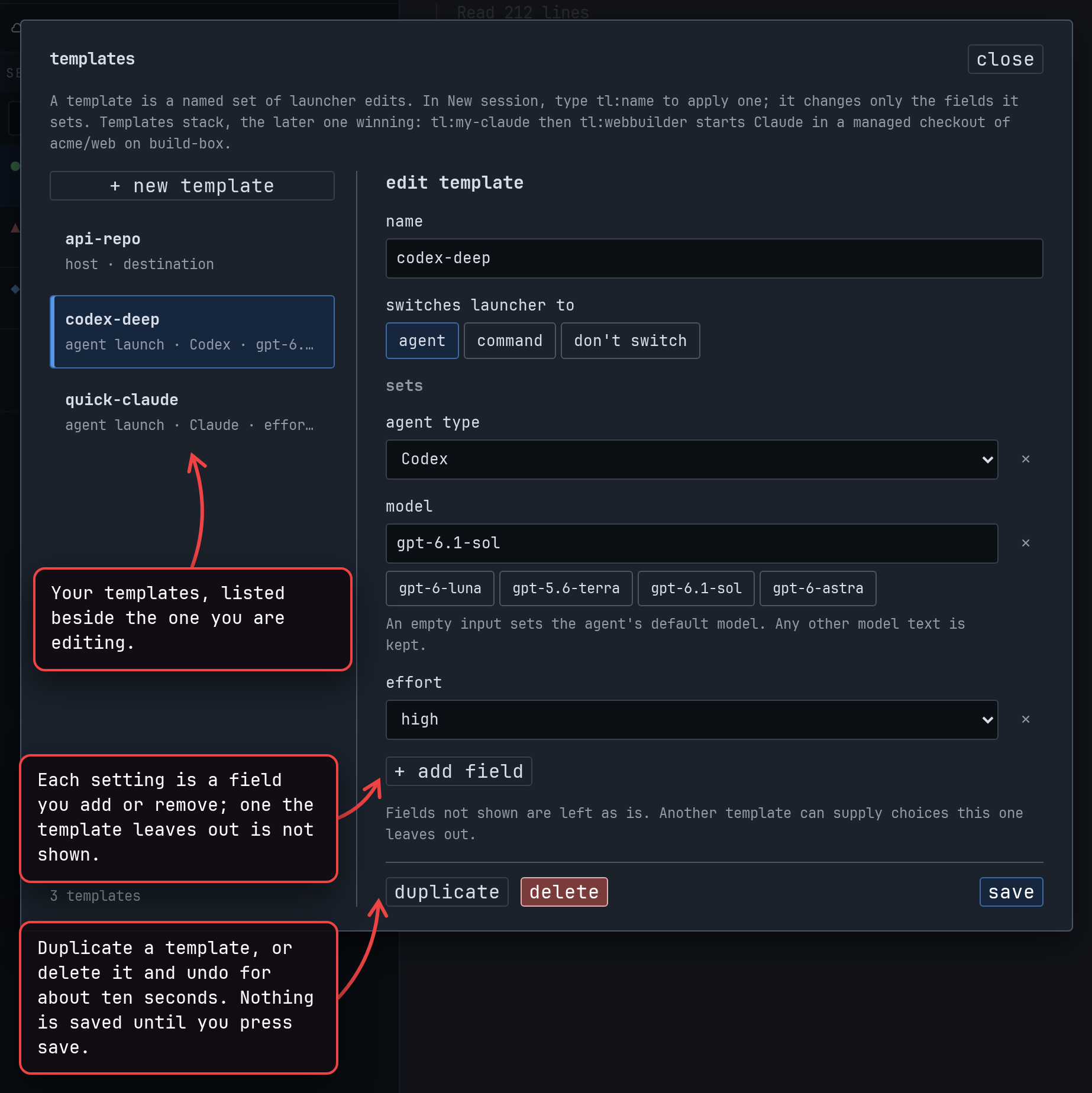
-
When an agent creates a template that says how a session launches (an agent type, whether a command runs without approval prompts, or a resume command), applying that template now switches the session launcher to the matching tab. Templates you already have behave as before. (#1678)
🔧 Fixed
Section titled “🔧 Fixed”- Terminal tabs opened beside a session that works in your home folder now start in
~rather than~/in shells that show the path they started in. Existing sessions whose folder was stored with a trailing slash are fixed too. (#1673)
v0.24.0
Section titled “v0.24.0”Released 2026-10-05.
🚀 Added
Section titled “🚀 Added”- Hosts whose SSH server allows only one session per connection and asks for an interactive approval (a second factor, say) on every new login can now be added and updated while Farhelm is connected to them, on a best-effort basis. Adding or updating a host now goes over an SSH connection of its own, separate from the one Farhelm keeps open to the host, so the two no longer compete for that single session. Farhelm cannot answer an approval prompt itself, so on such a host you start both connections by hand before Farhelm needs them. If you already start Farhelm’s connection by hand for such a host, updating it now needs the second connection as well, even for an update the app requires after you upgrade it, which used to work with the one connection. On an ordinary host this means one more SSH login when a host is added or updated; if your key asks for a touch or a confirmation on every login, expect one more prompt. (#1664)
🔧 Fixed
Section titled “🔧 Fixed”- Cancelling the “Confirm YOLO launch” question now always cancels it, in the session launcher, in restart with, and when you replace a session from the session list. Clicking cancel and then, in quick succession, start YOLO session anyway or start, and don’t ask again on this host could still start the agent with no approval prompts: a replaced session was deleted, a restarted agent was stopped first if it was working, and the second answer could stop the host from asking before YOLO launches. In restart with, an answer now applies only to the settings the question asked about: if you change the settings after the question appears, restart again to be asked about the new ones. While Farhelm records “don’t ask again” for the host, the question goes away, and it comes back with the reason if that fails. (#1658, #1659, #1660)
- Cancelling the setup question when adding a host now always cancels it. Clicking cancel (or pressing Escape) and then, in quick succession, yes or yes, and don’t ask in the future could still set up Farhelm on the remote machine. On a host already in the list, cancelling its setup question and then quickly answering yes, and don’t ask in the future set nothing up but still turned the question off for every host you add later. (#1663)
- Saving a new template, or renaming one, while the Templates panel’s list was still loading or had failed to load could silently replace an existing template with the same name. The panel now refuses such a save until the list has loaded, says why, and offers retry when loading the list failed. Saving changes to the template you opened under its own name works as before. (#1652)
- Closing the send feedback dialog right after pressing send, with cancel or Escape before the dialog had switched to “sending…”, could close it while the message was still on its way, losing your text without saying whether it arrived. The dialog now stays open until the send succeeds or fails, and a failed send keeps your text. (#1662)
- On a Mac, the installer now refuses to update Farhelm.app in place when the app, or one of the folders inside it that the update writes into, is a symbolic link or not a folder at all, and changes nothing. Before, an update followed such a link and could write the new program or icon into whatever folder it pointed to. Replace the link with a real folder, or move the app aside, and run the installer again. (#1656)
- A session created from a template that names its host could, in a narrow window, start on a different machine than the one the template was made for: when that host entry had just been pointed at another machine and the new installation adopted while the request was being handled. Such a request is now refused, saying the host now reaches a different installation, and nothing is started. A request that names its host with
--hostis unaffected. (#1653) - Uninstalling a remote host now refuses when the machine answering at its address reports an identity while Farhelm has none recorded for that host, the same way it already refused a machine reporting a different identity or none at all. Uninstall removes files, so it only goes ahead when it can tell it reached the machine whose sessions it just checked. (#1655)
- When letting a remote host’s supervisor keep running after you log out (linger) fails while adding or updating the host, the host’s error output is now written to the helm’s log with terminal control characters escaped, so a remote host can no longer put sequences into that log that redraw your terminal or change your clipboard when you read it. (#1654)
v0.23.0
Section titled “v0.23.0”Released 2026-10-05.
💥 Breaking
Section titled “💥 Breaking”- This release requires you to update your remote hosts. (#1608, #1609, #1617)
- After upgrading, you cannot go back to an earlier release. The helm and each host’s supervisor update their databases when they first start, and an older Farhelm then refuses to start, saying its database has a newer schema version than it understands. If you may want to go back, copy Farhelm’s data folder (usually
~/.local/state/farhelm) before upgrading, while Farhelm is not running, on this machine and on each remote host, and restore it together with the older version; anything that changed after the copy is lost. (#1606, #1620, #1621, #1627) - Farhelm is now installed from get.farhelm.io instead of GitHub. Install this release, and any later one by hand, with
curl -fsSL https://get.farhelm.io/install.sh | sh. Releases from before this one are not published there, soFARHELM_VERSIONcan no longer install them. The helm now also downloads the files it puts on a remote host from get.farhelm.io, so the machine the helm runs on must be able to reach get.farhelm.io when you add or update a host; those files are still checked against the release’s signature before they are used. (#1628, #1629, #1633) - Farhelm now asks you before an agent’s
farhelmcommand changes anything. When an agent (or anything else running in a session) runsfarhelm spawnorfarhelm agent create,clone,rename,stoporrestart, a card appears in the corner of the Farhelm window showing what it would do, with allow, always allow from the agent’s host, and deny. The agent waits up to nine minutes for your answer; with no Farhelm window open, the command is refused at once. Listings never ask. To stop being asked for a host, turn on run farhelm commands from this host without asking in that host’s settings, or answer a card with always allow. Agents can no longer start YOLO sessions, or sessions that run a command line, on a host that asks before YOLO launches; turn on start YOLO sessions here without asking for a host to allow that. The--confirm-yoloflag is gone, andfarhelm spawn --inherit-agentnow needs the session to be open in Farhelm, like every other spawn. (#1606, #1607, #1608) - Retrying
farhelm agent create, orfarhelm spawnwith launch flags, with the same idempotency key, host, templates and flags now returns the session the first attempt started however long ago that was. Before, this held only for 30 days when a template the create names had been edited in between, and a later retry was refused as a reused key. Retryingfarhelm agent clonethe same way now also returns the first copy when the session it copied has changed since.farhelm agent createnow needs--hostwhenever it is given an idempotency key, because the key is kept on the host the first attempt reached and a host taken from a template could change between attempts. Refusals about an idempotency key no longer quote the key back. A retry whose first attempt was cut short before its session started is refused, rather than started, if a template change means it would now start something different from what you approved. (#1617, #1627)
🚀 Added
Section titled “🚀 Added”- The Mac app now keeps itself up to date. Shortly after it starts, and about once a day after that, it checks get.farhelm.io for a new stable release and, when there is one, installs it in the background with the same install script you would run by hand. Before installing, it checks that the release is signed with one of the keys built into the app and that the install script matches it, and runs nothing otherwise. When a newer version is installed, the version number at the top of the sidebar turns red with an up-arrow, and its hover says which version is waiting. Select it and choose restart to update to restart Farhelm on the new version, or what’s new to see the releases on GitHub. Your sessions keep running through the restart, and quitting and reopening Farhelm also finishes the update. To check right away, choose check for updates in the
?menu, or update in the menu of the local (this machine) host. To stop the automatic checks, untick install updates automatically in the settings dialog. If a release cannot be verified, the version number shows a warning that this Farhelm can no longer verify its updates, with the command to reinstall it. Updating to this release itself still means running the install command. (#1600, #1604, #1631) - A session’s row in the session list now shows a bell, just left of its age, when Farhelm notices something about that session you can act on. For now these are problems with following the agent’s conversation that would keep restart from picking it up again: an agent that has been working for a while without telling Farhelm which conversation it is in, a launch Farhelm could not set up to follow, or a saved conversation Farhelm stopped offering to resume. Until now these were only written to a log. Each notification says what happened and what to do about it, such as starting the session over with replace with, or, when nothing can be done, what you lose. The bell is red and filled while something is new; clicking it lists the session’s last 10 notifications, closing the list marks them read, and clear all removes them. Read and cleared notifications are the same in every window connected to the same helm. (#1620, #1621, #1622)
- Agents can now create, change and delete launch templates with
farhelm agent template create,editanddelete, using the same flags asfarhelm agent create. Unless you have told Farhelm not to ask for the agent’s host, each write waits for your approval on a card that shows the whole template, including any command line it carries. An edit only sets the fields it is given, so a command line the agent cannot see is never dropped by accident. (#1609)
🔄 Changed
Section titled “🔄 Changed”- When Restart is greyed out because Farhelm has not captured the session’s conversation yet, its hover text now says, for that agent, when Restart normally becomes available: for Codex, once you submit your first prompt; for Pi and OMP, after the agent’s first reply; for Claude, a few seconds after it starts. Once the session has ended it says the conversation was never captured instead. Either way it asks you to send feedback if that is not what happened. The refusal an agent gets from
farhelm agent restartsays the same. (#1618)
🔧 Fixed
Section titled “🔧 Fixed”- Uninstalling Farhelm from a remote host in the hosts list no longer reports success when the host’s
~/.local/lib/farhelmis a symbolic link to a directory elsewhere. Before, uninstall deleted only the link, said it had finished and dropped the host from the list, while the Farhelm program it pointed to stayed on the host. Uninstall now refuses such a host before changing anything, names where the link points, and keeps the host listed. Removing the host from the list without uninstalling still works for it, as for any host. (#1614)
v0.22.0
Section titled “v0.22.0”Released 2026-10-04.
💥 Breaking
Section titled “💥 Breaking”- This release requires you to update your remote hosts. (#1441, #1509, #1559, #1560, #1563, #1576)
- After upgrading, you cannot go back to an earlier release. The helm and each host’s supervisor update their databases when they first start, and an older Farhelm then refuses to start, saying its database has a newer schema version than it understands. If you may want to go back, copy Farhelm’s data folder (usually
~/.local/state/farhelm) before upgrading, while Farhelm is not running, on this machine and on each remote host, and restore it together with the older version; anything that changed after the copy is lost. (#1496, #1502, #1509, #1542, #1559, #1560, #1563, #1572, #1576) - Agent profiles are gone. The Profiles button beside New, the profile picker in the session launcher, and the built-in profiles are removed, and the profiles you saved are deleted when you upgrade, with no conversion. If you made profiles of your own, write down their command lines and other settings from the Profiles button before upgrading: afterwards you can recreate them as launch templates (see Added), but templates only exist once you have upgraded, and the profiles cannot be read any more. Sessions you created from a profile keep running; their row no longer shows the profile’s name, and they are treated like the other sessions from before this release that the next entry describes. (#1560)
- Every session now starts as one of two kinds of launch, shown as the session launcher’s agent and command tabs. An agent launch is an agent you pick, such as Claude or Codex, with its choices, and Farhelm builds its command and its resume command as before. A command launch runs a command line you type, and Farhelm no longer reads the command to decide anything: you say whether it runs without approval prompts (YOLO), which the launcher asks for every new command, and you can say which agent it runs and give the command that resumes its conversation. A command that names its agent must contain
{farhelm_args}as a separate argument where Farhelm adds its own options, and its resume command needs{conversation}and{farhelm_args}. A command launch that names no agent gets no conversation tracking, and one without a resume command cannot be restarted. Farhelm no longer guesses from a typed command which agent it runs, whether it is YOLO, or how to resume it. Sessions created before this release keep running. One started by picking an agent in the launcher becomes an agent launch and behaves exactly as before. Any other one, from a typed command or a profile, keeps its old command: Restart still works when it can resume, but Replace, Restart with,farhelm agent cloneandfarhelm spawn --inherit-agentrefuse it and say what to use instead, Clone and Replace with open the launcher with its command filled in for you to finish, and its permission mark is a question mark, because whether it runs YOLO was never recorded. (#1563, #1571) - Restart now always continues the session’s own conversation. When Farhelm cannot do that, because no conversation was captured for the session or Farhelm cannot follow conversations for that agent at all, Restart and Restart with are greyed out, and hovering over them says why; use Replace to start the session over. Before, Restart then started a fresh conversation or ran a profile’s fallback command, and the conversation was lost. Sessions running Cursor, Muse or OpenCode, and command launches without a resume command, can no longer be restarted, and an interrupted session that cannot be resumed offers only Replace. (#1559)
- The commands agents in your sessions use to start and manage sessions changed, so update any scripts or instructions of your own that use them; an agent in a session that is already running gets a refusal that names the replacement.
farhelm agent createnow takes the session launcher’s choices as flags:--agentwith--model,--effort,--permissionsand--trustfor an agent launch, or--commandwith--yoloor--no-yolo(one of the two is required), and optionally--agentand--resume-command, for a command launch.--template <name>applies one of your launch templates and can be repeated: the templates apply first, in order, the other flags then change the result, and a template can supply the host, folder and title. Nothing is filled in from what you last chose in the launcher, and a launch that is missing something it needs is refused, naming the flag.--profile,--profile-idand--invocationare refused, and so isfarhelm agent profiles;farhelm agent templateslists your templates instead.farhelm spawntakes either--inherit-agent, as before, or the same launch flags, which need the session to be open in Farhelm; its--agentnow names an agent type rather than a profile, and a template that sets a host is refused there. A template that sets a fresh GitHub checkout is refused on the command line unless--cwdnames an existing folder.farhelm agent restartno longer takes--mode.farhelm agent sessionssays whether each session can be restarted (resume, or why not:not-captured,no-reportingorno-resume-command), and the--jsonschema version of thefarhelm agentlistings is now 6. Retrying a create or spawn with an idempotency key from before the upgrade is refused rather than repeated. (#1559, #1560, #1563, #1576) - Farhelm now starts Cursor as
cursor-agentinstead ofagent, socursor-agentmust be on thePATHof every host that runs Cursor sessions. Cursor installs itself under both names, but other tools install a command calledagenttoo. (#1388) - The install script now runs only on Apple silicon Macs, where it installs the desktop app and the
farhelmcommand. It refuses Linux for now: Linux machines are still supported for running a helm and as remote hosts, which the helm sets up over ssh, but an existing Linux installation can no longer be updated with the install script. The install locations are now always~/Applications/Farhelm.appand~/.local/bin, andFARHELM_INSTALL_DIRandFARHELM_NO_APP_BUNDLEno longer have any effect.FARHELM_VERSIONstill picks a version, but the install script refuses any release older than this one. (#1524, #1557) - On a Mac, Farhelm is now installed as a single app,
~/Applications/Farhelm.app, and can be updated while it is open. Quit Farhelm before you install this release, because this first update converts the installation; after that, running the install script while Farhelm is open is fine, and quitting and reopening it finishes the update, for sessions started before the update too. Before, the install script replaced the program a running Farhelm keeps starting, so until you restarted Farhelm, new sessions could fail to start, agents lost track of their conversations, andfarhelm spawnfailed.farhelm-desktopis no longer installed in~/.local/bin, and~/.local/bin/farhelmis now a link into the app for usingfarhelmfrom a terminal, so open Farhelm from Spotlight, Launchpad or~/Applications. (#1557) - The desktop app no longer shows its interface to a browser or accepts browser sign-ins with the token
farhelm helm token showprints. To use Farhelm from a browser, quit the app and runfarhelm helm runyourself on the same data folder. The app now picks its own private port each time it starts, and theFARHELM_DESKTOP_PORTandFARHELM_DESKTOP_UI_DISToverrides are removed. (#1516)
🚀 Added
Section titled “🚀 Added”- Launch templates are named sets of session launcher choices, which you create, edit and delete in the templates panel beside the new button. A template can set any launcher choice: the agent and its model, effort, permissions and workspace trust, a command with its YOLO answer and resume command, the host, the folder or a fresh GitHub checkout, and the session’s name. It holds only the choices you put in it. In the launcher, type
tl:and a template’s name in the search box to apply it; you can apply several in turn, and where two set the same choice, the later one wins. A template that does not fit the launcher as it is, such as one that sets a model while you are on the command tab, or a host in Replace with, is refused with the choice named, and nothing from it is applied. Restart with does not offer templates. Agents in your sessions can apply templates withfarhelm agent create --template, but cannot create or change them. Sessions do not record which templates made them, so editing or deleting a template never changes a session. Every host your helm manages can read every template, command lines included, so keep secrets out of them. (#1572, #1576) - Restart with now works for a command launch that names its agent and has a resume command. It lets you change the command, the resume command, and whether it runs without approval prompts, while the agent, host and folder stay as they are. Restart runs the resume command, so a changed command only takes effect the next time the session is cloned or replaced. (#1571)
- You can now remove Farhelm from a remote host: choose uninstall in the host’s
⋯menu in the host list. Farhelm first shows what it will remove from the host (its service and program files) and the folder where the host’s Farhelm data stays, and does nothing until you confirm. It never stops a session for you: it refuses, naming them, while any session on the host has not ended or still has a terminal tab open, and the host has to be connected. Once it is done, the host leaves the list, and a line above the list says where its data remains; delete that folder on the host yourself if you want it gone. If uninstall fails partway, choosing uninstall again finishes the job. (#1565, #1568) - A remote host running an older Farhelm than the helm now shows an update button beside its name: amber when updating is optional, red when the host cannot connect until it is updated. Hovering over it shows both versions, and clicking it updates the host at once, without another confirmation, with the progress shown in its place. Update is still in the host’s menu too. On your own machine’s row, local (this machine), update is now greyed out and says to run the install script again; choosing it used to show a refusal under the row that could not be dismissed. (#1518, #1558)
- Partially landed (not yet working): A new ? button at the top of the sidebar, to the right of the settings gear, opens a menu with send feedback and documentation. Send feedback lets you tell Farhelm’s maintainer something privately, without an account: you type a message and, if you want an answer, how to reach you, and the dialog shows the only other things sent with it, which are the Farhelm version, whether you use the desktop app or the web UI, and your operating system. Nothing is sent until you select send, and if sending fails, your text stays in the dialog. Sending does not work yet in this release: every send fails. Your helm sends the feedback to a service the project runs, which sees the IP address of the machine the helm runs on. Documentation opens Farhelm’s documentation in your browser. (#1569, #1570, #1598)
- You can now make the text in terminals larger or smaller: press Cmd+Shift with + or − on macOS (Ctrl+Shift on Linux), or use the A− and A+ buttons at the right end of a session’s terminal tabs. Every open terminal changes together, and the programs running in them see the new size. Each browser and desktop app remembers its own size. On Linux the shortcut takes over Ctrl+Shift+− inside the terminal, which some shells and editors use as undo. (#1501)
- When dragging over text copies nothing because the program in the terminal handles the mouse itself, as Codex does, or vim with mouse support on, the terminal now says why, once per page: use the program’s own copy command, or hold Option (Shift outside macOS) while dragging to select and copy in Farhelm instead. In a Codex session it also says how to copy what you highlighted in Codex’s prompt box: press Ctrl+C while the text is still highlighted, since without a highlight Ctrl+C clears your draft. (#1499)
- Every button and every icon that means something now explains itself when you rest the pointer on it or reach it with the keyboard, including the host marks, the buttons that open the session and host menus, the replace, clone and delete buttons at the top of an open session, terminal tabs, and the controls in the session launcher and the host list. Hover text also appears sooner, after about a third of a second instead of the second or more the browser took, in a small box just above what you point at that matches the app’s theme, and it shows at once as you move from one control to the next. (#1589, #1590)
🔄 Changed
Section titled “🔄 Changed”- The session launcher now shows its two kinds of launch as two tabs, agent and command, in place of the “other / command” button among the agents, and typing “command” in the search box no longer offers it. Each tab keeps what you entered on it when you switch to the other, and only the selected tab’s launch starts. On the command tab, picking an agent, a model or a recent setup in the search box switches to the agent tab, while picking a folder, a host or a name keeps the command tab. The arrow keys move between the tabs. (#1571)
- OpenCode, OMP and Goose sessions started from the agent tab now run in YOLO mode unless you choose otherwise, as Pi already did. Farhelm passes the setting to the agent explicitly, overriding a configuration of the agent’s own that asks for approval, and OpenCode also stops asking about paths outside the project. Choose an approval mode in OMP or Goose to keep their approval prompts; the launcher offers OpenCode no mode other than YOLO. On a host that asks before YOLO launches, which every host does until you tell it not to, these launches now ask you to confirm. Switching from one of these agents to another in the launcher no longer carries YOLO over to it. (#1519)
- Every session row now shows a permission mark: a slashed amber shield for a YOLO session, a green shield for one that asks for approval, and an amber question mark for a session from before this release whose permissions were never recorded. Hovering over the mark explains it, and for a command launch it says that the YOLO answer was given at launch and not checked by Farhelm. The shields replace the open and closed padlocks, which were easy to confuse. (#1520)
- Adding and removing a host now happen in dialogs. Adding a remote host keeps the check of the host, any error, and the setup question in one dialog; when setup is needed, it lists the files and service Farhelm will change on the host, and once you confirm, the dialog closes and the new host’s row shows the setup’s progress. Removing a host first explains what Farhelm forgets and what keeps running on the host. Each question offers an answer that stops it being asked again on this helm, “yes, and don’t ask in the future” and “remove, and don’t ask again”. To be asked again, untick set up new hosts without asking or remove hosts without asking in the new settings behind the gear beside the version number at the top of the sidebar; other open windows pick up a change there when they reload. (#1496, #1502, #1521)
- A host’s
⋯menu in the host list now looks and works like a session’s menu: it opens to the side, groups its commands, and shows an icon and a short description for each. Its button appears when you hover over the host’s row or reach it with the keyboard. (#1472) - A host entry that reaches the same machine as another entry now says which entry already holds it, by name, and asks you to remove that entry or change this one’s destination, then press Retry. This also covers entries that used to offer an “adopt” choice that could never succeed, such as one you pointed at another entry’s machine, or the old entry of a reinstalled host you added again. Such an entry no longer checks again on its own every 45 seconds; it waits for Retry, an edit of the entry, or a restart of the helm. (#1378)
- The install script’s messages are shorter and easier to scan. It ends with brief instructions for opening and updating Farhelm, the uninstall command with its full path, and, when tmux is missing or too old, how to get it with Homebrew. Run in a terminal, it shows labeled download progress, color, and a clickable Homebrew link; when its output goes to a file or another program, it stays plain. (#1526)
🔧 Fixed
Section titled “🔧 Fixed”- Restart now resumes the conversation an agent is actually in more reliably. When an agent tells Farhelm which conversation it is in, at startup or after
/clearor/new, that report is no longer lost when the host’s Farhelm is busy, restarting, or not running at all. On a Mac that means while the Farhelm app is closed: sessions keep running, and a conversation an agent switches to meanwhile is picked up when you reopen the app. Agents also no longer pause for a few seconds at startup or between turns while Farhelm is not running, and a report now takes up to about two seconds to apply. For Claude, Farhelm no longer guesses the conversation from files on the host, which could resume the wrong one: a Claude session whose report never arrives, for example because its Farhelm hook is turned off, cannot be restarted, while conversations recorded before the upgrade stay resumable. If you set up Grok’s Farhelm hooks with the 3-second timeout the documentation used to show, raise each timeout to 60 seconds, as the Grok page now says. While the host’s Farhelm is not running, an agent’sfarhelm spawnandfarhelm agentcommands still fail. (#1504, #1535, #1540, #1594) - Typing into sessions no longer freezes on a host where many sessions are being stopped, restarted or deleted at once. Each of those can take several seconds while a session’s programs are given time to exit, and once eight were in progress on one host, a session-list refresh, or one more stop, restart, rename, tab, folder-browsing or repository-search request, made every keystroke to every session there wait; a long enough wait dropped the app’s connection to the host. The session list now keeps refreshing, and those other requests are turned away at once with “this host is busy with other session operations; try again in a moment” before they change anything, so trying again is safe. (#1483, #1486, #1490, #1493)
- Delete, Replace and Restart confirmations now authorize only what they said. If the session was restarted after the prompt appeared, by the command line, an agent or another window, a delete or Replace whose prompt said nothing was running, or warned only about open terminal tabs, is now refused, nothing is deleted, and the next attempt asks again; a restart whose prompt had come to say there was nothing to stop no longer stops an agent that started working again. Before, confirming acted on whatever was running at the click, including when a Replace stopped for the YOLO confirmation in between. Replace with now also shows Replace’s warning about the running agent or open tabs it is about to stop, kept current while the launcher is open; if the source session was restarted after that, the new session is still created, the source is kept, and the launcher says both exist. (#1394, #1396, #1441, #1443)
- A YOLO launch that reached the helm just as its host was being removed could start without the confirmation the host asks for. It is now refused with the same “no such host” error as any launch to an unknown host. (#1390)
- Adopting a host’s new identity, after a reinstall, a recycled address, or pointing the entry at another machine, now turns its “start YOLO sessions here without asking” setting off again, and the adopt question says so. Before, the setting carried over to whatever install the entry now reached, so YOLO launches there started without confirmation. (#1391)
- Creating, replacing, restarting, renaming or deleting a session, and marking it read or unread, now finish once started even if the window that asked is reloaded or closed partway; that window only misses the answer. Before, a slow Replace could create the new session and never delete the original, usually with no error shown. A session action an agent starts through Farhelm (creating, cloning, renaming, stopping or restarting a session) likewise finishes when the helm’s connection to the agent’s host drops or is replaced meanwhile; the agent then gets an “outcome unknown” answer and should check the session list before trying again. (#1404, #1419)
- In the desktop app, the window no longer has to sign in again while the app runs, so
farhelm helm token rotatenow only signs out browsers. Before, the window signed in again after a rotation, which could throw away the action that ran into it, such as a delete, stop, restart, rename or new session, without saying whether it happened, or leave the terminals and the session list unable to connect. If the window ever fails to sign in, the error now has a Retry button instead of needing the app to be quit and reopened. The app also no longer keeps credentials in its state file. (#1357, #1358, #1487) - The desktop app no longer waits 30 seconds and then fails with “managed local supervisor did not connect” when the supervisor already running in its data folder cannot be used. If that supervisor runs an incompatible Farhelm version, typically one you started yourself before upgrading, the app stops at once, names both versions, and tells you to stop that supervisor and start Farhelm again. If it reports a different identity from the one the app recorded, or none, the app also stops at once and names the likely cause:
supervisor.dbandhelm.dbin the data folder no longer belong together, because one was restored from a backup or replaced without the other, orsupervisor.dbwas deleted. It then says to quit Farhelm, make sure no supervisor is still running for that folder, and restore both files from the same backup. (#1410, #1420) - Reopening the Farhelm app right after quitting it no longer fails to start: it now waits up to about 20 seconds for the Farhelm you just quit to finish closing its sessions’ terminal connections. (#1543)
- On a Mac, the desktop app no longer keeps the system busy and drains the battery while sessions are running. The green dot beside a running session pulsed smoothly, which made macOS redraw the whole window at the display’s full refresh rate the entire time, even with the window hidden. The dot and the other pulsing and spinning indicators now change in a few small steps per second, and all of them stand still whenever the Farhelm window is not the one you are using. Reduce Motion still turns them off entirely. (#1481)
- In the desktop app, a system clipboard that is slow or stops answering no longer lets copies, or clipboard updates from a program in a terminal, pile up inside Farhelm. A newer copy replaces one that is still waiting, at most a few wait at once, and further copies are dropped until the clipboard recovers, since copying is best effort, so the rest of the app keeps working. (#1400, #1473)
- Farhelm’s ssh connections to your hosts no longer forward your ssh agent, X11 display or ports, even when your ssh config turns forwarding on, for example with
ForwardAgent yesunderHost *. The connection to a host stays open as long as the helm runs, so such a setting used to give anything running on that host use of your ssh keys the whole time. A host whose ssh config setsRemoteCommand, orLocalCommandwithPermitLocalCommand yes, can now be added, set up and connected to. Your ssh config still decides how a host is reached and how you sign in. Farhelm now needs OpenSSH 7.6 or later on the machine the helm runs on. Right after upgrading, if the new version starts within a minute of the old one stopping, ssh can reuse the old version’s connection, and port forwards your config set up on it stay until it closes; stopping Farhelm for over a minute closes it. (#1447) - A supervisor you started yourself with
farhelm supervisor runnow shuts down cleanly when its terminal closes or its ssh connection drops, and so does the desktop app’s own supervisor when the terminal the app was started from closes. Before, the hangup killed it on the spot, which can make tmux abort and take every session on that host with it. A supervisor started undernohupstill ignores the hangup and keeps running. (#1392) - A Claude Code or Codex session asking you a question now shows as waiting while the question’s last answer is highlighted, such as Claude’s “Chat about this” or “Back” in Codex’s folder-trust question. Before, it showed as idle until the highlight moved up. (#1362, #1364)
- Farhelm now recognizes the “Working (… esc to interrupt)” line Codex shows while it is busy. Before, the check for it never matched what Codex actually draws, so a busy Codex session could show as idle where Codex’s terminal title is not available. (#1363)
- A Claude Code session that is waiting for its background tasks now shows as working instead of idle. (#1478)
- Deleting a session whose terminal was open and had shown a lot of output no longer occasionally leaves a stuck background tmux client on that host, retrying every five seconds until Farhelm on that host was restarted. (#1379)
- Folders and paths whose names are not valid UTF-8 are now refused up front with a message saying why. A session whose folder’s real location has such a name, for example behind a symbolic link, is refused when you create or restart it; before, it was created, but every later restart reported success while starting the agent in your home folder. A host’s Farhelm whose program or state folder sits at such a path now refuses to start, naming the path, instead of starting and then failing every new session and restart with a confusing error. (#1371, #1372)
- A browser tab or app window that disappeared without closing its connection, for example on a laptop that went to sleep or lost its network, now gives up its connection to the helm’s live updates within about a minute, even while sessions change often. Before, frequent changes kept postponing that check, and the connection was held until the network itself timed out, which can take many minutes. (#1375)
- Pi sessions on a host that had run Pi with Farhelm v0.12.0 or earlier can be resumed after a restart again, and the agent is told about
farhelm agentagain. Since v0.13.0, Farhelm had quietly started Pi on those hosts without the piece that reports which conversation it is in. (#1367) - In the browser, the host list no longer leaves the page stuck when you are asked for the sign-in token again while one of its actions on a host is still running. Before, after signing in again, every action in the app refused to start without saying why until you reloaded the page. (#1360)
- Marking a session read or unread can no longer crash the window when the session list goes away before the helm has answered, for example when the browser asks for the sign-in token again at that moment. The choice is still sent; once you are signed in again, the list shows whether it was saved. (#1359)
- If an open session went away while one of its restart controls was in use (the confirmation, the Restart with dialog, or a restart still in progress), for example because another window deleted it, the whole window could stay locked until the page was reloaded: no other session would open, and every action button stayed disabled. The same happened when an interrupted session’s Replace confirmation was open and another window restarted that session. The window now stays usable in all of these cases. (#1401)
- A session’s menu in the sidebar no longer ends up floating beside the wrong row when a session listed above it ends, comes back, goes stale, or shows or clears an error while the menu is open. The buttons acted on the right session, but the menu looked like it belonged to its neighbour. The menu now closes in that case, as it already did when the list scrolled or reordered. (#1402)
- Dropping or pasting a file into a terminal no longer fails silently when the terminal reconnects or the session restarts during the upload. The terminal now says the upload was interrupted and names the file: if the file was still being checked, nothing was uploaded; if it was already on its way, it may have reached the host, but its path was not inserted. A failure or “path not inserted” message already on screen also stays there through a reconnect instead of disappearing. (#1403)
- Restarting a session no longer occasionally closes it, leaving the main area empty or switching to another session, when the session list refreshes during the restart. A restarting session now stays in the list, showing the state it had before the restart until the new run reports its own. (#1405)
- The session launcher, including Clone, Replace with and recent setups, no longer refuses a choice that names an effort while the list of available models is still loading or failed to load. It used to call the choice “no longer supported” and disable Launch, and after a failed load the only way out was to close the launcher and lose what you had entered; a failed load now says so and offers a retry. Restart with no longer refuses while the list loads either, and the effort row in both now always shows the effort that will launch, selected, instead of an unselected “default”. (#1406, #1421)
- When a host’s earlier install had failed and a retry of it had just been confirmed, adding the same host again from another window could, in a race lasting a few milliseconds, start a second install or update at the same time, with the two overwriting each other’s progress in the host list. The second one is now refused while the first runs. (#1407)
- Changing a host’s destination at the exact moment the helm finished refreshing that host’s session list, or finished connecting to it, could briefly put the connection to the old destination back into use, so an action sent in that instant could reach the machine you had just stopped pointing at. The old connection now stays withdrawn. (#1408)
- Closing or reloading the page while Farhelm is checking a host you are adding no longer goes wrong. A host that already ran Farhelm could be saved but never connected, missing from the host list until the helm restarted or another host was edited, and a helper process from the check, such as a
ProxyCommandfrom your ssh config, could be left running on this machine. The check now always finishes and cleans up after itself, so a host it finds already running Farhelm is added even when the page that asked has gone. (#1409, #1460) - A terminal that was taken over by another window, or detached for not keeping up with its output, while it was reconnecting could come back as a blank pane, with no Detached notice and no take-control action, after its host stopped answering and then returned; leaving the session and opening it again was the only way out. It now comes back normally, and such terminals no longer keep using memory after they leave the view. (#1411)
- A new session in a fresh GitHub checkout could fail for good when its create was retried after a reboot or remount on setups such as btrfs subvolumes (Fedora’s default
/home), NFS or overlayfs. The retry refused the untouched checkout folder Farhelm had made as “replaced” and left it behind. The retry now recognizes the folder and continues. (#1412) - A terminal tab no longer takes a session away from the window or device you are using. A tab that started attaching in another window right after you took control in this one, or a tab you opened on another device while a window here was reconnecting after sleep or a network drop, used to silently take the session back and detach the window you were actually using. That other window now shows the tab as “Detached” with take control, like the rest of its terminals. (#1414)
- Update no longer installs an older Farhelm over a newer one. A host running a newer version than the helm used to be offered Update, alone and in “update all”, which replaced the newer build with the helm’s older one and, across a database change, left the host unreachable until the newer build was reinstalled by hand. Such a host is now labelled “too new” in the host list, where hovering over the label shows both versions; it is not offered Update, and an update request for it is refused. Update the helm instead. (#1418)
- The folder picker in the session launcher now lists folders you reach through a symbolic link, such as a
~/srcthat points at another disk; before, it showed only real folders, and you had to type the path. A folder holding an entry whose type cannot be read no longer fails to list as a whole; that entry is left out. (#1450) - Dropping a file on the web page anywhere but a connected terminal no longer replaces Farhelm with that file. A terminal that is still loading or reconnecting is hidden, so a file dropped on or beside it fell through to the browser, which opened the file in the tab and took every terminal and upload with it. Such a drop on a terminal now shows the same “not connected, nothing was attached” message a disconnected terminal gives, and a drop elsewhere on the page does nothing. Dropping text into a text field works as before. (#1453)
- A host setup or update whose download of a Farhelm release breaks partway, such as when the network drops, no longer leaves the unfinished download in the helm’s cache until the helm restarts. (#1454)
- After the helm restarted, a new session started from a page left open since before the restart could, in a rare case, launch on a different machine than the one the page showed, if that host had meanwhile been pointed at another install. Such a stale request is now refused. (#1455)
- A host whose Farhelm kept reporting that its sessions had changed could make the helm, and every open browser and desktop window, reload that host’s session list as fast as the network allowed. The helm now acts on those reports at most five times a second per host, which is as often as a working host ever sends them. (#1457)
- In a rare OMP setup, a session started with an extremely long command line that runs another interactive OMP inside it, Farhelm could record the inner OMP’s conversation as the session’s own, so a restart resumed the wrong conversation. Such a report is now refused, and the session keeps the conversation it had. (#1459)
- On a host without a usable systemd user manager, Stop and Delete no longer report a session stopped or deleted when their look at the running processes silently came back empty, though the session’s processes might still be running. They now report that they could not confirm the processes are gone. (#1467)
- A broken or hostile remote host can no longer make Farhelm hold gigabytes of terminal output in memory; Farhelm now detaches that terminal instead. (#1477)
- Cloning a session, or using Replace with, into a fresh GitHub checkout no longer fails with “a directory with that checkout name already exists”. Unless you type a name, the new session gets the next free
repo-N, the same as a new session with no name, instead of the name copied from the original session. This also applies to sessions you renamed and to cloning a session that was not itself a checkout. (#1482) - With OpenCode selected in the session launcher, you can now type any of its suggested models without the
opencode/prefix. Before, typing a name such asgpt-6-lunaeither switched the launch to Codex, which offers a model of the same name, or was refused as belonging to another agent. Typing a model name also no longer changes the agent you picked: a model only another agent offers shows a message naming that agent instead, and picking another agent’s model from the full model list still switches to it. (#1484) - Setting up or updating a host whose new supervisor Farhelm refuses now fails at once with the reason and what to do about it, instead of keeping the host busy for 30 seconds and then failing as “timed out”. The reasons are the ones the host list already shows: a different protocol version (the message names both), a different identity than the one on record, no identity at all, or an identity that belongs to another host entry. Updating an out-of-date host still works. (#1498)
- Stop and Restart now report an error when a host’s supervisor hits an internal fault while carrying them out, instead of waiting until the connection to that host drops. A failed Restart says its outcome is unknown, so check whether the agent is running. (#1512)
- A host’s session list no longer briefly fails to refresh, showing “the last session refresh failed” in the host list, while Replace with removes a session that had its own GitHub checkout. (#1523)
- A helm started with
farhelm helm runno longer answers pages shown by other desktop apps built on the same framework as Farhelm’s desktop app; those pages could reach it, though they could not act without a token. The desktop app is unaffected. (#1527) - The line that shows a renamed host’s real ssh destination when details is ticked is no longer shown noticeably larger than the text around it. (#1583)
🗑️ Removed
Section titled “🗑️ Removed”- The add host dialog now asks only for the ssh destination: its remote farhelm (optional) and remote state dir (optional) fields are gone. Farhelm looks for an existing installation where its own setup puts one, and records where setup installed it. A host that runs Farhelm from somewhere else, or with a state folder of its own, is no longer found from the dialog, which offers to set up a fresh copy instead. An
--ensure-hostsfile can still give both paths, but they now have to be absolute, because~was never expanded in them. A host already registered with such a path keeps working, the helm logs a warning naming it at startup, and setting the host up again repairs it. (#1452, #1562)
v0.21.2
Section titled “v0.21.2”Released 2026-10-01.
💥 Breaking
Section titled “💥 Breaking”- This release requires you to update your remote hosts. (#1325)
🚀 Added
Section titled “🚀 Added”- Hovering a link a program printed in the terminal now warns you when the link’s text is a web address that does not match where the link actually goes: the usual small display of the destination turns into a large red warning that shows the text next to the real destination. Text that is not a web address, such as a file name or “click here”, keeps the usual display, and a difference of only a trailing slash does not count. A long web address that wraps onto a second line can show the warning even when it is honest, because only the hovered line’s part of the text is compared. (#1326)
🔄 Changed
Section titled “🔄 Changed”- Restart and Restart with now ask for confirmation only while the agent is working. An agent that is idle, waiting for your input, or whose status is unknown is stopped and restarted on the first click. Before, Restart asked whenever the agent was running at all, which made the question easy to click through without reading. For agents other than Claude Code and Codex, and for custom commands, Farhelm can only guess whether the agent is working from changes on its screen, so such an agent may be restarted without asking while it is busy but its screen is still. Replace still always asks.
farhelm agent restartfollows the same rule: it needs--stop-if-runningonly for an agent that is working. (#1325) - The host setting that lets YOLO sessions start without asking, called “allow YOLO launches on this host” in v0.20.1, now reads “start YOLO sessions here without asking”, and the refusal message and the documentation use the same wording. It is still off by default, so Farhelm asks before each YOLO launch on a host until you turn it on. The matching command-line option of
farhelm agent create,farhelm agent clone, andfarhelm spawnis now--confirm-yolo; the old--allow-yolo-on-sensitive-hoststill works, so existing scripts keep working, but it no longer appears in the help. (#1323)
🔧 Fixed
Section titled “🔧 Fixed”- Renaming a host in its settings now always finishes even if the browser disconnects or the page reloads partway, as adding, changing, removing, and adopting a host already did. Before, the new name could be saved but not shown: every window kept showing the old name until some other change to a host. (#1319)
- tmux commands typed in a session or terminal tab, such as
tmux new-windowortmux split-window, now reach your own tmux, or report that none is running, as they would in a fresh SSH login. Before, they reached the tmux Farhelm runs every session inside, which is hidden from you, and nothing Farhelm did (Stop, Restart, Delete, closing the tab) cleaned up what they started there. If your shell’s startup files start or attach to tmux when they are not already inside one, that now also happens in a new terminal tab, and in shells an agent starts for its own work, as it would in a terminal outside tmux. Sessions and tabs that are already open keep the old behavior until you restart or reopen them. (#1327) - On macOS, re-running the installer after an interrupted
farhelm uninstallno longer refuses to rebuild~/Applications/Farhelm.appwhen the install folder has moved since, for example to a differentFARHELM_INSTALL_DIR, a~/.local/binreplaced by a link, or a renamed home folder. It used to mistake the interrupted uninstall’s leftovers for another installation’s and tell you to finish “that installation’s” uninstall, which was this one.farhelm uninstallitself still refuses to run after such a move until you re-run the installer from the new folder. (#1329) farhelm uninstallnow stops without removing anything, and says why, while an install or update of the same installation is running, whilefarhelm helm setupis changing Farhelm’s services, when what it was about to remove changed after you confirmed, or, on macOS, while the Farhelm desktop app or another Farhelm helm or supervisor using the same data folder is running. Before, it could delete files an update had just installed, or remove a service that setup was rewriting. An install or update started while uninstall runs is now refused instead. Stopping your sessions before uninstalling is still up to you. (#1330)
v0.20.1
Section titled “v0.20.1”Released 2026-09-30.
💥 Breaking
Section titled “💥 Breaking”- This release requires you to update your remote hosts. (#1273, #1281)
- Starting a YOLO session (an agent that runs without asking for approval) on a host you have not marked safe for YOLO launches now asks you to confirm first. In the app, creating, cloning, replacing, or restarting a session with a YOLO permission shows a confirmation naming the host, and nothing starts until you confirm. Every Pi launch counts as YOLO, as do
claude --dangerously-skip-permissionsandcodex --yolo.farhelm agent create,farhelm agent clone, andfarhelm spawnrefuse such a launch unless you pass--allow-yolo-on-sensitive-host, so a script that starts YOLO sessions keeps failing until you either add the flag or mark the host safe in its settings. Every host starts out not marked safe, including this machine. A plain restart of an existing YOLO session does not ask. (#1273, #1288)
🚀 Added
Section titled “🚀 Added”- Each host now has a settings dialog, opened from its row’s
⋯menu in the sidebar. It holds the host’s SSH destination and alias, which used to be separate “edit destination” and “edit alias” menu entries, and a new “allow YOLO launches on this host” setting. Each value shows in full and is edited in place, and a change Farhelm refuses keeps what you typed and shows the reason right under that setting. (#1269, #1306) - The confirmation Farhelm asks for before a YOLO launch can now also mark the host safe: “start, and don’t ask again on this host” starts the session and stops asking for that host, the same as ticking “allow YOLO launches on this host” in its settings. If marking the host fails, nothing starts and the confirmation stays up with the reason. The confirmation also now says what YOLO means and why this launch counts as one: you picked YOLO, the agent has no mode that asks, or its command line turns asking off. In the session launcher it appears right under the Launch button instead of at the bottom, where you had to scroll to find it. (#1307)
🔄 Changed
Section titled “🔄 Changed”- The app now shows almost at once, instead of up to three seconds later, when an agent’s status changes, an agent exits, an agent starts a new session, or the shell in a terminal tab exits. A tab you open and exit right away no longer lingers in the tab strip. (#1281, #1282)
- A session being deleted now shows it until the delete finishes. While its agent stops, a spinner and “Stopping agent…” (or “Deleting…” when nothing was running) replace its title in the session list, and the top of the open session and an overlay on its terminal say the same, in blue. The terminal’s red “Detached” notice no longer appears during a delete; if the delete fails, it shows then. (#1280, #1305)
- Hovering over a host’s update progress now lists every step of the update with its status, the current one highlighted, instead of only the step count, the current step, and the elapsed time. (#1277)
- The instructions Farhelm gives agents (
farhelm agent instructions) now tell them never to pass--allow-yolo-on-sensitive-hoston their own. An agent whose YOLO launch is refused reports it to you, and retries with the flag only after you explicitly approve that launch. (#1274) - The install script now refuses a
FARHELM_INSTALL_DIRthat is not a full path. A quoted~/binused to create a folder literally named~in whatever folder you ran the script from, where tidying it up withrm -rf ~would delete your home folder, and any other relative path installed under the current folder. Use$HOMEinstead, for exampleFARHELM_INSTALL_DIR="$HOME/bin". (#1189) - The desktop app shows Farhelm’s interface as a built-in web page, the same page the browser version shows, and that page no longer ever receives Farhelm’s access token: the token
farhelm helm token showprints, which can sign in any number of devices. Before, the app gave the page the token each time the page had to sign in again, so anything that managed to run its own code inside the page, for example through text from a host or agent that the page displayed, could have read it. The app now signs the page in itself and gives it only a login of its own. Nothing changes in how you use the app. (#1194)
🔧 Fixed
Section titled “🔧 Fixed”- A Claude Code or Codex session you have not touched no longer jumps up the session list, turns unread, and shows a fresh “last active” time when the agent redraws something on its own while idle, such as Claude’s
/clearsuggestion, Codex’s recap of the conversation, or Codex’s usage counter. A Claude Code or Codex session waiting for your answer, such as a permission prompt or a question, is now reliably shown as waiting and moves up the list when it starts waiting, and its “last active” time is when the question appeared. Other agents keep the old behavior, where any change on screen counts as activity. (#1254) - When an agent prints something just before it exits, you now see it in the open session. Before, those last lines could be missing until you closed the session and opened it again. (#1265)
- Pasting into a terminal no longer leaves a “clipboard facts” label over the terminal’s bottom-right corner, where it hid part of the agent’s display and could not be clicked. (#1276)
- Opening a session with many terminal tabs no longer leaves terminals marked as not connected, or retrying, when they had connected fine. (#1292)
- A terminal tab that no longer exists on its host now says so and stops trying to reconnect. Before, it kept retrying as if the connection had dropped, and a session with many such tabs could keep the page busy for tens of seconds. (#1293)
- A session you restart now stays open on screen. Before, it could disappear from view right after the restart, leaving the main area empty until you clicked the session in the sidebar again. (#1310)
- While one session was being stopped, restarted, or deleted, the working, idle, and waiting indicators of every other session on the same host could freeze until it finished. They now keep updating. (#1163)
- Deleting a session that had received large uploaded files no longer freezes typing, resizing, and opening terminals in every other session on the same host while the files are removed. (#1164)
- Deleting a session while a file was being uploaded to it could take about a minute when the browser tab doing the upload had stopped keeping up. The delete now stops the upload straight away. (#1207)
- Stop and Restart no longer say they are done while something the agent started is still running. Before, a program the agent had left running in the background, such as a dev server, could survive a Stop or Restart, and after a Restart the old server could still be using its port when the new agent wanted it. When Farhelm cannot be sure everything has stopped, Stop and Restart now say so, as Delete already did, and you can try again. This applies to Linux hosts that use systemd, which most do. (#1168)
- In rare cases, Stop, Delete, Restart, or closing a tab reported that nothing was left running while the terminal’s own processes were still alive. They now report a failure in that case and can be retried. (#1171)
- On a host with systemd, closing a terminal tab could leave its background processes running, with no error, if Farhelm had once failed to reach systemd on that host, for example briefly at startup. Closing a tab now checks again, and reports a failure when it cannot confirm the tab’s processes are gone. (#1170)
- On Linux, Farhelm puts each session’s processes in their own systemd scope, which is how it makes sure they all stop with the session. A systemd that was merely slow to answer once used to turn this off until Farhelm restarted on that host. Now a session started while systemd is slow runs without its own scope, but later sessions check again, and a systemd that refuses to start a scope is recognized at once instead of after a 15-second wait. (#1279)
- On macOS, deleting a session could leave programs started in its terminal tabs running, such as a backgrounded
ssh -N,caffeinate, or anohupcommand, while reporting the session deleted, with nothing left in Farhelm to stop them. Delete now stops a tab’s processes the way closing the tab does. (#1199) - Restarting a session now finishes stopping the old run even if the helm loses its connection to the host partway through. Before, the stop could be cut short, leaving the old agent’s processes signalled but not confirmed gone, and the session open to another stop or restart while that was still in progress. (#1195)
- When a restart failed in a way that left it unclear whether the new agent had started, the session could keep pointing at its old, closed terminal: opening it showed nothing, and the next restart could stop the new agent without asking. The session now shows no terminal until Farhelm finds the running one again, and a restart asks first, as it does for any session whose agent may be running. (#1198)
- Deleting a session no longer leaves its agent command line, and the command that resumes it, stored on the host. Farhelm still keeps a record that stops the same create request from running twice, but only as a fingerprint. (#1190)
- When an agent starts another session with
farhelm agent create,farhelm agent clone, orfarhelm spawn, it can pass--idempotency-keyso that running the same command twice does not start two sessions. That protection now only applies within the session that ran the command. Before, a different session running the identical command, such as a child session repeating its parent’s command, got back the session the first one had started instead of starting its own, and could even be told that it was itself the new session. After upgrading, repeating a command that was first run before the upgrade starts a new session instead of returning the old one. (#1191, #1192) - When you pick a GitHub repository (
gh:owner/repo) in the session launcher, Farhelm makes a GitHub clone of it: it clones the repository into a new folder, shows you that folder before you launch, and moves the clone into an archive folder once you delete the last session using it. A folder path so long that the clone could never be moved into the archive is now refused before you launch, with a message to pick a shorter folder or session title. Before, such a clone could be created but then never archived. (#1177) - Deleting a session no longer fails when its GitHub clone cannot be moved into the archive folder, for example because the folder it was cloned into was removed, recreated, or unmounted. The session is deleted, the clone stays where it is and Farhelm stops looking after it, and the session list shows a notice naming the folder and why it was not archived. (#1173)
- When a GitHub clone sits on a filesystem that cannot do the kind of move Farhelm archives with, such as some network filesystems, or the archive folder cannot be written, deleting the clone’s last session now says plainly that the clone was not moved. An archive attempt on such a filesystem that a crash interrupted no longer stops the session from being restarted. (#1176)
- Deleting a session whose GitHub clone never finished cloning, for example because Farhelm stopped on the host partway through, now tells you in the session list that the folder was left as it is for you to inspect. Before, only Farhelm’s log on the host said so. (#1178)
- A session on a GitHub clone could refuse to restart ever again after a reboot or remount on btrfs (the default
/homelayout on Fedora), NFS, overlayfs, or some device-mapper setups. The folder was unchanged, but the filesystem reported it differently after the remount, so Farhelm no longer recognized it as its own clone. Farhelm now recognizes it by details that survive a remount; on a filesystem that lacks them, the refusal now says that a remount may be the cause. (#1200) - On macOS, a GitHub clone could not be created when the folder it goes into already held a folder whose name differed from the proposed one only in upper and lower case, such as
Bar-1next to a proposedbar-1: every attempt failed and the launcher kept proposing the same name. The launcher now treats such folders as taken and proposes the next free name. (#1179) - Remote hosts no longer all fail to connect when your username is long (16 or more characters on Linux, 11 or more on macOS, with the default state folder), or when the helm’s state folder is deeply nested. The file ssh uses to share one connection per host had a path too long for the system limit, so ssh gave up before reaching the host, while Farhelm’s hint wrongly suggested Farhelm was missing there. Where the path still cannot fit, such as with a macOS username of 18 or more characters, Farhelm connects without connection sharing, which works but makes each new connection slower. (#1188)
- While a host was being set up or updated from the hosts panel, its session list stopped updating, and creating, restarting, renaming, or deleting a session on it seemed to hang for minutes, although the action had already happened. The list and those actions now keep working during the update. Renaming or editing the host itself still waits for the update to finish. (#1165)
- Removing a host while it was being set up or updated from the hosts panel could hang as long as the update took, or indefinitely if its download or upload had stalled. Removing a host now answers at once: while an update is running it refuses with a message saying the host is busy, and the host can be removed once the update finishes. (#1167)
- Confirming “add host” for a host that is already being updated is now refused before anything changes. Before, the refusal came only after the host’s connection settings had been rewritten, which could break the running update and leave the host unable to connect. (#1182)
- Adding, changing, removing, or adopting a host in the hosts panel now always finishes even if the browser disconnects or the page reloads partway. Before, the change could be saved without the helm acting on it: a new host that never connected and could not be added again, a host still connected to its old address, a removed host still connected, or a host that kept asking you to confirm an identity change you had already confirmed. (#1196)
- Reloading the page just as a host update started could leave the host showing an update stuck as running, and refusing every later setup or update until the helm restarted. The update now starts and runs whether or not the page is still waiting for the answer. (#1197)
- Adding or updating a host from the hosts panel no longer fails when Farhelm cannot turn on systemd’s linger setting, which lets Farhelm start at boot rather than when you log in, for a reason it did not recognize, such as
loginctlmissing. That step is now marked as degraded, Farhelm on that host starts at login instead, and an update still moves it to the new version. (#1181) - For developers:
farhelm helm run --payload-dir, an unsupported option that makes Farhelm install hosts from a folder of release files instead of downloading them, no longer needs to write to that folder. Before, a read-only folder, one owned by root, or one shared with other users made every host setup and update fail with a permission error. Hidden.farhelm_extract_tmpor.extractedfolders that older versions left there are no longer used and can be deleted. (#1202) - After an upgrade, Farhelm no longer fails to start when it cannot delete leftover files an older version kept, for example because one of them is owned by root. It now starts anyway and leaves them for you to delete; they are in the
embedded-payloadsfolder inside Farhelm’s data folder (usually~/.local/state/farhelm). (#1204) - When the configuration folder systemd uses for your account (its
XDG_CONFIG_HOME) contained a space or another character systemd prints escaped, which is common on systemd 255 and later, the hosts panel refused automatic setup with a false “relative XDG_CONFIG_HOME” reason,farhelm helm setuprefused with a wrong message, andfarhelm uninstallcould look for Farhelm’s services in the wrong place and leave them behind. Farhelm now reads that setting exactly. On a host without a user D-Bus session, where it cannot be read that way, such a value is refused with a message that says why. (#1205) farhelm helm setup, which makes Farhelm start automatically on a Linux machine, could fail halfway and leave Farhelm half set up. If you were changing its data folder or whichfarhelmit runs, the two background services it installs could then use different ones after the next reboot. Setup now checks that it can finish before changing anything, and undoes its first change if the second one fails. (#1187)farhelm helm setupno longer refuses an installedfarhelmwhose path merely contains a folder namedtarget, such as/opt/target/bin. It still refuses afarhelmrun straight out of a Cargo build folder (target/debugortarget/release). (#1206)- On macOS, installing after the install folder moved (a different
FARHELM_INSTALL_DIR,~/.local/binreplaced by a link, or a renamed home folder) no longer refuses~/Applications/Farhelm.appand leaves it on the old version, the known issue listed in v0.19.0. The installer now recognizes the app as its own and rebuilds it. An app that belongs to another installation that still exists is still refused, and the message now says which folder that installation is in. (#1278) - On macOS, the install script now builds and replaces
~/Applications/Farhelm.appone install at a time, and moves the old app aside instead of deleting it in place. Two installs running at once can no longer produce an app mixing two versions or one app nested inside another; one of them stops and asks you to run it again. Interrupting the installer no longer leaves a half-deleted app that later installs and uninstall refuse to touch. (#1184) - Two runs of the install script started at the same time after an interrupted install could both try to undo the interrupted one, and the second could delete the
farhelmthe first had just put back. Only one run now does that; a run that starts while another is recovering stops and asks you to try again. (#1183) - On macOS, if
farhelm uninstallwas interrupted at the very end and you then installed a different version, every later uninstall refused with advice to run the installer again, which did not help. The installer now removes the file the interrupted uninstall left next toFarhelm.app, when it belongs to that installation. (#1185) - If an install or update was interrupted at the very end,
farhelm uninstallcould refuse with a bare “does not match its recorded SHA-256 digest”, which read like tampering. It now says to run the installer again, which records the files it installed, and then run uninstall again. (#1186) - On macOS,
farhelm uninstallrefused to run at all when~/Applications/Farhelm.apphad no record from Farhelm’s installer, which is the case for an app built by installers from before those records existed, or one you built yourself. Uninstall now leaves such an app in place, removes the rest of the installation, and says it kept the app. (#1203) - In the desktop app, copying text, or a terminal program setting the clipboard, could freeze terminals and the session list for as long as the system clipboard took to accept the text. Clipboard writes no longer hold anything else up. (#1166)
v0.19.0
Section titled “v0.19.0”Released 2026-09-29.
🚀 Added
Section titled “🚀 Added”- Open sessions now have a red Delete button at the top, next to the other buttons, so you can delete the session you are looking at without hunting for it in the sidebar. It always asks you to confirm first, right under the button, even when the session has already ended. (#1174)
- When you delete a session, you can now see that it is happening. Until the session is gone, its row in the sidebar is dimmed and says it is stopping (or deleting, if nothing was running), and if the session is open, the top of it says the same where its buttons were. Stopping an agent can take a few seconds, and before this it looked as if your click had been ignored. (#1175)
- Hovering over a clickable link that a program prints in the terminal now shows where the link really goes, with the website’s name highlighted. A program can print a link that shows one address but opens another, and before there was no way to see the real one before clicking. Clicking still opens the link directly. (#1158)
🔄 Changed
Section titled “🔄 Changed”- The session list no longer reorders itself while your mouse is over it, so a session does not jump away just as you go to click it. The new order shows up once the mouse leaves the list or has been still for five seconds. In the meantime, a session you create appears at the bottom of the list, and one you delete disappears right away. (#1193)
- The
⋯menu on a session or host now closes when you click anywhere else, such as in the terminal, instead of staying open until you click⋯again. If the menu was asking you to confirm a delete or replace, clicking elsewhere cancels it, so the question is not still waiting the next time you open the menu. (#1172) - While a host is updating, its status in the sidebar is shorter, so more of the current step fits in the row. Hover over it to see the whole step, how far through the steps it is, and how long it has been running. (#1169)
- When the shell in a terminal tab exits, the tab now closes right away instead of up to two seconds later. (#1180)
- The session launcher now offers
gpt-6.1-solin place ofgpt-6-solfor Codex, Goose, Pi, OMP, and OpenCode. (#1236)
🔧 Fixed
Section titled “🔧 Fixed”- Deleting a session that looks stopped in the sidebar can no longer kill its agent when the agent was in fact running again, for example because it was restarted from another window or by an agent, or Farhelm had not yet noticed a restart. Farhelm now checks at the moment you delete and refuses if the agent or any terminal tab is still running: you see a delete error, and your next Delete asks you to confirm. Replace makes the same check when its confirmation said nothing was running. This needs the host updated too; a host that is not updated yet deletes as before. (#1152)
- Clicking Cancel and then Replace in quick succession on the Replace prompt at the top of an open session no longer replaces the session you just cancelled, which also deleted it. More generally, clicking confirm and cancel at almost the same moment on the Replace, Restart, close-tab, and remove-host prompts can no longer disturb an action that is already under way. (#1153)
- After you delete a session, a
⋯menu you had opened meanwhile on a session further down the sidebar now closes. Before, the menu stayed where it was while the rows below the deleted session moved up, so it ended up next to a different session, and its Delete could remove a session other than the one it seemed to belong to. (#1154) - Deleting a session whose agent has stopped now asks you first when the session still has terminal tabs open, and says how many tabs will close. Before, one click on Delete quietly killed whatever was running in those tabs, such as a dev server or a build. The Replace confirmation now mentions open tabs too, since replacing deletes the old session. (#1151)
- Farhelm runs every session inside tmux, and
farhelm helm setuprecords whichtmuxprogram to use for all of them. Setup no longer picks that program up from whatever folder you happen to run it in. If yourPATHincluded entries such as.ornode_modules/.bin, which point somewhere different depending on where you are, setup could find a program namedtmuxthere, and Farhelm would then run every session through it from then on. Setup now only looks inPATHentries that are full paths, and when it finds no usable tmux it tells you about any it skipped. You can still choose one with--tmux /path/to/tmux. (#1149) - On macOS, the installer now makes sure only you can change the Farhelm app’s settings file (
Info.plist). Before, if your account’s default file permissions let other users write to files you create (a umask such as002), another user on the same Mac could change that file and make their own code run inside Farhelm the next time you opened it. Running the installer again fixes an existing install. (#1148) - The installer no longer uses the helm’s download-mirror setting,
FARHELM_RELEASE_BASE_URL. If that was set in your shell, the installer downloaded Farhelm from the mirror, possibly unencrypted and without the signature check the helm does, instead of from GitHub. It now always downloads from GitHub over HTTPS. (#1146) - On macOS, the installer no longer deletes a
~/Applications/Farhelm.appit did not build itself, such as one you built or changed, just because its settings mention Farhelm. It now stops and asks you to rename that app. It also now rebuilds its own app when an interrupted uninstall had already removed part of it, which it used to refuse to do. An app built by an installer from before early September 2026, which did not yet keep track of what it installed, is still recognised and replaced. Known issue: if the folder Farhelm is installed in has moved since the app was built, for example because~/.local/binis now a link to another folder, the installer refuses its own app too; delete~/Applications/Farhelm.appand run the installer again. (#1145) - The installer no longer deletes an existing
farhelmfile (orfarhelm-desktopon macOS) that it did not install itself, such as a wrapper script of your own. It now keeps that file next to the new one, renamed tofarhelm.replaced-<time>, and says so when it finishes. The first update of a Farhelm installed before the installer kept track of what it installed is handled the same way, which leaves one old copy behind that you can delete. (#1144) - Adding or updating a remote host no longer changes the permissions of existing folders that Farhelm only puts a file into, such as
~/.config/systemd/useror the folder holding afarhelmyou pointed the helm at, which can be your home folder. Before, it made them readable by every account on that host, exposing whatever else was in them. Folders that belong to Farhelm alone still get the permissions they should have. (#1142) - Setting up or updating a host added by IPv6 address (such as
fe80::1) or asssh://user@host:portnow works. Copying Farhelm to the host used a separate file-transfer tool,sftp, that read those addresses as a different host, so the copy always failed, and in rare setups could go to a machine you never added. The copy now goes over the same ssh connection as everything else, so hosts also no longer need sftp enabled. (#1143) - Adding or updating a host from the hosts panel no longer overwrites the Farhelm service that
farhelm helm setupinstalled on that machine. The panel now refuses and says setup manages Farhelm there. Before, after such an overwrite,farhelm helm setupandfarhelm uninstallon that machine refused to manage the service. (#1141) - When a Claude session starts another
claude, for example a sub-agent it runs from its shell, that secondclaudecan no longer change which conversation Restart resumes; only the session’s own Claude decides that. If you start Claude through a wrapper script, keep it to one layer: when a wrapper runs a script that in turn runsclaude(withoutexec), Farhelm now finds the conversation by looking through Claude’s saved history instead of being told by Claude directly. (#1137) - The top of an open session now shows its title, folder, and command with hidden characters, including ones that reverse the direction of text, as visible codes such as
<U+202E>, and does the same in their hover text. A host or agent therefore cannot make a command look different from what the copy button copies. Copying still gives you the exact original text, and the “copied” note now warns you when that text contains hidden characters. (#1155) - Session titles in the sidebar and in the delete and replace confirmations now show hidden characters as visible codes too. Before, an agent could give a session a title that looked exactly like another session’s, or make a confirmation name a different session than the one it would delete or replace. (#1156)
- More characters that normally display as nothing now show as visible codes wherever Farhelm displays text from a host or agent, such as session titles and host details. When the hosts panel asks you to confirm that a destination is a different Farhelm installation, the installation IDs now show every character other than plain English letters, digits, and punctuation as a code, so two different IDs cannot look the same. Emoji in session titles still look normal, except the flags of places such as England, Scotland, and Wales, whose hidden parts now show as codes too. (#1157)
v0.18.0
Section titled “v0.18.0”Released 2026-09-27.
💥 Breaking
Section titled “💥 Breaking”- The web UI now only works at
http://127.0.0.1:<port>. Openinghttp://localhost:<port>orhttp://[::1]:<port>redirects you there, and anything else that talks to the helm at those two addresses is refused, so update bookmarks and scripts that use them. On a machine shared with other users, this makes it slightly less likely that another user’s program on the same port could end up serving the page your browser opens. (#1035)
🔧 Fixed
Section titled “🔧 Fixed”- Stopping or restarting Farhelm on a host (restarting its service, updating it, pressing Ctrl-C on a foreground
farhelm supervisor run, or quitting the desktop app) no longer risks ending every session on that host. The risk comes from a tmux bug that can crash its whole server when a terminal connection closes mid-output; Farhelm already worked around it elsewhere and now does so on these stops too. Farhelm being killed outright (out of memory,kill -9) still carries that risk. (#1043) - If your shell startup files run
systemctl --user import-environment(ordbus-update-activation-environment --systemd --all), opening a terminal tab could hand that tab’s details to systemd, and Farhelm’s service on the host picked them up on its next restart. Deleting that session or closing that tab then stopped the service itself, which could end every session on the host.farhelm helm setupand host updates now write a service definition that prevents this. A remote host gets it the next time it is updated, and Farhelm started by hand is not covered. (#1032) - A tmux that stops responding can no longer freeze every terminal on a host. Resizing a terminal, which also happens each time one opens, now gives up after a short wait and leaves that one terminal at its old size. (#1064)
- Sessions and terminal tabs in a folder whose name contains
#, such asC#Samples, now start in that folder. tmux reads#in a folder name as the start of one of its own formatting codes, so before, the agent quietly started in your home folder while Farhelm showed the folder you picked, and a folder name containing#(…)ran the text inside as a command every time the session was created, restarted, or got a new tab. Farhelm now escapes the#for tmux. (#1040, #1041, #1042) - When you delete the last session using a fresh GitHub checkout Farhelm created, Farhelm moves the checkout folder into
farhelm-archived-working-copies, after checking that the folder is still the one it created. That check could be fooled: if you had removed the checkout yourself and cloned or created a new folder at the same path, the filesystem often gave the new folder the same internal id number, so deleting the old session moved your new folder into the archive. Farhelm now also compares the folder’s creation time. Checkouts created before this version have no recorded creation time and are still checked the old way. (#1046) - A fresh GitHub checkout could end up named
farhelm-archived-working-copies, the same name as the folder Farhelm moves deleted checkouts into, for example from a title like “archived working copies” on a repository calledfarhelm. Deleting other sessions then moved their checkouts inside it, and its own session could never be deleted or restarted. That name is now refused. If you already have a checkout with that name, other deletes no longer move anything into it, and deleting its own session tells you to move or rename the folder by hand. (#1044, #1045) - Updating a remote host could put Farhelm’s own copy of tmux in the same folder as
farhelm, such as~/.local/binwhere the install script puts it. If you had your owntmuxthere, it was overwritten; if not, typingtmuxon that host could start Farhelm’s copy instead of the one you installed. Updates now keep Farhelm’s tmux in~/.local/lib/farhelm, off your PATH. A copy an earlier update left behind is not removed: if there is atmuxin that folder you did not put there, delete it. (#1072) - A remote host can no longer sign your browser out of the web UI. When a host turned down an action on one of its sessions with a “not authorized” error, the web UI took that as its own sign-in expiring and showed the token prompt, for every host. Such refusals now show as an ordinary error on that one action. A host also can no longer make the session launcher throw away a launch you were setting up by wording its error a particular way. After updating, reload any browser tab that was open during the update. (#1036)
- The session launcher’s remembered choices (permission mode, workspace trust, and recent setups) now come only from launches you made yourself in it. Before, a remote host’s reply to a new session could make “yolo” with workspace trust the preselected default for every host, sessions started by agents showed up among your recent setups, and pressing Replace on a session recorded that session’s settings or profile as if you had chosen them. (#1053, #1055, #1060, #1063)
- Starting a session whose command begins with the
{conversation}placeholder is now refused. Such a session stopped Farhelm on its host from starting after the next restart, upgrade, or reboot, until the session was removed from Farhelm’s database by hand. (#1065) - Running the install script twice in quick succession can no longer delete, or quietly undo, the
farhelmthat was just installed. (#1075) - Stopping or deleting a session no longer sometimes leaves one of its processes frozen instead of ended, still holding on to things like a dev server’s port. This could happen to a process that had just started a program such as
sudo. (#1068) - Deleting a session on a Linux host no longer sometimes leaves a background process running, from an earlier run of that session or from one of its closed terminal tabs. (#1066)
- On Linux hosts, interrupting a restart at the wrong moment, for example by closing the browser, can no longer leave Farhelm on that host unable to stop, delete, restart, or open terminals for any session until Farhelm itself is restarted. (#1067)
- Adding a remote host where you already installed Farhelm with the install script now finds that installation. Before, the helm did not look in
~/.local/bin, concluded Farhelm was missing, and offered to install a second copy. An installation in a customFARHELM_INSTALL_DIRis still not found this way. (#1073) - If
XDG_STATE_HOMEis set to a relative path, Farhelm now ignores it and uses~/.local/state/farhelm. Before, the helm service and commands you ran by hand, such asfarhelm helm token show, could end up reading different folders, sotoken showcould print a token the running helm did not accept. If you set a relativeXDG_STATE_HOMEon purpose, use--state-dirinstead. (#1113) farhelm helm token rotatenow refuses when it finds no helm in the folder it is pointed at, and says which folder it checked. Before, a mistyped--state-dir, or a shell with a differentXDG_STATE_HOMEthan your helm, created a new, empty helm there and printed a new token, while your real helm kept the old token and every browser stayed signed in. If you rotated a token that way to lock someone out, rotate it again against the right folder. (#1034)farhelm helm token rotatenow waits up to 15 seconds for the running helm to answer, instead of 2. Before, a rotation that was merely slow could be reported as a timeout even though it went through and signed every browser out, without showing you the new token. If it still times out, the error tells you to runfarhelm helm token show. (#1098)- The helm, including the one built into the desktop app, no longer fails to start with “another process owns token control” when
farhelm helm token showorfarhelm helm token rotateruns at the same moment, as it easily can right afterfarhelm helm setup. (#1070) - Starting a second helm on the same state folder as one that is already running, for example the desktop app next to the helm service, is now refused straight away. Before, the second helm first upgraded the shared database and connected to every host before giving up, and if it was a newer version, the older running helm could then fail and be unable to start again. (#1069)
- A terminal you close and reopen right away is no longer sometimes closed again immediately with “session terminal ended”, “output stream failed”, or a stalled message. (#1056)
- Opening the same session from two browser tabs or windows at the same moment can no longer leave one of them waiting forever when tmux stops responding; the slower one now shows an error and you can try again. (#1054)
- Typing in one of a session’s extra terminal tabs no longer affects which agent conversation Farhelm connects to the session. Before, using a tab before your first message to the agent could make restart stop offering to resume the conversation, or pick up a conversation you ran in the tab instead. This affected agents whose conversation Farhelm finds by looking on disk, such as Claude. (#1057)
- With many sessions, the web and desktop UI no longer jumps away from the session you just opened to the one you had open on your last visit. (#1078)
- The Restart and Replace confirmations at the top of a session now say what will happen to the agent. Replace warns that a running agent is killed and its conversation thrown away, and neither claims the agent is “still running” when Farhelm does not know. (#1079, #1080)
- After you replace a session on a remote host, the session launcher again defaults to that host and the session’s folder, instead of the local machine with an empty folder. (#1124)
- Renaming the open session from the session list now updates the name at the top of the session straight away, and in the Clone and Replace with forms it fills in. (#1121)
- A session you delete no longer briefly reappears in the list, with a working Delete button, if the list was refreshing at that moment. (#1123)
- Error messages in the session view, “failed to load sessions”, and the folder and host tooltips in the session list now show hidden and text-direction characters as visible codes, like the rest of the interface, so such characters in a folder name, host name, or error cannot hide or reorder part of the text. (#1126)
- Clicking a copy button at the top of a session twice in quick succession no longer cuts the second “copied” confirmation short. (#1122)
- Marking a session as read from its row menu now always shows an error on the row if it fails, and clears an earlier error when it works. (#1125)
- In the browser, entering the access token again while a session action was still running no longer leaves the Restart, Replace, and “+ terminal” buttons refusing to work until you reload the page. (#1120)
- In the desktop app, the first thing you do after rotating the helm’s token no longer fails with “authentication is required”. (#1077)
- The desktop app no longer sits on “Starting Farhelm…” forever when its built-in helm starts but never answers; after 5 seconds it shows an error. (#1118)
- When the desktop app fails to start, it now shows the actual reason instead of only “embedded helm stopped unexpectedly”. On macOS this also avoids a second, misleading alert. (#1119)
farhelm helm setupand the desktop app no longer hang at startup when yourtmuxis, for example, a wrapper script that leaves a program running in the background; they now report that it did not answer like tmux. (#1091)- If an earlier
farhelm helm setupfailed before restarting Farhelm’s services, the next run restarts them. When it could not read its note about that pending restart, it used to skip the restart and report success while the services kept running the old setup; it now stops with an error. (#1114) farhelm agentcommands no longer sometimes wait 30 seconds and time out, or report that the outcome is unknown, after the helm has reconnected to a host. (#1062)- A
farhelm agentcommand that changes something (stop, restart, rename, create, or clone) no longer waits up to ten minutes when an earlier such command from the same session has not been answered yet. It now gives up after about half a minute and says it is safe to try again later. Before, the waiting command could still take effect minutes after the agent had given up on it. (#1061) farhelm agent restartno longer kills the agent of a session whose start was never confirmed (shown as unknown, so its agent may still be running) unless you pass--stop-if-running. Restarting a session that was interrupted by a reboot or has exited still needs nothing extra. (#1030)- The
agentcolumn offarhelm agent sessionsno longer shows text copied from a session’s command line. A session started asAPI_KEY=… claudeshowed the key itself there, to every agent on every host. The column now shows the profile’s name, the agent Farhelm recognized, orcustom. Until a remote host is updated, its sessions that were not started from a profile showcustom. (#1038) - When an agent’s request to start another session is turned down, the agent’s own session is no longer left stuck, unable to be stopped or deleted and blocking new sessions on that host, if the agent stopped listening for the answer. (#1058)
- A session started with
farhelm spawn --inherit-agentthat re-runs its parent’s spawn command with the same--idempotency-keyno longer gets itself back as the “new” session, which made stopping or restarting “its child” hit itself. That spawn is now refused and nothing is created. (#1059) - When
farhelm spawn --agentor--profile-idfails because no helm is connected to the session, the error now tells you to use--inherit-agent, instead of suggesting to leave out--agent, which the command rejects. (#1082) farhelm agent clone --cwd ""is now refused straight away with a hint to leave--cwdout, instead of failing later with a confusing error on the destination host. Clone’s errors about the source session now name its real flag,--source-session. (#1083, #1084)- If a host answers a new session request with a session id that another host already uses, the helm now reports an error naming that host, instead of success. Before, opening, typing into, or stopping that “new” session could act on the other machine’s session. Only a faulty or compromised host answers this way. (#1052)
- The helm now rejects a host’s reply to a rename or restart that is about a different session than the one you acted on, instead of showing that other session’s details. Retrying a session in a fresh GitHub checkout now also rejects a malformed session id from the host, which used to give you a session the interface could not open. (#1128, #1129)
- When adding a host fails, the helm now also drops any connection it had already opened to it. Before, a host the helm said it had not added could still show up in the host list, possibly connected, and could not be removed. (#1103)
- A remote host removed while it was connected could, in some cases, stay in the host list as connected. It now disconnects and leaves the list at the next refresh. (#1104)
- When the helm’s connection to a host crashes and is restarted (on Retry or after you change the host), the old connection is now always closed. Before, it could keep answering
farhelm agentcommands for that host for a short while. (#1105) - Renaming a host, or editing or retrying one while its sessions are refreshing, now shows up in your other open windows straight away instead of after a later refresh. (#1106, #1107)
- On a host that does not report an identity to the helm, a session you create right after the host connects now works straight away instead of answering “no such session” for a while, and a session id that another host also has is listed once rather than twice. (#1100, #1102)
- Adding a remote host with an empty or invalid remote state folder is now refused. Such a host used to be added and then never connect, and the only way out was to remove it and add it again. (#1071)
- Updating a remote host where the
farhelmprogram or its service file is a symlink no longer changes the permissions of the file it points to on every update, or fails when that file belongs to another user. (#1074) - If the connection to a host drops at the start of installing or updating Farhelm there, the large file already uploaded is now removed instead of left behind on the host. (#1111)
- Updating a host that was added with a relative path to
farhelmnow fails with a message saying to use a full path, instead of an error that looked like a connection problem. (#1109) - Creating a fresh GitHub checkout without a title no longer keeps suggesting, and then refusing, the name of a checkout folder that was removed from disk but still belongs to a session in your list. (#1130)
- If tmux fails partway through starting a new session, the session now opens normally. Before, its agent could be running while the session had no terminal to open until Farhelm on that host was restarted. (#1094)
- If starting a session fails and Farhelm also cannot clean up afterwards, the session now shows in the list with an unknown status so you can delete it. Before, it was invisible, and stopping or deleting it said “not found” until Farhelm on that host was restarted. (#1092)
- In the rare case where a restart fails and Farhelm cannot restore the session’s earlier status, the session now shows as unknown straight away, instead of showing its old status and changing to unknown later on its own. (#1093)
- If Farhelm cannot work out a new session’s folder at the moment it creates it, for example because part of the path is being changed, the create now fails and you can try again. Before, the session was created, but restarting it could be refused for as long as it existed. (#1095)
- Two Codex, Goose, Pi, OMP, or Grok sessions started in the same folder within about a minute of each other no longer log a warning that their conversations cannot be captured, and are no longer marked that way. That rule is for agents whose conversation Farhelm finds by looking on disk, such as Claude; these agents tell Farhelm their conversation directly. (#1089)
- When Goose does not tell Farhelm its session id, the hook log now says so instead of staying empty, which helps figure out why a Goose session cannot be resumed. (#1115)
- If Farhelm crashed on a host while starting or restarting a session, the temporary files it left behind, which can contain the session’s command line and access token, are now removed the next time Farhelm starts there instead of staying until the session is deleted. (#1127)
- The helm now only accepts browser requests from its own
http://page. When it ran on port 80, it also accepted requests from a page served by a different local web server athttps://127.0.0.1, although those requests still had to pass the helm’s sign-in check. (#1099) - The install script no longer refuses forever with “another farhelm install/update is already running” when an earlier, killed run left its lock behind and the new run happens to get the same process id, which is common in containers. (#1116)
- The install script now explains why it stopped when it cannot read the downloaded archive’s contents, instead of stopping without a message. (#1117)
- Downloading a release now follows up to five redirects, as documented, instead of failing with “too many redirects” at the fifth. (#1112)
- On a Mac with two Farhelm installations in different folders,
farhelm uninstallrun for the one that does not own~/Applications/Farhelm.appnow tells you which installation owns the app and to uninstall that one first, or move the app aside. It used to suggest rerunning the installer, which would have taken the app away from the other installation. (#1076)
v0.17.0
Section titled “v0.17.0”Released 2026-09-27.
💥 Breaking
Section titled “💥 Breaking”- This release requires you to update your remote hosts. (#970, #977)
🚀 Added
Section titled “🚀 Added”restart within a session’s header restarts the session with a different model, effort, permissions, or workspace trust, and continues the same conversation. The session’s harness, host, and folder cannot be changed this way. (#977, #978)- The session launcher’s search now takes
yolo,perms:yolo, andperms:defaultto set the launch permissions. (#964) - The Farhelm wordmark now appears at the top left of the window, above the session list. (#963)
🔄 Changed
Section titled “🔄 Changed”- Host updates now show their current step and elapsed time in the host row, so you can follow an update without opening the row. A failed or uncertain update still opens the row with its details. (#975)
- The session
⋯menu now opens beside the session list, with the session’s name and details at the top and a short explanation for each action that creates, replaces, stops, or deletes a session. (#974) - The profiles button now sits beside the new session button at the top of the session list, in the same compact shape. (#962)
- “+ terminal” and the session launcher’s “reset choices” now look like buttons, and the session’s action buttons (restart, replace, clone, replace with) are lowercase like the rest of Farhelm’s controls. (#957, #958, #959)
🔧 Fixed
Section titled “🔧 Fixed”- Cloning a session that was started from a profile could pick the profile you last launched with instead of the session’s own, if you chose “other / command” before the launch dialog had finished loading your profiles. The dialog now picks nothing in that case and asks you to choose. (#1023)
- While renaming a session or using the session launcher, a terminal tab closing in the background could move keyboard focus to the agent’s terminal, so the rest of what you typed went to the agent. Focus now stays in the dialog. (#1014)
- The folder and command shown at the top of an open session now use the available width before being cut off. Previously they were cut off after a handful of characters even in a wide window. (#961)
- A profile’s resume command is now split into arguments the same way as its invocation. Previously a backslash inside double quotes was dropped only in the resume command, so
--append-system-prompt "match \d+"restarted the session withmatch d+. Saved profiles are unaffected until you edit their resume command. (#995) - Sessions now start when the path to Farhelm or its state folder contains characters such as
{}or!. Previously the shell that starts the session could mangle the path. (#971) - A session whose tmux session you renamed, or whose pane you moved, by hand was recorded as exited even though its agent was still running. It now shows as unknown. A permission problem on the tmux socket could, in rare cases, also make a live session look like it had lost its terminal; that is fixed too. (#968, #996)
- The session launcher now refuses
{codex:trusted-cwd}and{codex:untrusted-cwd}as a custom model id, as it already did for{cwd}and{conversation}. Previously they were accepted, and the launch then failed. (#997) - The session launcher now spells OMP as “OMP” everywhere, instead of “Omp” in some places. (#1000)
- If the host’s supervisor went away while
farhelm spawnwas starting a session, spawn now says the outcome is unknown and to check before retrying, since the session may already be running. (#985) - The instructions Farhelm gives agents now explain how the restart options listed by
farhelm agent sessions --jsonmap tofarhelm agent restart --mode. Agents following the old instructions got a usage error instead of a restart. (#998) farhelm agenttables now show invisible characters in titles, paths, and errors as visible escapes such as\u{200b}, so two titles that look identical can be told apart. (#966)- Several error messages are clearer: an unexpected reply from a supervisor no longer dumps the whole reply into the error, a host identity mismatch no longer names the two identities the wrong way round, and refusing an unknown remembered permission lists all four accepted ones. (#972, #1005, #1011)
v0.16.0
Section titled “v0.16.0”Released 2026-09-25.
🔧 Fixed
Section titled “🔧 Fixed”- Restarting a session whose agent had died could kill all of the session’s extra terminal tabs and the shells running in them, while the session went on listing those tabs as open. The tabs and their shells now survive the restart. (#919)
- Changing a host’s destination while Farhelm was connecting to it could briefly keep Farhelm talking to the old machine, so something you did right after the change could land there instead. Changing the destination of a host marked as a duplicate now connects to the new destination right away, instead of staying stuck until you changed it a second time. (#920, #924, #954)
- Deleting a session behaves better when the delete does not go through. A delete that hit an internal error no longer blocks every later attempt to delete that session until the supervisor restarts. If a delete fails at its very last step, the session’s attached files are put back, instead of becoming unreachable and then being erased at the next supervisor restart while the session itself stays. And a delete that is turned down because the session is not yet safe to delete no longer destroys an attachment that is still uploading. (#911, #914, #916)
- Stopping, restarting, or deleting a session could in rare cases stop an unrelated program: if the session’s process had already exited and the system had since given its process ID to something else. Farhelm now checks that it is still the same process before stopping it. (#915)
- Farhelm no longer mistakes a session’s agent window for one of its extra terminal tabs. A program running in the session could relabel the agent’s tmux window so that it showed up as a tab; closing that tab, or Farhelm removing it on its own, then stopped the agent along with it. Farhelm now recognizes the agent window from its own record of the session instead of from that label. (#921)
- If starting a session was interrupted partway (for example by a supervisor crash) and the retry then failed a safety check, such as the session’s folder having changed in the meantime, Farhelm now deletes the files left by the interrupted attempt right away. They can contain credentials and secrets passed on the command line, and previously stayed on disk until the supervisor restarted. (#918, #953)
- If Farhelm could not tell whether a restart had actually started the agent, the session was shown as exited, with the exit code of the run before the restart, and could flip between exited and unknown every time the supervisor restarted. It is now shown as unknown. (#917)
- Using Browse on a saved folder in the session launcher could erase the name you had most recently used for that folder, so searching for it by that name stopped finding it. In some cases it also left duplicate entries in the saved folders and logged a warning on every visit. Both are fixed. (#889, #890)
- For generic sessions, a restart command containing a conversation placeholder was accepted even though it could never work, so every restart quietly started over with a fresh conversation. Farhelm now refuses to create the session with such a command, and suggests removing the placeholder or picking a supported harness. (#895)
- If a host’s user database answered Farhelm’s login-shell lookup with malformed output, starting a session there failed with a misleading error. Farhelm now ignores the malformed answer and finds the shell another way. This has not been seen to happen in practice. (#896)
- An interrupted host install or update left full-size copies of the Farhelm binary hidden on the host, where nothing ever removed them, so repeated failures over a flaky connection could slowly fill its disk. The next install now removes those leftovers, and nothing else. The same goes for half-unpacked files the helm leaves in its own cache if it crashes while provisioning with
--payload-dir. (#905, #909) - Closing a terminal tab while the connection to its host was stuck could tie up the helm for about a minute. Cleanup now stops waiting after five seconds. (#900)
- An attachment upload that stalled in one particular way could, in principle, keep a CPU core on the helm busy indefinitely. It is now aborted like any other stalled upload. It is not known whether this can actually happen. (#898)
- When a host kept failing to connect or refresh with the same error, the helm’s log output stopped mentioning it after the first few times. Those errors are now logged every time they repeat. (#887)
v0.15.0
Section titled “v0.15.0”Released 2026-09-24.
🔄 Changed
Section titled “🔄 Changed”- The session header keeps Restart, Replace, Clone, and Replace with visible together in one row. The session’s directory and command line are shown in the header too; long values are shortened, hovering shows the full text, and clicking copies it. Confirmations for these actions are clearer. (#928, #932)
- When a host restart interrupts a session, the session now shows a centered card explaining what happened, with Restart and Replace buttons, instead of the previous notice. (#927)
- Buttons now look the same wherever they appear according to what they do: blue for the main action, gray for secondary actions, and red for confirming something that cannot be undone. (#926)
🔧 Fixed
Section titled “🔧 Fixed”- Maybe: On macOS, typing in a terminal could insert words you never typed, such as
SPECIALLYafter typingSPEin Codex, apparently because macOS inline predictive text completed words in the terminal’s input. Farhelm now turns inline predictions off for terminal input. The corruption has always been inconsistent in how easily it can be reproduced, so this is a somewhat likely fix but not confirmed. Will see after more use. (#912)
v0.14.0
Section titled “v0.14.0”Released 2026-09-23.
🚀 Added
Section titled “🚀 Added”- Grok is now a supported harness. Launch it from the session launcher, and Farhelm tracks its conversation so a restarted session can resume it. There is no model or effort picker for Grok. (#845, #861)
- The session launcher can set “workspace trust”, avoiding the “do you want to trust this project?” prompts, for Codex, Muse, and Pi sessions with
trust:trueortrust:false. The choice applies to that launch only, is remembered as the default for the next new session, and never changes the harness’s own trust settings. Claude, Goose, OMP, and Cursor have no such switch. (#863, #869) - The session launcher’s search now takes
name:footo set the session name andhost:footo pick a host;host:localpicks this machine. (#864) - The Hosts header has an
update allaction for remote hosts whose individual Update action is available. Each host shows its own progress and result, and a failure on one does not stop the others. Hosts already busy with setup or another update are skipped, and the local host is never included. (#894) - The Hosts panel shows the binary upload as its own progress step during setup and updates, so you can tell when Farhelm is still transferring over the network. (#891)
🔄 Changed
Section titled “🔄 Changed”- After a host reboot interrupts a session, Farhelm now explains what happened and waits for your choice: restart the session with its existing conversation, or replace it with a fresh conversation using the same settings. (#897)
- The desktop app remembers its window size and position, and reopens maximized if it was maximized when closed. If the display layout changed, it picks a safe placement instead of reopening off-screen. (#899)
- OMP session tracking is more reliable: Farhelm only accepts a conversation reported by the session’s own interactive OMP, not by subagents or nested OMP processes. OMP sessions started before this version offer only a fresh restart until they are relaunched. (#814)
🔧 Fixed
Section titled “🔧 Fixed”- Selecting a GitHub repository in the session launcher now shows the folder the checkout will be created in, instead of a stale path from earlier.
use existing folderswitches back to editing the path yourself. (#865) - OpenCode, Goose, Pi, and OMP sessions can be launched without picking a model; the harness then uses its own configured default. (#866)
- After a supervisor restart, sessions keep their last known status instead of briefly showing as running. A session with no known status asks for confirmation before Restart. (#867)
- The destination picker and Browse button in the session launcher line up again. Hovering a session’s status dot shows its status, and the unlock icon on YOLO sessions explains the permission mode. (#862)
- Remote host updates no longer abort an upload after 60 seconds while it is still making progress. A stalled upload still times out and leaves the installed binary intact. (#888)
- Host rows show compatible supervisors running an older Farhelm build as
old versioninstead ofneeds update, and they stay connected and usable. Hosts whose supervisor is actually incompatible still showneeds update. (#893)
v0.13.0
Section titled “v0.13.0”Released 2026-09-22.
✨ Highlights
Section titled “✨ Highlights”Session archiving is removed
Section titled “Session archiving is removed”The concept of session archival is removed. No use for it. Might add back in the future if useful.
On upgrade, any archived sessions return to the session list. (#834)
More reliable session id tracking for codex
Section titled “More reliable session id tracking for codex”This version should more reliably be able to resume codex sessions. The bug was that sub agents and shelled out sub harnesses were able to report a session id back to farhelm as the currently active session. This should now be prevented.
Other harnesses have similar problems which is planned to be addressed in future releases. (#811)
💥 Breaking
Section titled “💥 Breaking”- As stated above, session archival is removed. (#834)
🚀 Added
Section titled “🚀 Added”- The cursor CLI agent is now a partially supported harness. There is no session tracking yet, so restarts won’t resume sessions properly. (#844)
- Better icons for the various harness types. Official ones where allowed by terms of use; otherwise something reasonable. (#847)
- Going forward, releases will have curated release notes, such as the ones you are reading now. (#858)
🔄 Changed
Section titled “🔄 Changed”- More reliable codex session tracking as mentioned above. (#811)
- Replace gpt-5.6 luna+sol models with their gpt-6-* counterparts. (#859)
🔧 Fixed
Section titled “🔧 Fixed”- The examples in
$farhelm helpare now clearer and no longer include unrelated restart caveats. (#828) - Rare edge case could cause a helm to inappropriately claim a browser is still attached when attempting to re-attach. (#843)
- The icons indicating harness type in the session list, and the permission lock icon for yolo sessions, are now properly displayed in two fixed columns. Previously they would not be aligned when some sessions were in yolo and others were not. (#850)
v0.12.0
Section titled “v0.12.0”Released 2026-09-21.
✨ Highlights
Section titled “✨ Highlights”The session launcher looks like the rest of Farhelm
Section titled “The session launcher looks like the rest of Farhelm”Previously the session launcher had a considerably different look and feel from the rest of Farhelm. It now uses the same colors, corners, and selection style as the main window, and its “recent-setup” rows, which show recent launches, only show what those launches explicitly override relative to default values. (#819, #820)
🔄 Changed
Section titled “🔄 Changed”- The session launcher uses the main window’s colors, corners, and selection style, and its “recent-setup” rows, that show recent launches, only show what those launches explicitly override relative to default values. (#819, #820)
🔧 Fixed
Section titled “🔧 Fixed”- Buttons, inputs, and selects in the session launcher render in Farhelm’s typeface instead of the platform’s sans-serif. (#818)